
 Need help?
Do you have a question about the Altec Lansing MINI H2O and is the answer not in the manual?
Lists the items included in the speaker package, such as USB and AUX cables.
Identifies and explains the purpose of each button and port on the speaker.
Details the process of charging the speaker's internal battery using the provided USB cable and indicator lights.
Guides users on connecting the speaker to a Bluetooth device via pairing.
Explains how to play, pause, skip tracks, and adjust the volume on the speaker.
Describes how to connect external audio sources using the 3.5mm auxiliary cable.
Covers defects in material or workmanship for one year for the original purchaser.
Details what is not covered by the warranty and disclaims implied warranties.
Includes notes on water exposure, FCC compliance, and potential interference.
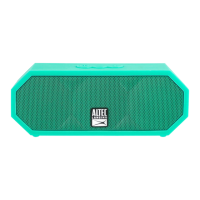
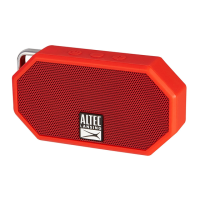
The Altec Lansing Mini H2O is a rugged Bluetooth speaker designed for portability and durability, offering a range of features for on-the-go audio enjoyment.
The primary function of the Mini H2O is to provide wireless audio playback from Bluetooth-enabled devices. It can also connect to audio sources via a wired auxiliary input. Beyond music playback, the speaker includes a hands-free speakerphone function, allowing users to make and receive calls directly through the device. Its robust design ensures it can withstand various environmental conditions, making it suitable for outdoor and adventurous use. The speaker is equipped with an internal rechargeable battery, providing hours of playback on a single charge.
Wireless Connectivity: To use the Mini H2O wirelessly, users first need to power on the speaker by pressing and holding the Power button for approximately 5 seconds. Upon activation, the speaker enters pairing mode, indicated by a voice prompt. Users then navigate to the Bluetooth Manager on their device (e.g., smartphone, tablet) and search for "JH2O Mini" in the list of available Bluetooth devices. Selecting this option initiates the connection. If prompted, a PIN code of "0000" should be entered to confirm the pairing. Once successfully paired, the speaker will audibly confirm the connection with the phrase: "You are now paired, enjoy." This process establishes a wireless link for streaming audio.
Wired Connectivity: For devices without Bluetooth capability or when a wired connection is preferred, the Mini H2O includes a 3.5mm auxiliary input port. Users can connect their audio source to the speaker using the provided 3.5mm auxiliary cable. This allows for direct audio playback without relying on a wireless connection.
Music Playback Control: The speaker offers intuitive controls for managing music playback. The Power button doubles as a Play/Pause button; a single press will toggle between playing and pausing the audio from the connected source. For navigating tracks, users can press and hold the Volume + button for 2 seconds to advance to the next song, or press and hold the Volume - button for 2 seconds to return to the previous song. Adjusting the playback volume is also straightforward: a quick press of the Volume + button increases the volume, while a quick press of the Volume - button decreases it.
Hands-Free Speakerphone: The Mini H2O integrates a speakerphone function, enabling users to answer calls directly through the speaker. This feature is particularly useful when the speaker is paired with a smartphone, allowing for hands-free communication.
Siri Activation (iOS Devices): For users with iOS devices capable of running Siri, the Mini H2O provides a convenient way to activate the personal assistant. By pressing the power button three times in quick succession, Siri can be triggered, allowing users to issue voice commands through the speaker.
LED Indicator Light: An LED indicator light on the speaker provides visual feedback on its status. During charging, this light illuminates red. Once the battery is fully charged, the LED light turns off, signaling that the charging cycle is complete.
Charging: The Mini H2O is powered by an internal rechargeable battery. To charge the speaker, users connect one end of the included USB cable to the charging port on the speaker. The other end of the USB cable should be connected to a USB power source, such as a computer's USB port or an AC charging adapter (which is not included). A full charge typically takes up to 3 hours. The LED indicator light will glow red during charging and turn off once the battery is fully replenished.
Durability and Water Resistance: The Mini H2O is designed with ruggedness in mind, featuring an IP67 rating. This means it is waterproof, sandproof, and generally "everything proof," making it resilient against various environmental elements. It is also designed to float in water, adding to its utility in aquatic environments.
Saltwater Exposure Care: While the speaker is waterproof, specific maintenance is recommended after exposure to saltwater. To ensure proper long-term performance and prevent potential damage from salt residue, it is advised to rinse the product off with tap water after it has been exposed to saltwater. This simple step helps maintain the integrity and functionality of the speaker over time.
Technical Support: For any technical support issues, users can visit the Altec Lansing website (www.alteclansing.com) where they can find manuals, software, and FAQs. If further assistance is needed, a technical support hotline is available at 1-855-292-4087.
Warranty Information: The Mini H2O comes with a one-year warranty covering defects in material or workmanship under normal usage. This warranty ensures that the product will be repaired or replaced at no charge for parts or labor for a period of one year from the original purchase date. The warranty does not cover damages or malfunctions resulting from non-normal use, unauthorized repairs, tampering, modification, or accidents. To obtain warranty service, users must contact Altec Lansing for problem determination and service procedures, providing proof of purchase.
 General
| Magnet type | Neodymium |
|---|---|
| Speaker type | 1-way |
| Number of drivers | 2 |
| Number of speakers | 1 |
| Audio output channels | - channels |
| Subwoofer driver diameter | 25.4 mm |
| Battery type | Built-in |
| USB charging | Yes |
| Power source type | Battery |
| Battery life (max) | 6 h |
| Impedance | - Ω |
| Frequency range | - Hz |
| RMS rated power | - W |
| Wi-Fi | No |
| Bluetooth range | 10 m |
| Connectivity technology | Wired & Wireless |
| Product color | Blue |
| Product design | Rectangle |
| Volume control | Digital |
| Protection features | Dust resistant, Shock resistant, Snow resistant, Water resistant |
| International Protection (IP) code | IP67 |
| Recommended usage | Universal |
| Mobile operating systems supported | Android, BlackBerry OS, iOS |
| Cables included | Audio (3.5mm), USB |
 Weight and Dimensions
| Width | 104.8 mm |
|---|---|
| Height | 57.15 mm |
| Weight | 100 g |





 To Next Page