EasyManua.ls Logo

Altec TTP-343E Plus - Install Memory Card

Default Icon
50 pages
Print Icon
To Next Page IconTo Next Page
To Previous Page IconTo Previous Page
Loading...
28
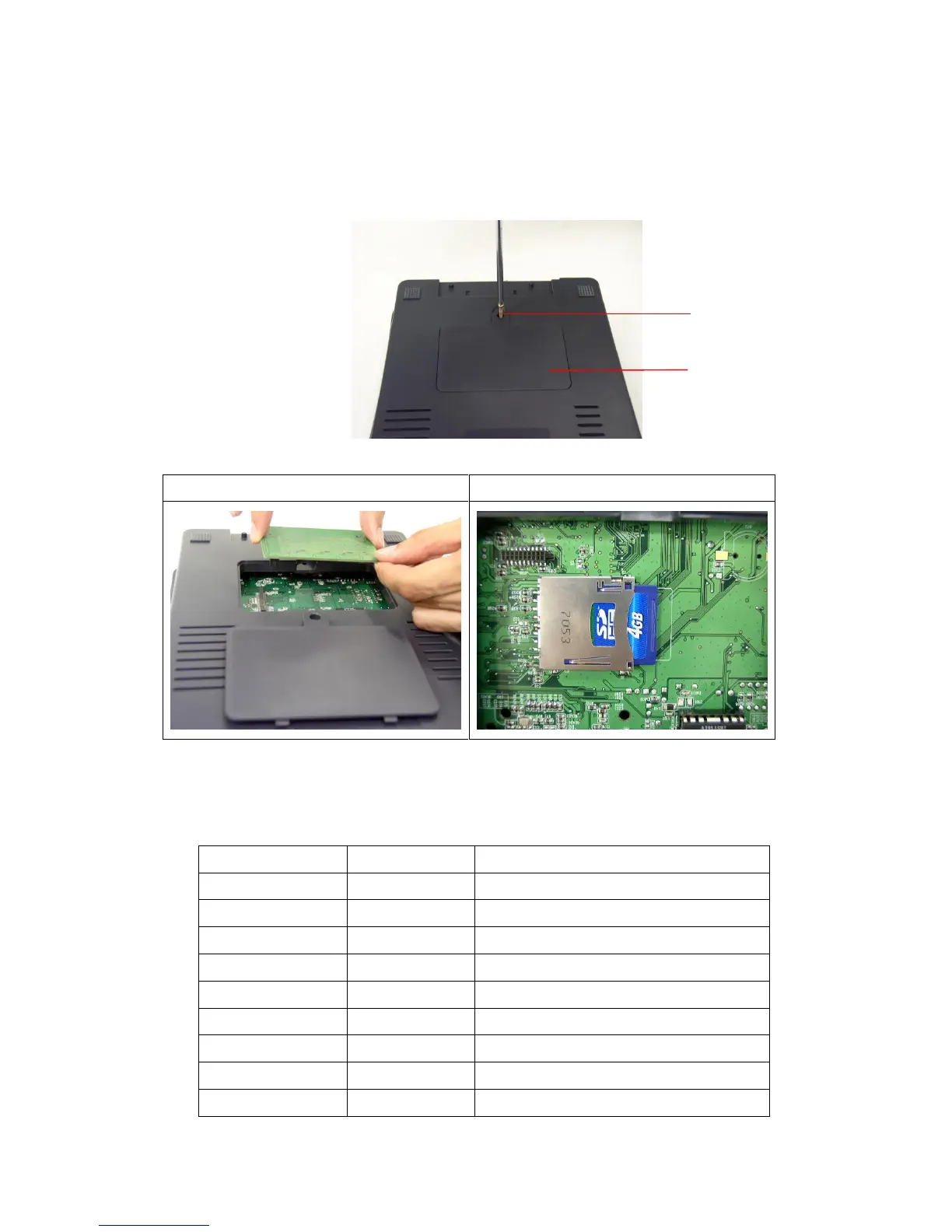
3.10 Install Memory Card
1. Turn the printer upside down.
2. Remove the screw that fixes the memory card cover.
3. Plug in the memory card on main board.
TTP-245/343 Model (Option)
TTP-245/343 Plus Model (SD Card)
4. Revert the memory card cover.
* Recommended SD card specification.
SD card spec
SD card capacity
Approved SD card manufacturer
V1.0, V1.1
128 MB
SanDisk, Transcend
V1.0, V1.1
256 MB
SanDisk, Transcend, Panasonic
V1.0, V1.1
512 MB
SanDisk, Transcend, Panasonic
V1.0, V1.1
1 GB
SanDisk, Transcend, Panasonic
V2.0 SDHC CLASS 4
4 GB
V2.0 SDHC CLASS 6
4 GB
SanDisk, Transcend, Panasonic
V1.0, V1.1
microSD 128 MB
Transcend, Panasonic
V1.0, V1.1
microSD 256 MB
Transcend, Panasonic
V1.0, V1.1
microSD 512 MB
Panasonic
Memory Card Cover
Screw
ALTEC industrial identification
altec.nl | altec.be

Related product manuals