INSTALLATION
Vecto r H® S eries ▪ Operat or’s M anual ▪ M N-46 2 95 ▪ Rev 7 ▪ 6/22
51
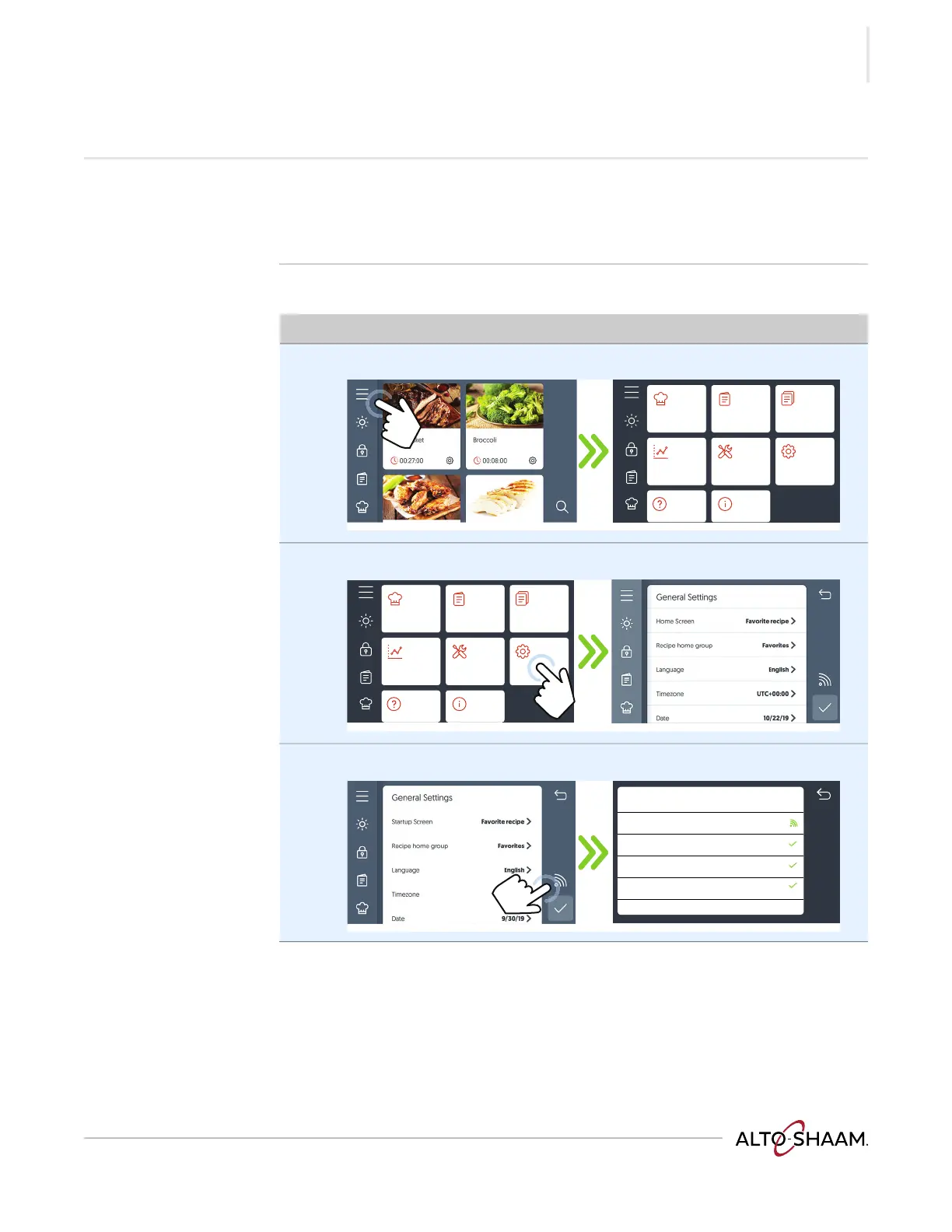
How to View and Set up Network Connections
Before you begin ▪ The facility must have Wi-Fi.
▪ The oven will only recognize networks that require a password to connect.
▪ Do not connect to a guest network.
Procedure To set up Wi-Fi, do the following.
Step Action
1. Touch the menu icon a. The menu screen displays.
2. Touch the settings icon b. The general settings screen displays.
3. Touch the Wi-Fi icon c. The Network Status screen displays.
Continued on next page
VMC-TS-006259
a
Manual cooking
HACCP data
Service Settings
My recipe
library
My menus
library
VMC-TS-006262
Manual cooking
HACCP data
Service Settings
My recipe
library
My menus
library
Network Status
Connection type Wifi
Internet Connected
Cloud Connected
Update Server Connected
XXXX xxx
AS-TS-009332
c



 To Next Page
 Loading...