IPB-5000B
6. Description of Display Screens
6-21
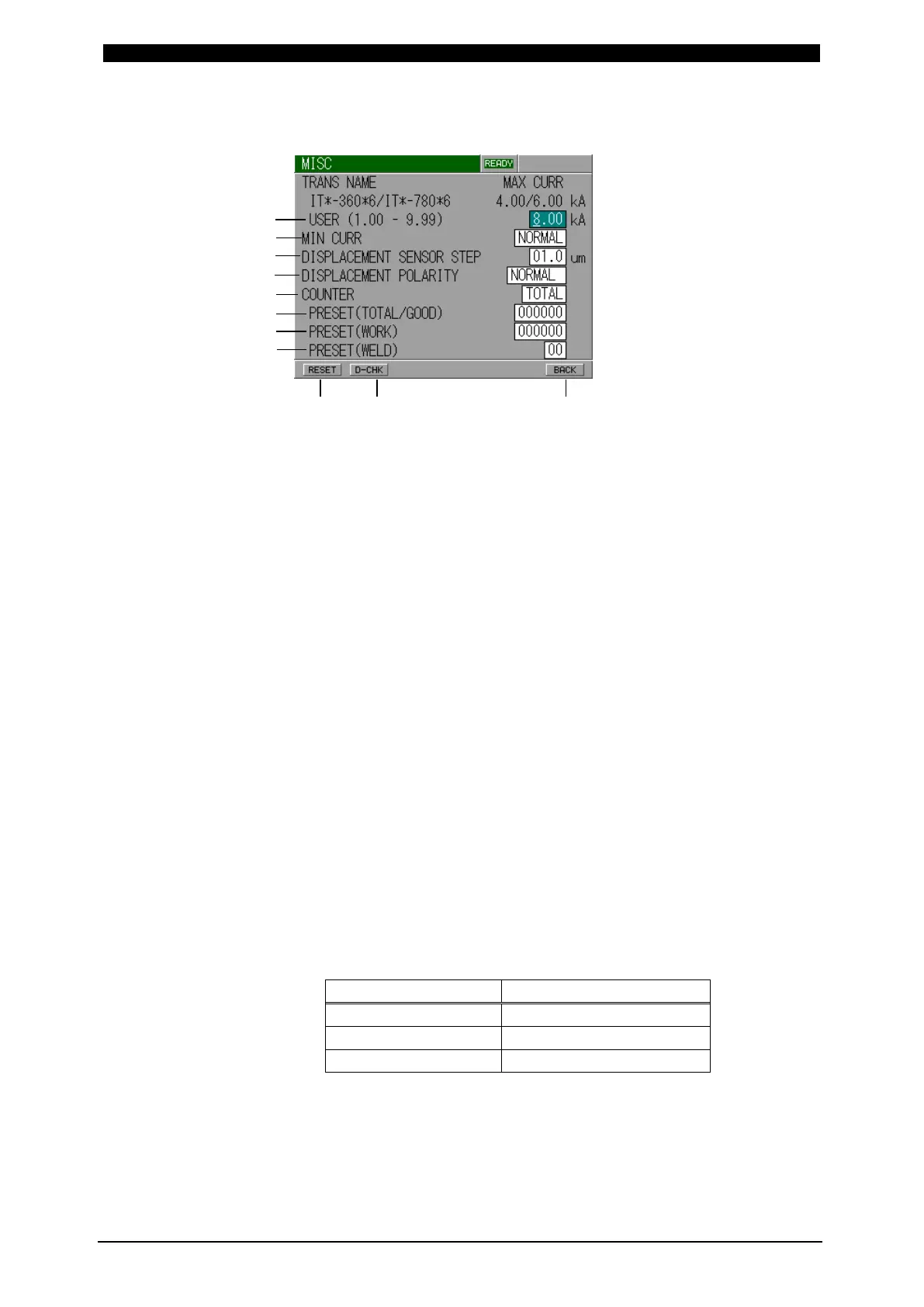
MISC Screen
(a) USER (1.00 – 9.99)
It is for testing. It cannot be used.
(b) MIN CURR
Set the minimum current.
NORMAL: Settable from 10% of full scale.
LOW: Settable from 2.5% of full scale.
Note: You can set lower current in LOW mode, but note that it may
exceed the range of the setting accuracy when the setting is 10% of
full scale or less.
(c) DISPLACEMENT SENSOR STEP
Input the resolution of Displacement Sensor.
Ex.)
GS-1830A, GS-1813A, LGK-110: 1.0 μm
ST1278: 0.5 μm
(d) DISPLACEMENT POLARITY
Set the polarity of displacement.
NORMAL: Set the force-applying direction as plus.
REVERSE: Set the force-applying direction as minus.
(e) COUNTER
Set the mode of Counter.
TOTAL: Count-up (increment of +1) is done despite the result of the
judgment in monitoring when the current is supplied.
(a)
(b)
(c)
(d)
(e)
(f)
(g)
(h)



 To Next Page