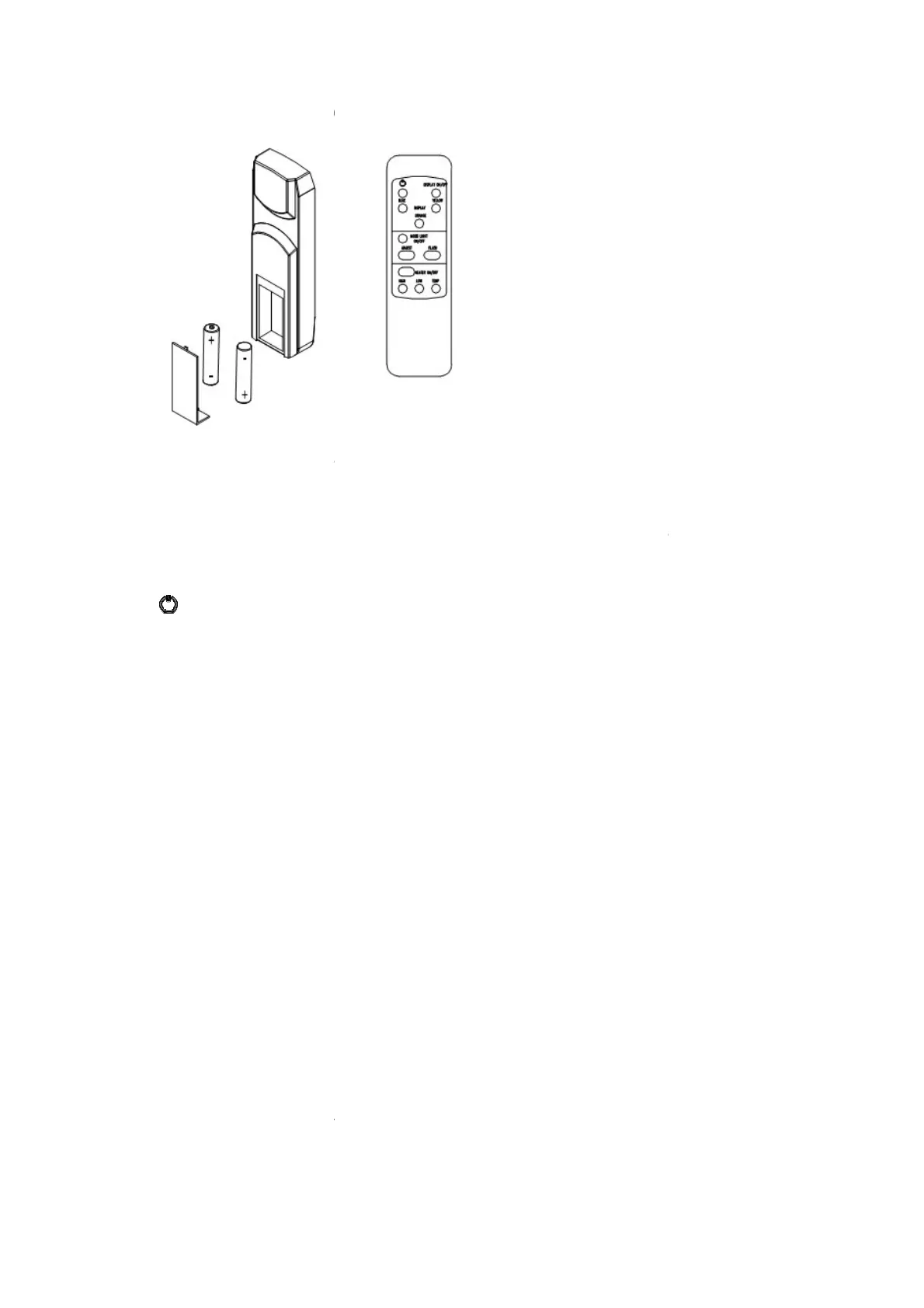
For remote to function make sure the heater is plugged in and main power switch located on the
bottom left hand side is at position I.
When operating the remote make s
sure each time you press the button the buzzer inside the unit will beep once. It takes some time for
the receiver to respond to the transmitter. Do not PRESS the buttons more than once withi
seconds for correct operation.
Power on button: The power-
power button. This will turn off
all the functions and the fireplace will be in standby
DISPLAY ON/OFF button:
the last setting.
DISPLAY BLUE button
DISPLAY YELLOW button
tray.
DISPLAY ORANGE button
and tray.
MOOD LIGHT ON/OFF button
ADJUST button: Switches
the color of the mood light.
FLASH button
: Switches the mood light into flash mode
HEATER ON/OFF button:
HIGH button
: Press the high button to switch the heater to high heat setting 1500W.
LOW button
: Press the low button to switch the heater to
TEMP button
the heater will operate as explained
9
For remote to function make sure the heater is plugged in and main power switch located on the
bottom left hand side is at position I.
When operating the remote make s
ure you point the remote to the center
of the fireplace and make
sure each time you press the button the buzzer inside the unit will beep once. It takes some time for
the receiver to respond to the transmitter. Do not PRESS the buttons more than once withi
on button at top left corner of the remote is the main ON/OFF
all the functions and the fireplace will be in standby
es
the fireplace flame and tray light O
s the blue color and
brightness of flame and tray.
s the yellow color and
s the orange color and
es the mood light On and Off..
the color of the mood light.
: Switches the mood light into flash mode
. This cycles
through all mood light colors.
the heater On and Off. It
: Press the high button to switch the heater to high heat setting 1500W.
: Press the low button to switch the heater to
button to switch the heater to AUTO mode. Under this mode
the heater will operate as explained
in the manual operation.
For remote to function make sure the heater is plugged in and main power switch located on the
of the fireplace and make
sure each time you press the button the buzzer inside the unit will beep once. It takes some time for
the receiver to respond to the transmitter. Do not PRESS the buttons more than once withi
n two
on button at top left corner of the remote is the m
ain ON/OFF
all the functions and the fireplace will be in stan
dby mode.
the fireplace flame and tray light O
n and Off. It will store
brightness of flame and tray.
through all mood light colors.
setting.
: Press the high button to switch the heater to high heat setting 1500W.
button to switch the heater to AUTO mode. Under thi
s mode


 To Next Page