6
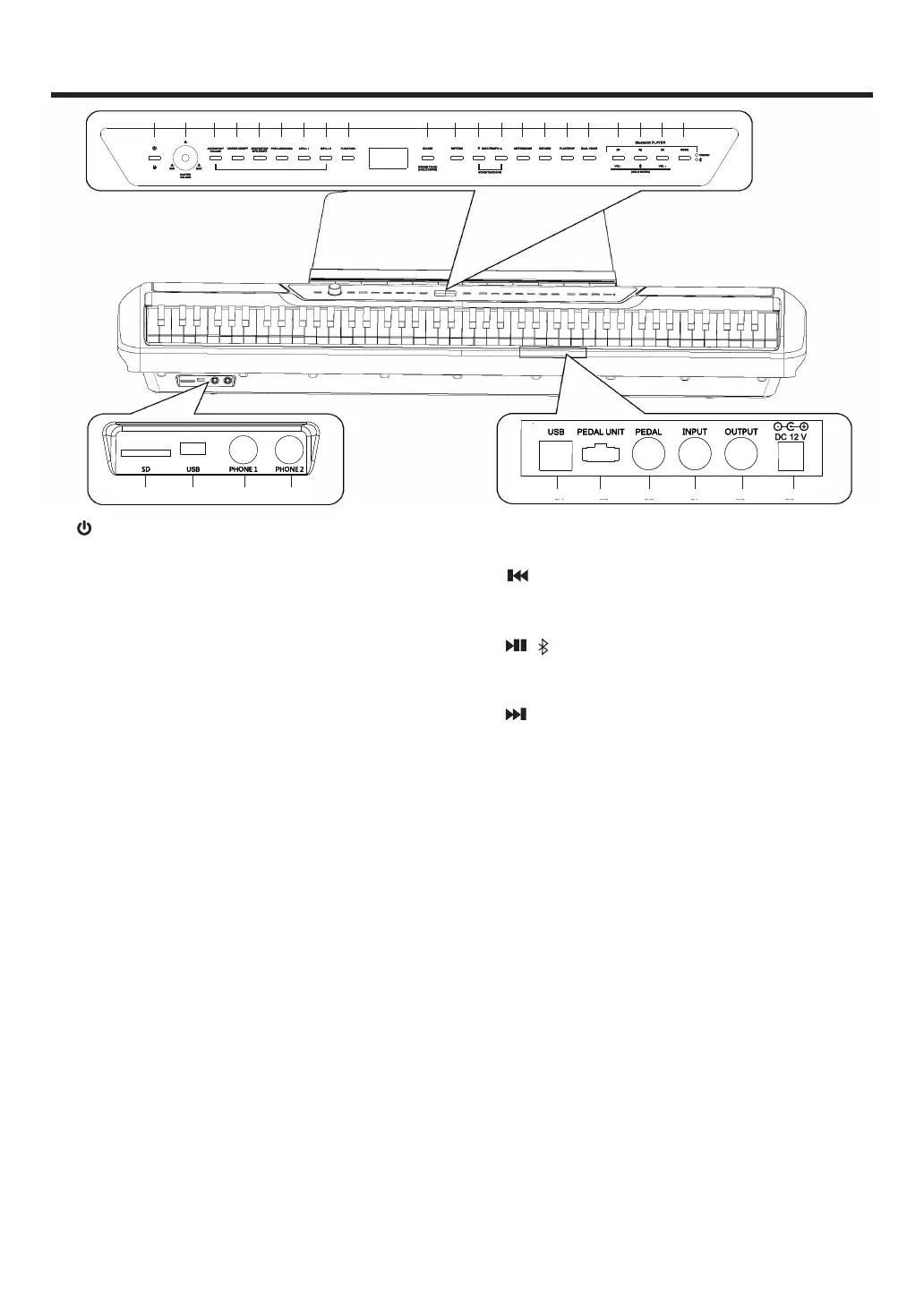
Panel Controls and Terminals
1 [ ](Standby/On/Panel locking) Switch ...page 7
For turning the power on\ setting to standby or Panel locking.
2 [MASTER VOLUME] knob .......................page 7
For adjusting the volume of the entire sound.
3 [ACCOMPANY VOLUME] button .............page 7
For adjusting the accompany volume.
4 [CHORD ON/OFF] button ........................page 8
For turn on or turn off the chord function.
5 [START/STOP,SYN START] button ......page 8
For Start/Stop the accompany function.
6 [PRELUDE/CODA] button ........................page 8
For Auto play Prelude/Coda.
7 [A/FILL 1] button .......................................page 8
Music get into A mode when in automatic playing.
8 [B/FILL 2] button .......................................page 8
Music get into B mode when in automatic playing.
9 [FUNCTION] button ............................... page 10
Simultaneously press this button and specified key sets will set
different effect and function.
10 [SOUND] button .....................................page 8
Choosing the sound.
11 [RHYTHM] button ...................................page 8
Choosing the accompaniment.
12 [DATA/TEMPO] +/-button......................page 10
Press Date/Tempo button at the same time, then the demo or
teaching song will be on.
13 [METRONOME] button ..........................page 9
For Start or Stop metronome.
14 [RECORD] button .................................. page 9
For Recording the music when playing.
15 [PLAY/STOP] button .............................. page 9
For playing or stopping the music.
16 [DUAL VOICE] button ............................page 9
For In/Out dual voice effect.
17 [ ,VOL-] button ..................................page 9
Choosing the last track when playing MP3, Long press the
button to turn the volume down.
18 [ , ] button ......................................page 9
Start or stop MP3 music, Long press the button to connect with
Bluetooth.
19 [ ,VOL+] button ................................ page 9
Choosing the next track when playing MP3, Long press the
button to turn the volume up.
20 [MODE] button .......................................page 9
For switching mode when playing MP3.
21 [SD] button .............................................page 9
For connecting SD card.
22 Standard [USB] jack ...............................page 9
For connecting USB.
23 [PHONE1/2] jack ....................................page 7
For connecting a set of standard stereo headphones.
24 [USB] jack ..............................................page 7
For connecting to a computer.
25 [PEDAL UNIT] jack ...............................page 13
For connecting three pedal Cord.
26 [PEDAL] jack ........................................page 13
For connecting the sustains pedal.
27 [INPUT] jack ...........................................page 6
For Audio input jack.
28 [OUTPUT] jack .......................................page 6
For Audio output jack.
29 [DC] jack ................................................page 7
For connecting the power adapter.
ACCOMPANY
VOLUME
CHORD ON/OFF
START/TOP
SYN START
PRELUDE/CODA A/FILL1 B/FILL2
MIN MAX
MASTER
VOLUME
AUTO ACCOMP-
PEDAL UNIT PEDAL
1 2 3 4 5 6 7 8 9 10 11 12 12 13 14 15 16 17 18 19 20
21 22 23 23
PEDAL UNIT PEDAL
24 25 26 27 28 29



 To Next Page