9
Record
Metronome
Dual Voice
Bluetooth MP3 Function
RHYTHM
DATA/TEMPO
SONG/TEACHING
This instrument can record music, including record the accompany in the piano. Operation as follows:
Record:
1.Press [RECORD] button, indicated light is on, and default metronome will be on and start to record; Press
[METRONOME] button if you need to turn off the metronome.
2.After recording, Press [RECORD] button, indicated light is off, log out the record function.
Play:
1.Press [PLAY/STOP] button, indicated light is on, The portable piano will play the audio you recorded.
2.After playing, log out the playing function automatically and the indicated light turns off.
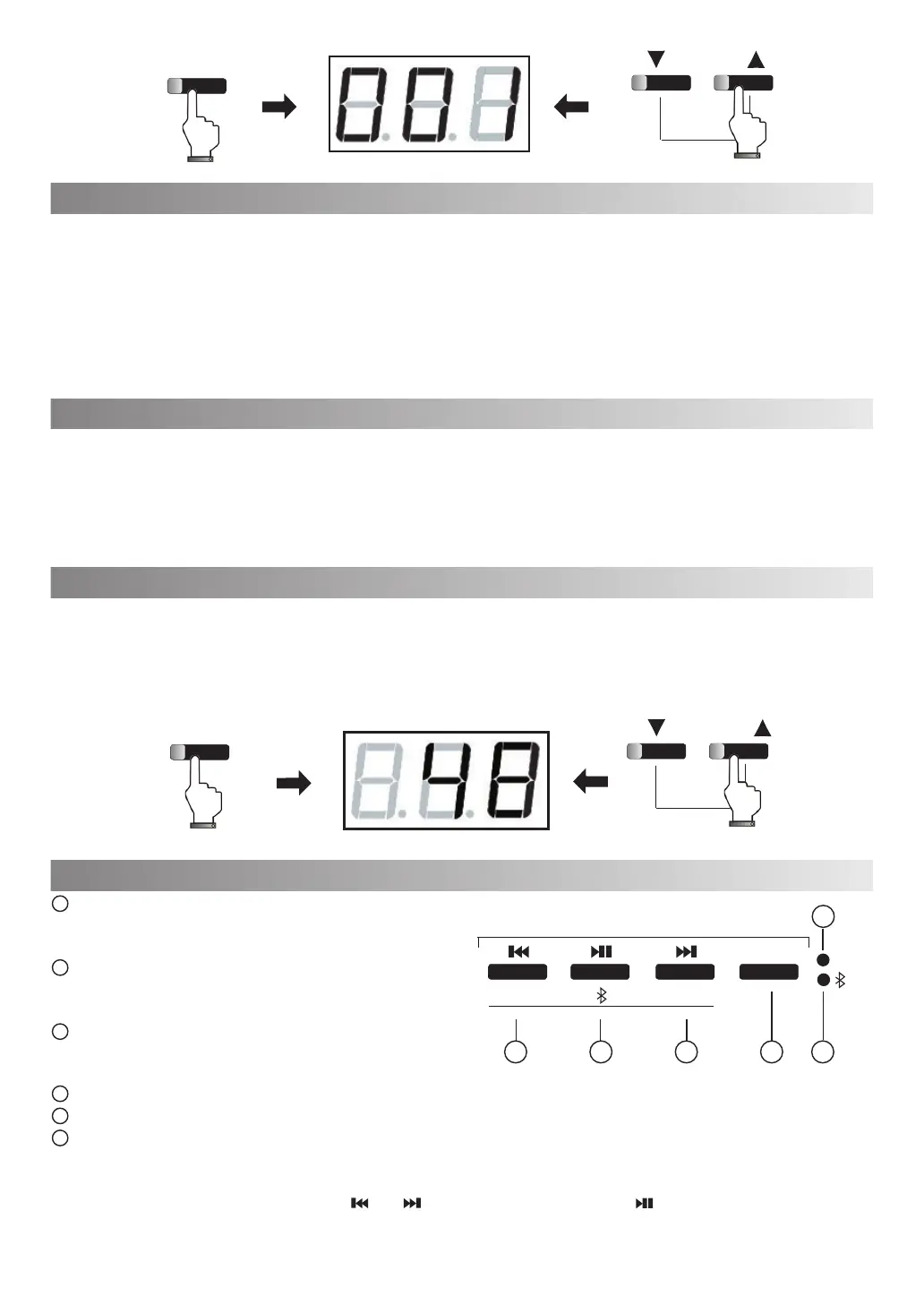
1. Press [METRONOME] button on the panel to enable your metronome function; The indicated light will start
flashing and the Tempo shows on the digital tube display. Default tempo: 120BPM/per minute.
2.Press [DATA/TEMPO] +/- button can adjust tempo, Tempo range:20-280BPM/per minute.
3.Press [METRONOME]button again to exit the metronome function. The Portable digital piano will save the current
setting automatically.
4. It will be default metronome when restart the instrument.
1.Press [DUAL VOICE] button, get into the dual voice effect with the flashing indicated light, Default second voice is
048 STRINGS1.
2.To select other second voice by pressing [DATA/TEMPO]+/- button, Press (DUAL VOICE)button to adjust if the
first voice needed.
3.Press [DUAL VOICE] button, indicated light off, shut down the dual voice effect and return the first voice.
Last song/turn down the volume: In playing status, press
it shortly to switch to last composition. Long press to reduce
the volume.
Play - Pause / Bluetooth Matching: In playing status,
press it shortly to play or pause, Long press for Bluetooth
matching.
Next song/Volume: In playing status, press it shortly
to switch to next composition. Long press to increase the
volume
Playing Mode: Switch between USB,SD and Bluetooth.
USB/SD indicated light: the indicated light is on when in USB\SD status.
Bluetooth indicated light: Light on when in Bluetooth status.
USB\SD Use Guideline:
The default status of Bluetooth is standby after power on.It switches to reading status after inserting USB and SD Card.
The red LED flashes during reading. Press [ ] or[ ] to select composition. Press [ ] to play or pause. The red LED
lights constantly when it is paused.
DUAL VOICE
DATA/TEMPO
SONG/TEACHING
MODE
VOL-
VOL+
USB/SD
Bluetooth PLAYER
(HOLD DOWN)
1
2
3
4 6
5
1
2
3
4
5
6



 To Next Page