5 6
HOW TO CONTROL YOUR STARRIDERS™
Your STARRIDERS™ is equipped with motion sensors and air pressure sensors which read your
hand motions to determine its direction for flight.
5.
Make sure you have properly synced The STARRIDERS™.
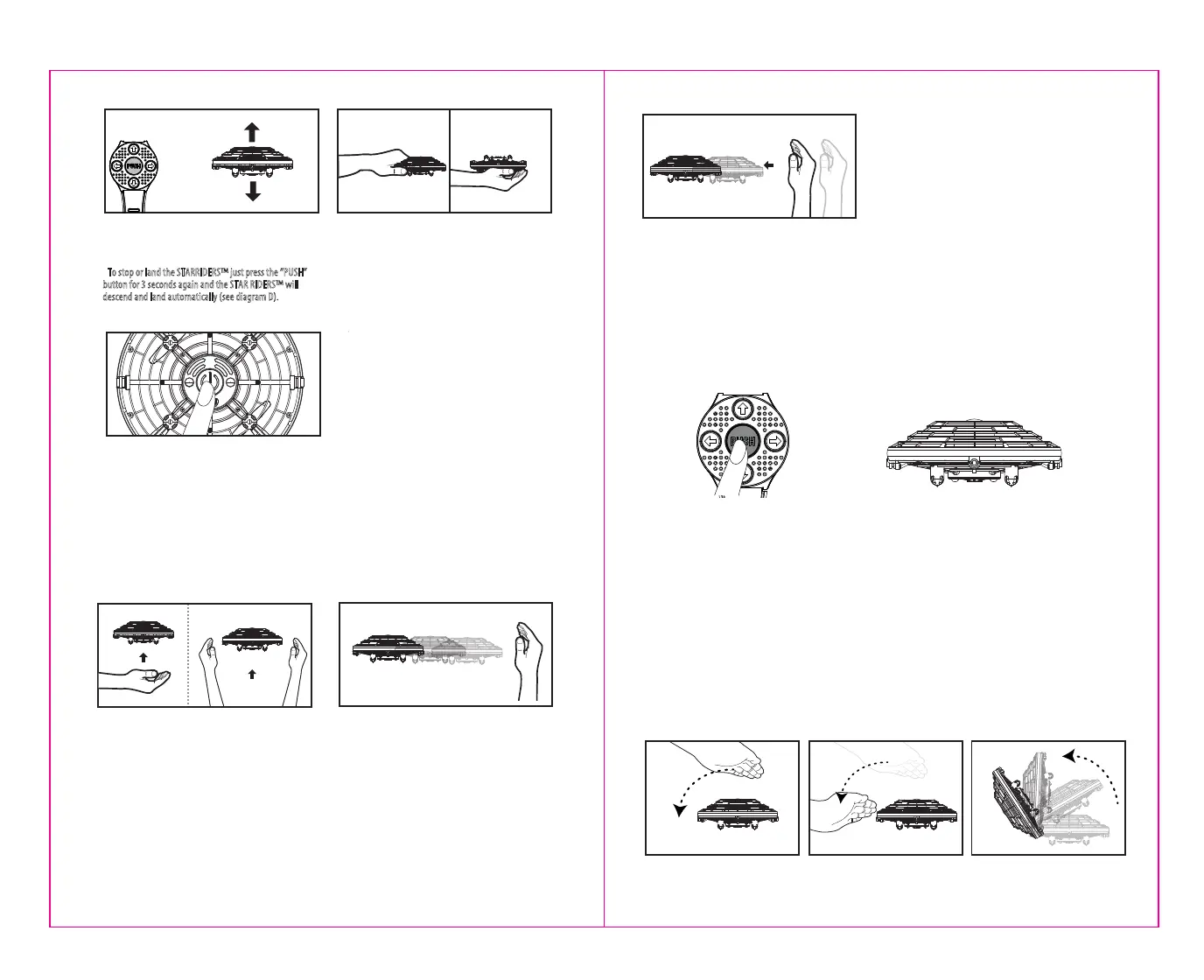
• Press the “PUSH” button for 3 seconds, your STARRIDERS™
will automatically take off.
• To stop or land the STARRIDERS™ just press the “PUSH”
button for 3 seconds again and the STAR RIDERS™ will
descend and land automatically (see diagram D).
7. When done playing make sure to turn the power off by
depressing the power button for 3 seconds (see power
button diagram on pg. 3 ) All the lights will turn off.
TO MAKE YOUR STARRIDERS™ FLY HORIZONTALLY
ACROSS THE ROOM:
Hold your hand up vertically palm side facing the
STARRIDERS™ like your going to push it away, but don’t
actually touch it. The STARRIDERS™ will begin to move
in the opposite direction of your hand (See Diagram H).
TO MAKE YOUR STARRIDERS™ GO UP:
There are 2 ways to make your STARRIDERS™ ascend:
1) Place one hand palm side up directly underneath the
bottom of the STARRIDERS™ and slowly move your hand
straight up, STARRIDERS™ will rise upward (See Diagram F)
2) The second way which will create a faster response, is to
hold both your hands out simultaneously on both sides of the
STARRIDERS™ about two inches from the body so the
STARRIDERS™ is in the center space between your two
hands. The drone will quickly ascend! (See Diagram G)
TO MAKE YOUR STARRIDERS™ MOVE FASTER AND FURTHER.
Once you have gotten the hang of controlling the direction of your
STARRIDERS™ simply move your hand along outside of the
STARRIDERS™ as it begins to fly away, literally follow the
STARRIDERS™ with your hand. The longer and faster you move your
hand behind the STARRIDERS™ the further and faster it will fly (See
diagram I) Remember to follow behind it, not touch it.
6. Another method to stop the STARRIDERS™ quickly
capture the STARRIDERS™ with your hand and turn it
upside down (see diagram E) the blades will stop
spinning.
ED
J.
H
I
F G
HOW TO DO 360˚ STUNT ROLLS! (USING HAND GESTURE)
The STARRIDERS™ allows you to command 360˚ stunt rolls with a special hand movement! Your
STARRIDERS™ has the ability to do a 360˚ roll in all 4 directions.
• First pass your open palm face down across the top of your STARRIDERS™ from one side to the other
like doing a horizontal karate chop in the air, you are crossing an invisible sensor
• Complete the move by rounding the corner and moving your hand down the side. The fluid
combination of going across the top and down the side will activate the 360˚roll.
NOTE the STARRIDERS™ will do somersaults in the direction of the side where your hand completed the
movement (SEE DIAGRAM K1, K2, K3).
LIGHT & MUSIC SWITCHING OF STARRIDER™
STARRIDERS™ also includes 5 different sound effects, plus exciting animated LED lighting effects. It
even has an on-board Starriders Pilot that glows!
By simply pressing the 'Light & Sound Switching' button on the remote controller, you can easily
switch between music and lighting modes for your STARRIDERS™. Each musical beat corresponds to
a unique lighting mode, providing a fun and dynamic experience.
K1 K2 K3



 To Next Page