20Lockit+ Users manual |
9.7 Metadata Workow with LockitScript App
To make camera metadata (e.g. clip name, lens, ISO etc.) show up in the
LockitScript App, the iPad must be connected to the Lockit+ in C-Jam
Mode via WiFi.
Compatible cameras:
• ARRI CAP2 cameras
• RED DSMC2 cameras
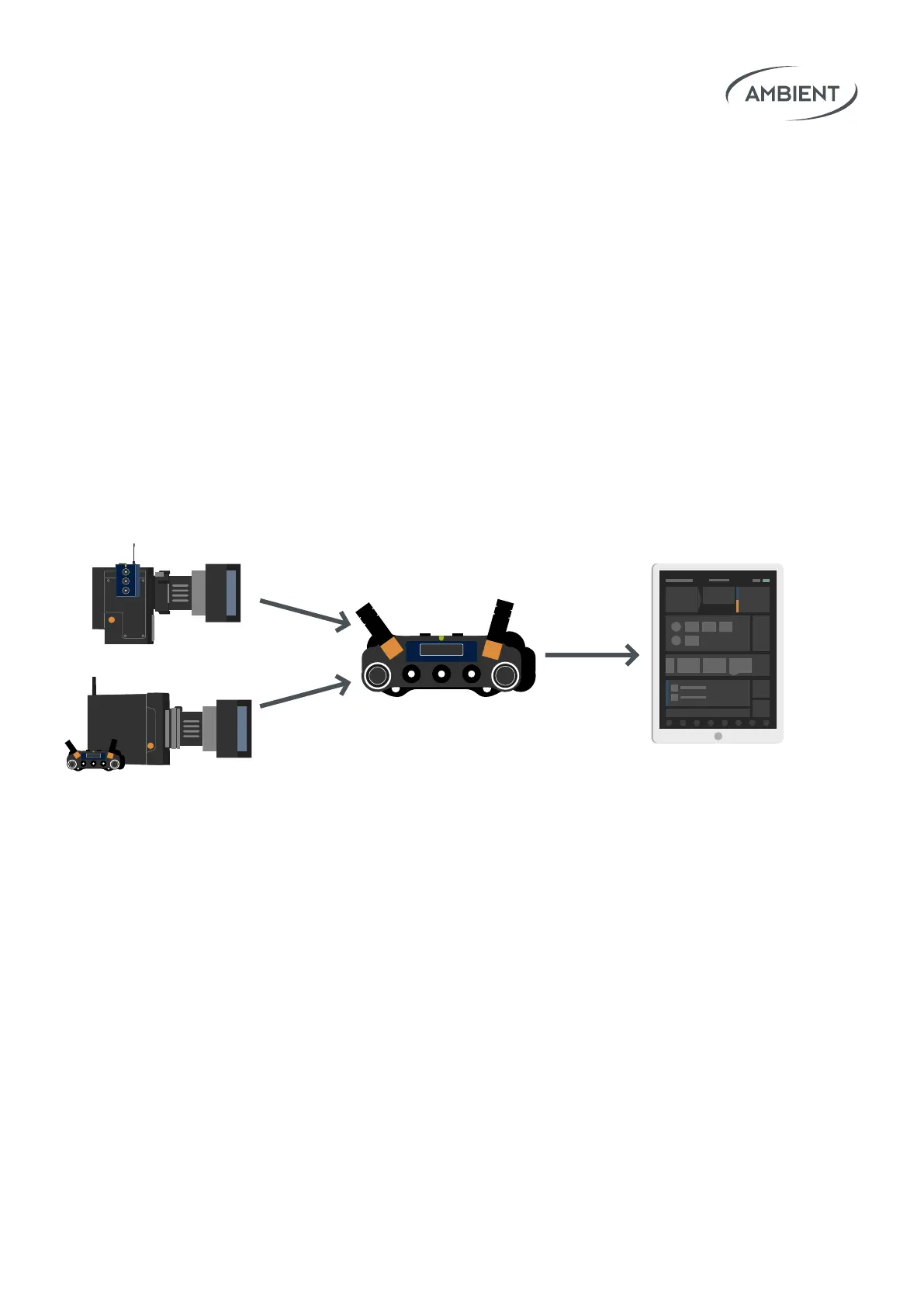
The basic principle is that Lockit boxes on the cameras send the metadata
via ACN to the Lockit+ in C-Jam Mode. From there, all collected metadata is
sent via WiFi to the iPad with the LockitScript App.
ACN
ACN
WiFi
Workow for ARRI CAP2 cameras:
• Connect a Lockit+ to the ethernet port of the camera.
• Required cable: MLC-L1B10P
• In the camera menu activate CAP2 and leave the CAP2 password
at its default "arri".
• Make sure both the connected Lockit+ and the camera operate in
LAN Mode “Static”.
• The default IP of the camera is "192.168.0.100".
• Congure your Lockit+ LAN adapter to use a static IP in the same
network (e.g. 192.168.0.101).


 To Next Page