Page 8 of 13
ON/OFF (7)
· Press “POWER” to switch the unit On or Off
· The unit will be turn to cooling mode preset to 22
o
C target temperature. Press again and the unit will
switch off.
Mode button (6)
· Press this key to choose Cooling Fan, SLEEP or Dehumidifying Mode.
Cooling Mode
· After machine turns on, default value is cooling mode with 22
o
C and low fan speed.
· Press “MODE” to select cooling mode, cooling mode indictor (C) turns on
· Press “UP ” (2) or “DOWN ” (3) to adjust temperature (from 16
o
C to 31
o
C)
· Press “FAN” to select fan speed (low, high)
Fan Mode
· Press “MODE” to select fan mode, fan mode indicator (D) turns on
Timer Mode (1)
· Under standby mode, press “TIMER” to setup the power-on time, press “TIMER” to adjust the timer (from
1 to 24 hours). Timer indicator turns on. Unit will start after selected number of hours.
· Under power on mode, press “TIMER” to setup power-off timer. Press “TIMER” to adjust the timer (from 1
to 24 hours). Timer indicator turns on. Unit will stop after selected number of hours.
· Timer functions cannot be combined or repeated. Timer mode indicator (I) turns on
Sleep Mode
· Press Mode button (6) until unit enter into sleep mode, default value of fan speed is low. Sleep mode
indicator (E) turns on
· When the sleep mode is turned on, under cooling mode only, one hour later, set temperature will go up 1
degree Celsius, after another hour the set temperature will go up another degree than kept at this
temperature.
· Sleeping mode is invalid under dehumidifying and fan mode.
· If internal tank full, machine standby and mode selection, sleeping mode will be cancelled.
Note: Sleep mode is not operational in the dehumidifying or Fan mode.
Compressor Protection
· There is a three minutes compressor start delay after power on or restart.
3. Remote Control
T
h
e
a
i
r
c
o
n
d
iti
o
n
e
r
can be controlled via
a
r
e
m
o
t
e
control. Two AAA-batteries are required to use the remote
control.
Note: the air flow direction cannot be adjusted with the remote control.
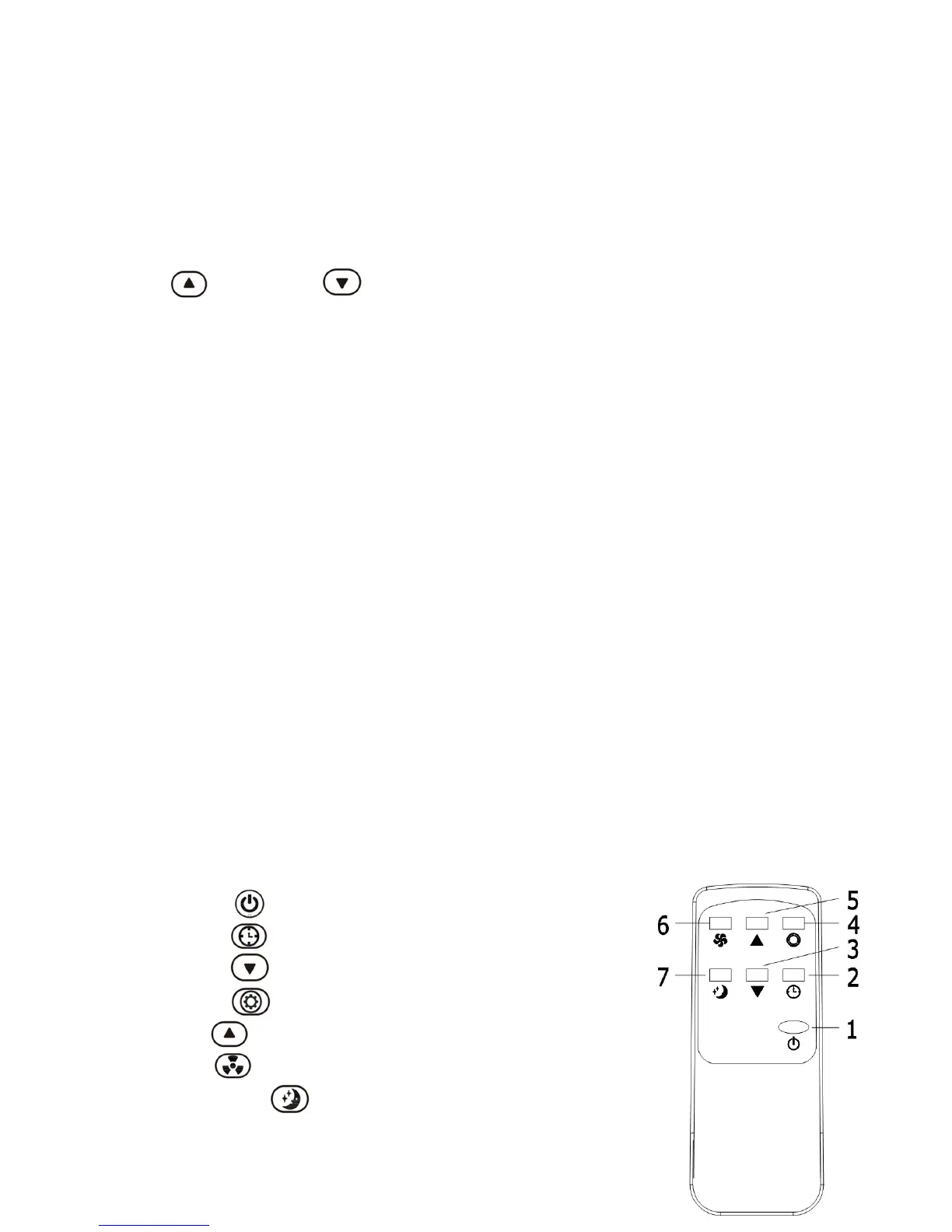
1. Power: Press the key to turn on or turn off the machine
2. Timer: Press the key to set the timer
3. Down: Press the key to decrease temperature and timer
4. Mode: Press the key to switch between cooling, fan, dehumidifier
5. Up: Press the key to increase temperature and timer
6. Fan: Press the key to select high / low fan speed
7. Sleep Mode: Press the key to turn on the sleep mode



 To Next Page