d. Click Extend my Windows desktop onto this monitor.
e. Set the Screen Resolution and Color Quality as appropriate for the second
monitor.
f. Click OK.
2.2 AMD Radeon HD 6750/6770 Connections
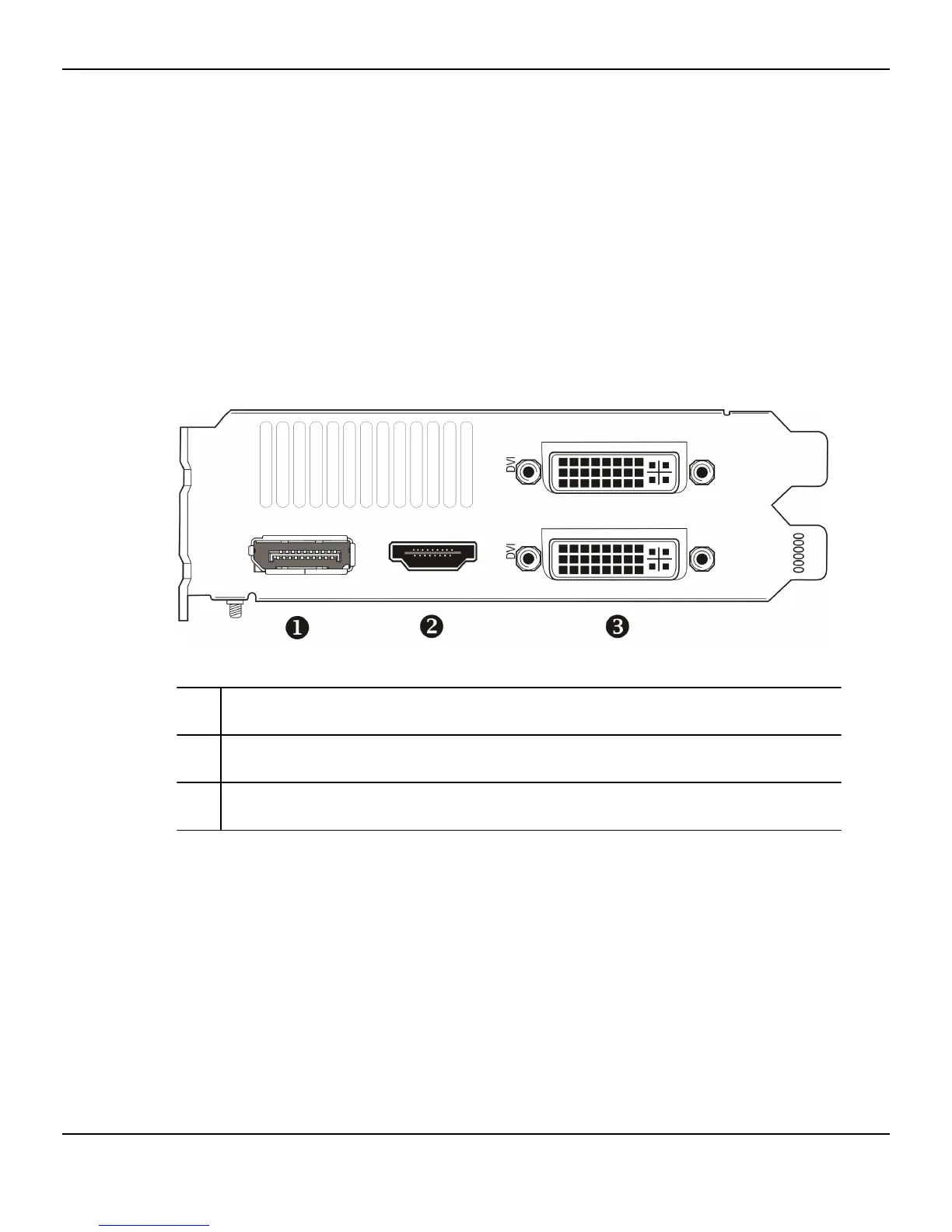
The following figure shows the display connections available on your AMD Radeon
HD 6750/6770 graphics card.
Note: The baseplate may not appear exactly as depicted.
Figure 2–1 AMD Radeon HD 6750/6770 Display Connections
1 DisplayPort connection (DP only). Carries video and audio signals to
DisplayPort-compliant devices.
2 HDMI™ connection. Carries video and audio signals to HDMI-compliant
devices.
3 Two DVI-I Dual Link connections. Provides video digital signals and HDMI
output that is compatible with most HDMI-compliant devices.
2.3 Display Configurations
The following table lists options for connecting displays that are indirectly supported
by the connection types available on the graphics card.
For best graphics performance and quality, always use native connections, if
available, when connecting displays.
Note: Only display configurations using the DVI-to-VGA adapter included with your
graphics card are mentioned here.
8 Display Configuration
AMD Radeon™ HD 6750/6770 © 2010 Advanced Micro Devices, Inc.








 To Next Page