User Manual
70
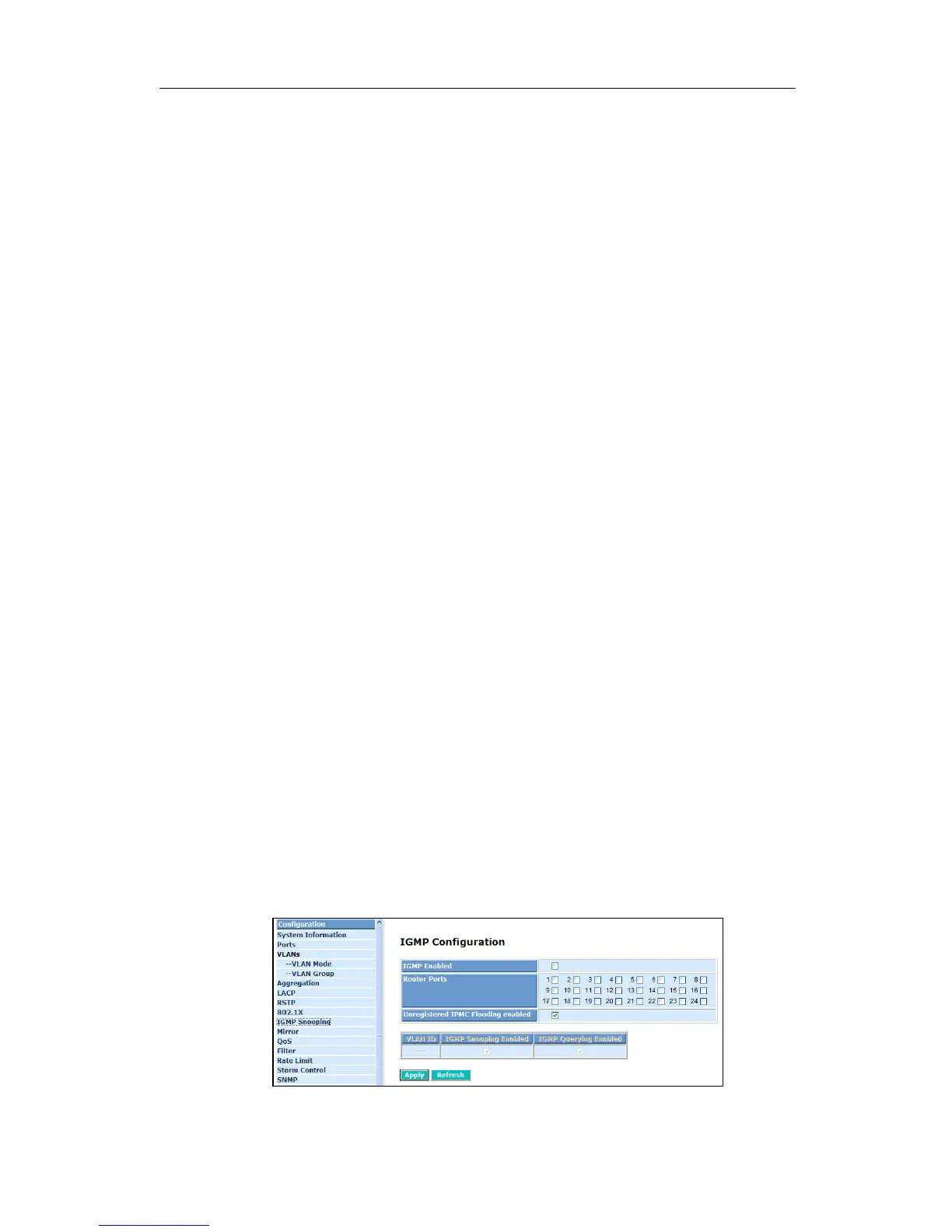
4-2-9 IGMP Snooping
Function name:
IGMP Snooping Configuration
Function description:
IGMP Snooping lets administrators configure a switch to constrain multicast
traffic by listening to
Internet Group Management Protocol (IGMP). After finishing
the settings, please press <Apply> button to start up the function.
Parameter description:
IGMP Enabled:
Just tick the check box (;) to enable this function.
Default: disable
Router Ports:
Just tick the check box (
;) beside the port x to enable router ports, then
press the <Apply> button to start up.
Default: none
Unregistered IGMP Flooding enabled:
Just tick the check box (
;) to enable this function.
Default: enable
VLAN ID:
At the IGMP Enable mode being selected, it will list the VLAN ID number.
IGMP Snooping Enabled:
After IGMP Enabled function start up then user can tick the check box (
;) to
enable this function.
Default: enable
IGMP Querying Enabled:
After IGMP Enabled function start up then user can tick the check box (
;) to
enable this function.
Default: enable
Fig. 4-19 IGMP Configuration



 To Next Page