
 Need help?
Do you have a question about the American DJ RGBW4C and is the answer not in the manual?
Thank you for purchasing the RGBW4C by American DJ®. Check carton for damage.
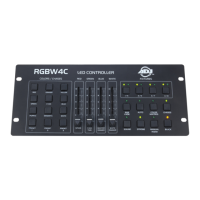
The RGBW4C is a 32-channel RGB, RGBW or RGBA LED controller with 9 Static Color/Chase buttons and 4 faders.
American DJ provides a toll-free customer support line for help and questions.
Warning: To prevent electrical shock or fire, do not expose this unit to rain or moisture.
Read these operating instructions carefully to familiarize yourself with the basic operations and safety information.
Lists key features like 9 Static Colors, RGBW Faders, 9 Chases, Auto/Program/Chase/Sound Active Modes, and adjustable speed/sensitivity.
Details the 1-year limited warranty and how to validate it via card or online registration.
Ensure your area voltage matches the required 120v for the American DJ® RGBW4C. Use only the included power supply.
DMX-512 is a universal protocol for communication between intelligent fixtures and controllers using serial data.
Explains how DMX links fixtures from different manufacturers using a single controller, provided they are DMX compliant.
Requires approved DMX-512 110 Ohm Data cable for input/output, using standard 110-120 Ohm shielded cable with XLR connectors.
Details the pinout for 3-pin XLR DMX connectors, warning against using the ground lug or connecting shield to casing.
Defines the configuration for XLR pins: Pin 1 (Ground), Pin 2 (Data Compliment), and Pin 3 (Data True).
Recommends using a 110-120 ohm resistor terminator on the last DMX unit to prevent erratic behavior.
Addresses the use of 5-pin DMX-512 cables as an alternative to 3-pin and the need for adaptors in a 3-pin line.
Provides a chart for converting 3-pin XLR female (out) to 5-pin XLR male (in) DMX connectors.
Explains how to select individual or groups of up to 8 LED fixtures using the 1/5, 2/6, 3/7, 4/8 buttons.
Details how to activate chase mode and select desired chases using the COLORS/CHASES grid buttons.
Describes the function to activate and deactivate the blackout mode, turning all lights off.
Explains how to activate Color Macros and control them using faders for static color, speed, and intensity.
Covers activation of Manual RGBW mode for direct control of Red, Green, Blue, and White LEDs using color buttons and faders.
Details how to activate the Auto Program and control its speed, fade time, and LED intensity using faders.
Explains how to activate and deactivate the strobe effect and adjust its speed using the Red/Speed fader.
Describes how to activate RGB Fade mode and control its speed, fade time, and LED intensity using faders.
Explains how the Red/Speed, Green/Fade Time, Blue/Master Dimmer, and White/White Dimmer faders control RGB Fade.
Guides on activating Sound Active mode and adjusting sensitivity and LED intensity/fade time using rear knob and faders.
Use this fader to control the output intensity of the white LEDs.
This fader controls blue LEDs in Manual RGBW and RGB LEDs in other modes (Auto, Chase, Fade, Macros, Sound Active).
This fader controls green LEDs in Manual RGBW and fade time in other modes (Auto, Chase, Fade, Macros, Sound Active).
This fader controls red LEDs in Manual RGBW, program speed in Auto/Chase/Fade, and static color in Macros.
Press the COLOR buttons to activate desired COLOR MACROS, or when in CHASE MODE the color buttons will activate chases.
Describes the Power Switch and DC Input port, both accepting a DC 9V~12V, 300mA power supply.
Identifies the DMX OUT port used for sending DMX signal to compatible LED fixtures.
Explains the use of the Sound Sensitivity knob on the rear panel to adjust audio responsiveness.
Press the SOUND ACTIVE button and use the rear sensitivity knob and faders (10, 11, 12) for adjustments.
Press CHASE button, select chase with COLOR buttons (14), and adjust intensity, fade time, and speed with faders (10, 11, 12, 13).
Press AUTO button and use faders (10, 11, 12, 13) to adjust LED intensity, fade time, and chase speed.
Press COLOR MACROS button and use faders (10, 11, 12, 13) to adjust static color, intensity, and fade time.
Press RGB FADE button and use faders (10, 11, 12, 13) to adjust LED intensity, fade time, and chase speed.
Press MANUAL RGBW button and use color buttons or faders (10, 11, 12, 13) to set color and intensity.
Explains how to save (hold button 3s) and recall saved chases, colors, or programs using the 3 PRESET buttons.
American DJ warrants products to be free of manufacturing defects for a specified period, valid in the USA.
Outlines the process for obtaining warranty service, including obtaining an RA number and shipping instructions.
Lists conditions that will void the warranty, such as serial number alteration, unauthorized repairs, or improper maintenance.
Clarifies that the warranty does not cover maintenance, cleaning, or accessories, and limits liability.
States that implied warranties of merchantability or fitness are limited to the warranty period and disclaims liability for consequential damages.
Includes details on power supply, consumption, output, audio trigger, dimensions, weight, and warranty period.
Informs users that specifications and improvements may be made without prior written notice.
 Power
Power| power supply | 12V DC, 500mA |
|---|---|
| power consumption | 3.6W |
 Weight and Dimensions
| dimensions | 327mm x 140mm x 48mm |
|---|---|
| dimensions (inches) | 12.9” x 5.5” x 1.9” |
| weight | 2.4Lbs./ 1.1Kgs. |


 To Next Page