EasyManua.ls Logo

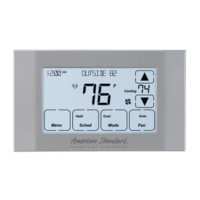
American Standard NEXIA Silver 724 - User Manual

American Standard NEXIA Silver 724
40 pages
Print Icon
To Next Page IconTo Next Page
Loading...
Nexia Smart Home
Comfort System
Customer Service:
For HVAC related
issues, contact your
servicing dealer
Î NOTE: A 24 Volt
common and hot
wire MUST be
connected to
the Silver 724 for
operation.
Silver 724
Touchscreen
Comfort Control
Model ACONT724AS42DA
User Guide and Installation Instructions
11-HD16D1-1E-EN
Contents
User Guide
Features .............................................................................................................................2
Operation ............................................................................................................................3
User settings .......................................................................................................................4
Schedules ...........................................................................................................................5
Display settings ..................................................................................................................5
Sensor settings ...................................................................................................................5
WiFi settings ....................................................................................................................... 6
Nexia settings ..................................................................................................................... 6
Installer settings ..................................................................................................................7
Test Mode ........................................................................................................................... 7
Reminders ..........................................................................................................................8
Restore Defaults .................................................................................................................8
About ..................................................................................................................................8
Clean Screen ......................................................................................................................8
Nexia Mobile App Instructions ............................................................................................ 9
Installer’s Guide
Product Specications ..................................................................................................... 16
Installation and Wiring .....................................................................................................17
Physical Location .............................................................................................................17
Field Wiring Diagrams ......................................................................................................18
Remote Temp Sensors ..................................................................................................... 35
Troubleshooting ................................................................................................................ 37
FCC/IC notice ................................................................................................................... 38

Questions and Answers

  • M
    Matthew RiceAug 15, 2025
    Why is my American Standard Thermostat not cooling?
    • N
      nnicholsAug 16, 2025
      Your American Standard Thermostat might not be cooling because: 1. The system mode isn't set to Cool/Auto, or the setpoint is too high. To resolve this, select the correct system mode and/or lower the setpoint. 2. The delta “On” for cooling is set too high. In this case, change the delta “On” setting for cooling mode. 3. The minimum off time delay is being enforced. If this is objectionable, change Control Response settings in the Installers Settings, Comfort Settings Menu. 4. The cooling system may need service. In that case, check/repair the system.
  • J
    Jonathan ThompsonAug 18, 2025
    What to do if my American Standard NEXIA Silver 724 temperature is incorrect?
    • M
      Marissa SchmidtAug 18, 2025
      If your American Standard Thermostat displays an incorrect indoor temperature: 1. The indoor temperature display may need calibrating. Always allow 1 hour before calibrating after any power cycle. 2. Heat from the touchscreen might be trapped within the body of the control. To resolve this, relocate the control away from any competing air sources or redirect the air sources away from the control.
  • L
    Lisa PadillaAug 21, 2025
    How to fix American Standard Thermostat display if it will not come on?
    • N
      Natalie RiveraAug 21, 2025
      If the display on your American Standard Thermostat will not come on, it could be due to a loss of 24VAC between R & C at the Control. To resolve this: 1. Check the wiring between R & C. 2. Check the transformer for 24VAC output. 3. Check for a broken or shorted thermostat wire.
  • J
    johnperezAug 25, 2025
    What to do if my American Standard NEXIA Silver 724 humidity display is incorrect?
    • B
      Bobby DiazAug 25, 2025
      If your American Standard Thermostat displays incorrect indoor humidity, the indoor humidity sensor may need calibrating. Calibrate the humidity sensor to resolve this issue.
  • D
    David LewisAug 27, 2025
    Why is my American Standard NEXIA Silver 724 not heating?
    • O
      owalkerAug 27, 2025
      Your American Standard Thermostat might not be heating because: 1. The system mode is not set to Heat/Auto, or the setpoint is too low. To resolve this, select the correct system mode and/or raise the setpoint. 2. The delta “On” for heating is set too high. In this case, change the delta “On” setting for heating mode. 3. The minimum off time delay is being enforced. If this is objectionable, change Control Response settings in the Installers Settings, Comfort Settings Menu. 4. The heating system may need service. In that case, check/repair the system.
  • A
    Anthony RamirezAug 30, 2025
    Why does the fan on my American Standard Thermostat run all the time?
    • C
      Caroline RamseyAug 30, 2025
      The fan on your American Standard Thermostat might be running constantly because: 1. The fan mode is set to “On” or “Circ”. This is intended operation; if objectionable, change the fan mode to “Auto”. 2. The system may not be operating properly. In that case, check/repair the system.
  • J
    Justin BlackSep 2, 2025
    What to do if heating or cooling is displayed, but no air is coming from the vents of my American Standard NEXIA Silver 724?
    • S
      Scott WilliamsSep 2, 2025
      If your American Standard Thermostat displays heating or cooling, but no air is coming from the registers/vents: 1. The fan delay time may not have expired. Wait one minute for the blower delay to end, then recheck the register/grills. 2. The system might not be operating properly. In that case, check/repair the system.
  • N
    Nicole JohnsonSep 5, 2025
    Why does my American Standard NEXIA Silver 724 Thermostat overshoot the setpoint in cooling mode?
    • E
      Erika MartinSep 5, 2025
      Your American Standard Thermostat might overshoot the desired setpoint in cooling mode because: 1. The delta “Off” in cooling mode is set to a negative number. This is intended operation; if objectionable, change the delta “Off” to 0 degrees. 2. Cooling overshoot is enabled, and the indoor RH is higher than the target cooling RH. This is intended operation: if objectionable, disable cooling overshoot or raise the cooling target RH. 3. The minimum compressor on time has not been met. This is intended operation; if objectionable, change Control Response settings in the Installers Settings, Comfort Settings Menu.
  • J
    Jacob PorterSep 8, 2025
    Why does my American Standard Thermostat overshoot the setpoint in heating mode?
    • S
      Stephanie BrownSep 8, 2025
      Your American Standard Thermostat might overshoot the desired setpoint in heating mode because the minimum compressor/indoor heat on time has not been met. This is intended operation; if objectionable, change control response settings in the Installers Settings, Comfort Settings Menu.
  • D
    Dennis DiazSep 12, 2025
    Why is the fan on my American Standard Thermostat set to “On” but not running?
    • A
      Anthony HughesSep 12, 2025
      The fan on your American Standard Thermostat might be set to “On” but not running because: 1. Smart continuous fan (SCF) is enabled, and the indoor humidity is higher than the cooling target RH (SCF will be displayed on the fan mode button). This is intended operation; if objectionable, disable SCF or raise the cooling target humidity. 2. The system may not be operating properly. In that case, check/repair the system.

Summary

Silver 724 Features

Product Specifications

Operation

User Settings

Humidity Settings

Configure desired indoor relative humidity for cooling and heating modes.

Thermostat Settings

Adjust temperature scale, setpoints, time, date, and fan settings.

Schedule Management

Create and manage 7-day programmable heating/cooling schedules.

Display and Sensor Settings

Configure screen brightness, lock, and calibrate sensors for accuracy.

WiFi and Nexia Connectivity

WiFi Network Setup

Steps to connect the thermostat to a wireless network for remote access.

Nexia Enrollment

Guide to connect the thermostat to the Nexia Smart Home system.

Nexia WiFi Reconfiguration

Procedure to change or update the thermostat's WiFi connection to Nexia.

Service and Maintenance

Installer Settings

Configure HVAC system type, stages, and comfort settings for installation.

Test Modes and Reminders

Access diagnostic tests and set maintenance alerts for filter and system checks.

Restore Defaults

Reset thermostat settings to factory or HVAC default configurations.

Advanced Control Features

Clean Screen

Instructions for cleaning the thermostat display and accessing settings.

Control Response Profiles

Customize system response to temperature changes for comfort and efficiency.

Installation and Wiring

Physical Location Considerations

Guidelines for selecting an optimal installation location for accurate temperature sensing.

Wiring and Installation Steps

Step-by-step instructions for safely wiring and mounting the thermostat.

Wiring Diagrams

Heat;Cool System Wiring

Schematics for connecting the thermostat to various heat and cool HVAC systems.

Heat Pump System Wiring

Schematics for connecting the thermostat to different heat pump configurations.

Dual Fuel System Wiring

Schematics for connecting dual fuel systems with heat pumps and furnaces.

Optional Remote Temperature Sensor Installation

Troubleshooting

Regulatory Compliance

FCC Compliance

Information regarding FCC rules for digital devices and radio frequency emissions.

IC Compliance

Industry Canada compliance for radio-exempt devices and operational conditions.

About American Standard

American Standard NEXIA Silver 724 Specifications

General IconGeneral
BrandAmerican Standard
ModelNEXIA Silver 724
CategoryThermostat
LanguageEnglish

Related product manuals