Page 9<&(%$*4.8"4,7%H'*#$"&8#I%/7*,#*%4,77%JKLLLKLMMKNOPO1Item 64017
?@<6AQRS6;@ACRED@CEA6E@ET6 ?6AFS
W,4[7"3.$%,89%U&([7"3.$
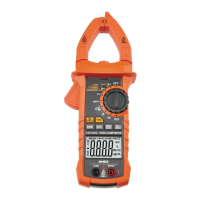
1� Press the W1G%BRGX button for
two or more seconds to turn on the
LCD backlight for 30 seconds�
2� Press the W1G%BRGX button for
two or more seconds again to
turn the LCD backlight off�
3� While in current range modes,
turning the backlight on also
turns the clamp Worklight on�
E&$*- Frequent use of the backlight will
shorten the life of the batteries� Only
use the backlight when necessary�
X,$,%B&79
The data hold function keeps the current reading on the Display� To activate data hold:
1� Press the W1G%BRGX button and
the reading will be held on the
Display� The %symbol appears�
2� Press W1G%BRGX again
to release the hold�
ET!%aE&8KT&8$,4$%!&7$,3*b
1� Turn Rotary Switch to
the ET! position�
2� Move the tip of the clamp close to the
unshielded conductor� If detected
voltage is >110V AC, Meter will beep
and the NCV Indicator will flash�
U@;ECEV` 6Y*8%"2%8&%"89"4,$"&8%"#%
3"Y*8I%Y&7$,3*%5,>%#$"77%+*%/(*#*8$1
Do not rely solely on NCV detection to
determine the presence of voltage�
@'$&%S&)*(KR22
If the Meter is not used for approximately 15 minutes, it will automatically turn itself off
to conserve battery power� To turn the Meter back on after auto-off, press the <FET
button� To disable Auto Power-Off, hold the <FET button while powering the Meter on�


 To Next Page