A113X1 Development Kit User Guide
5.0 (2018-05-22) AMLOGIC, Inc. Proprietary
7
c)If you can use UART debug tool, you can enter UBOOT command line mode by execute “Ctrl + C”
immediately when power on system, input “update”, then enter USB burning mode.
axg_s420_v1#<INTERRUPT>
axg_s420_v1#update
InUsbBurn
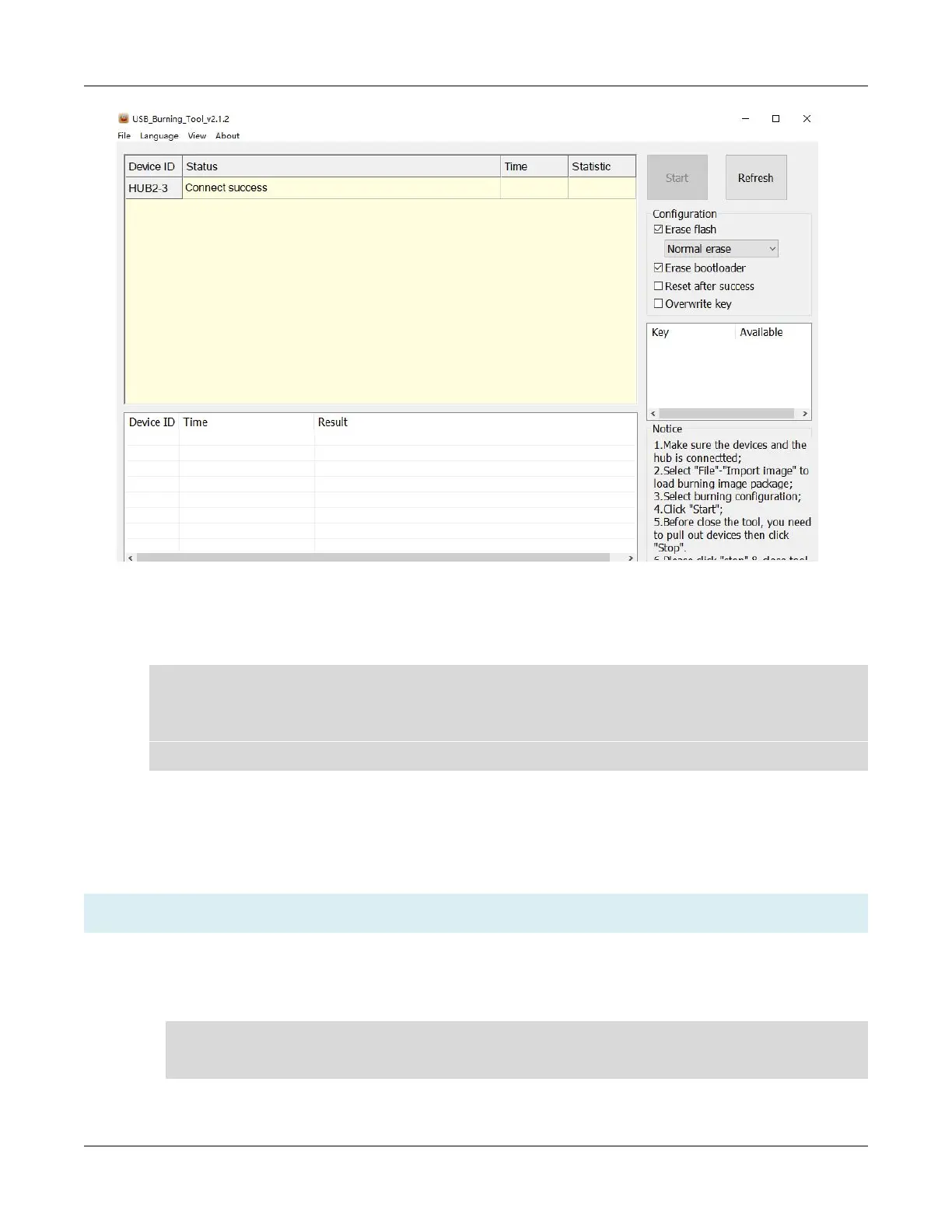
Step 5. Import the firmware form “File ->Import Image”.
Step 6. After import Image completed, start to download.
Step 7. Show “100% Burning successfully ”after downloaded successfully.
3.2.2 Upgrade from Ubuntu Host
Note:
“
flash-tool-v4.7
”
is a tool for Amlogic platforms witch used in linux to upgrade.
Step 1. Install the driver in Ubuntu PC .
a)Add the Ubuntu user to access worldcup device without root authority. in the path /etc/udev/rules.d,
create a '70-persistent-usb.rules' and edit like this:
SUBSYSTEMS=="usb",ATTRS{idVendor}=="1b8e",ATTRS{idProduct}=="c003",OWNE
R="yourUserName",MODE="0666",SYMLINK+="worldcup"
b)Enter usb burning mode.


 To Next Page