10
8
9
1 2
3
6
Features
Layout
Layout
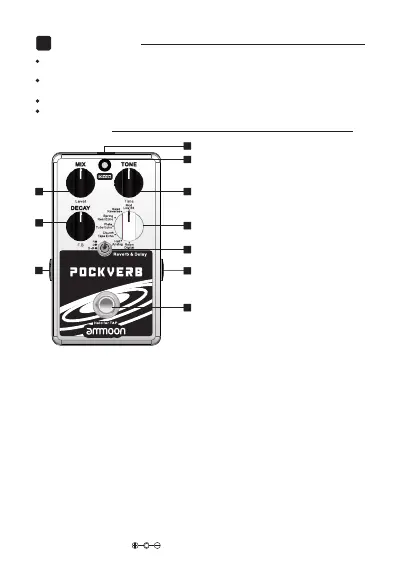
1. MIX/Level
Adjusts the REVERB MIX (wet/dry)
andDELAY LEVEL (volume of repeats)
2. TONE/Time
Adjusts the REVERB TONE (dark/bright)
andDELAY TIME (0ms – 2000ms)
3. DECAY/F.B.
Adjusts REVERB DECAY (length of
reverb trails) and DELAY FEEDBACK
(number of repeats)
4. TYPE
Select effect algorithm type
5. MODE SWITCH
R = REVERB only
D = DELAY only
D+R = DELAY + REVERB
Press and hold for 2 seconds to enter/exit tap tempo control. The DIVIDE LED
will turn RED and flash in time to the tempo when TAP TEMPO is active.
7. FOOTSWITCH
Press to toggle BYPASS on/off. The DIVIDE LED will illuminate when the
pedal is active.
6. DIVIDE
When in D+R MODE press this button to toggle the control knobs functions
between REVERB parameters and DELAY parameters. The LED will flash in
time with the delay repeats when the controls are set to adjust DELAY parameters.
When POCKVERB is bypassed, press and hold for 2.5 seconds to toggle
trails on/off.
Red = Trails on
Blue = Trails off
8. INPUT
Connect to your instrument using a standard ¼” jack cable
9. OUTPUT
Connect to your amplifier using a standard ¼” jack cable
10.DC IN
Connect to a 9V DC 150mA power source
4
5
7
Contains 7 high quality digital reverb algorithms which have been paired up
with 7 complimentary delay models
Reverb and Delay can be used simultaneously or independently from each
other at the flick of a switch.
Footswitch Tap Tempo control for easy, “on the fly” adjustment of the delay time
Optional bypass trails to suit the needs of all users
EN


 To Next Page