PEDAL MODES
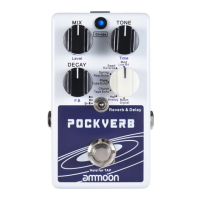
POCKVERB has 3 different modes of operation. The mode can be selected using the
MODE SWITCH.
R = Reverb only
D = Delay only
D+R = Delay + Reverb simultaneously
REVERB MODE
In REVERB MODE the DIVIDE LED will be illuminated when the pedal is turned on
using the FOOTSWITCH. Only Reverb effect will be active.
The effect parameters that can be adjusted are written in black text.
MIX - Wet/Dry mix of reverb effect and dry signal
TONE - The tonal voicing of the reverb effect
DECAY - The length of the reverb trails
DELAY MODE
In DELAY MODE the DIVIDE LED will illuminate blue and flash on/off in time
with the delay repeats when the pedal is turned on using the FOOTSWITCH.
Only Delay effect will be active.
The effect parameters that can be adjusted are written in purple text.
Level - The volume of the delay repeats
Time - The time between delay repeats (0ms-2000ms)
F.B - FeedBack. The number of delay repeats
EN
TAP TEMPO
TAP TEMPO is a control feature which allows convenient adjustment of the DELAY
time parameter using your foot. TAP TEMPO can be used when in DELAY MODE and
DELAY+REVERB MODE.
1. Whilst the pedal is turned on, press and hold the FOOTSWITCH to activate TAP
TEMPO control. The DIVIDE LED will turn red and flash in time with the delay
repeats.
2. Press the FOOTSWITCH several times at your desired speed and the delay
repeats will synchronize with the tempo.
3. Press and hold the FOOTSWITCH again to exit TAP TEMPO control. The DIVIDE
LED will return to a blue colour and the FOOTSWITCH operation returns to control
bypass on/off.
In DELAY + REVERB mode both Delay and Reverb will be active simultaneously when
the pedal is turned on using the FOOTSWITCH.
Effect parameters for both effects can be adjusted. Press the DIVIDE LED to choose
which effect’s parameters you wish to adjust.
When the DIVIDE LED is flashing in time with the delay repeats you can adjust the
DELAY parameters. When the DIVIDE LED is on but not flashing you can adjust the
REVERB parameters.
DELAY + REVERB MODE


 To Next Page