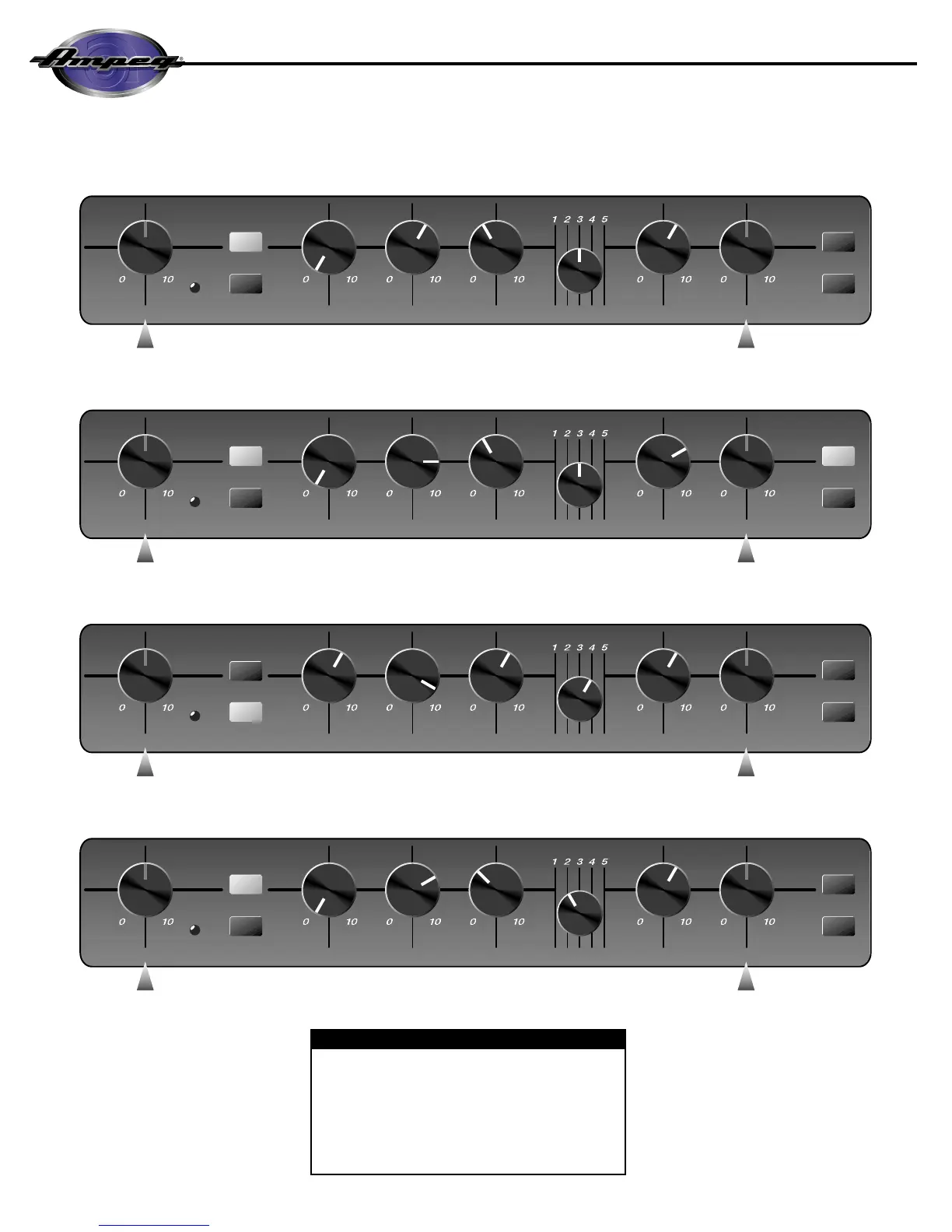
PEAK /
MUTE
ULTRA LO
BRIGHT
ULTRA HI
MASTERTREBLEFREQUENCYMIDRANGEBASSDRIVEGAIN
IN
OUT OUT
OUT
AS NEEDED AS NEEDED
PEAK /
MUTE
ULTRA LO
BRIGHT
ULTRA HI
MASTERTREBLEFREQUENCYMIDRANGEBASSDRIVEGAIN
IN
OUT OUT
AS NEEDED AS NEEDED
PEAK /
MUTE
ULTRA LO
BRIGHT
ULTRA HI
MASTERTREBLEFREQUENCYMIDRANGEBASSDRIVEGAIN
OUT
OUT
OUT
AS NEEDED AS NEEDED
PEAK /
MUTE
ULTRA LO
BRIGHT
ULTRA HI
MASTERTREBLEFREQUENCYMIDRANGEBASSDRIVEGAIN
IN
OUT OUT
OUT
AS NEEDED AS NEEDED
IN
IN
GRAPHIC EQ
GRAPHIC EQ
GRAPHIC EQ
GRAPHIC EQ
*A Note About The Graphic EQ:
The Graphic EQ can be used in two ways:
1) To fine tune your sound, make small adjustments at the
desired frequencies and leave the EQ on throughout the
entire session. (This is great for adapting to varying room
acoustics when going from club to club, etc.);
2) For a completely different sound, make larger adjustments
and only activate the EQ when you want a “second channel”
sound (such as during bass solos).
ROCK:
JAZZ:
COUNTRY:
FUNK “POPPING”:


 To Next Page