SVT-4 PRO Bass Guitar Amplifier SVT-4 PRO Bass Guitar Amplifier
13
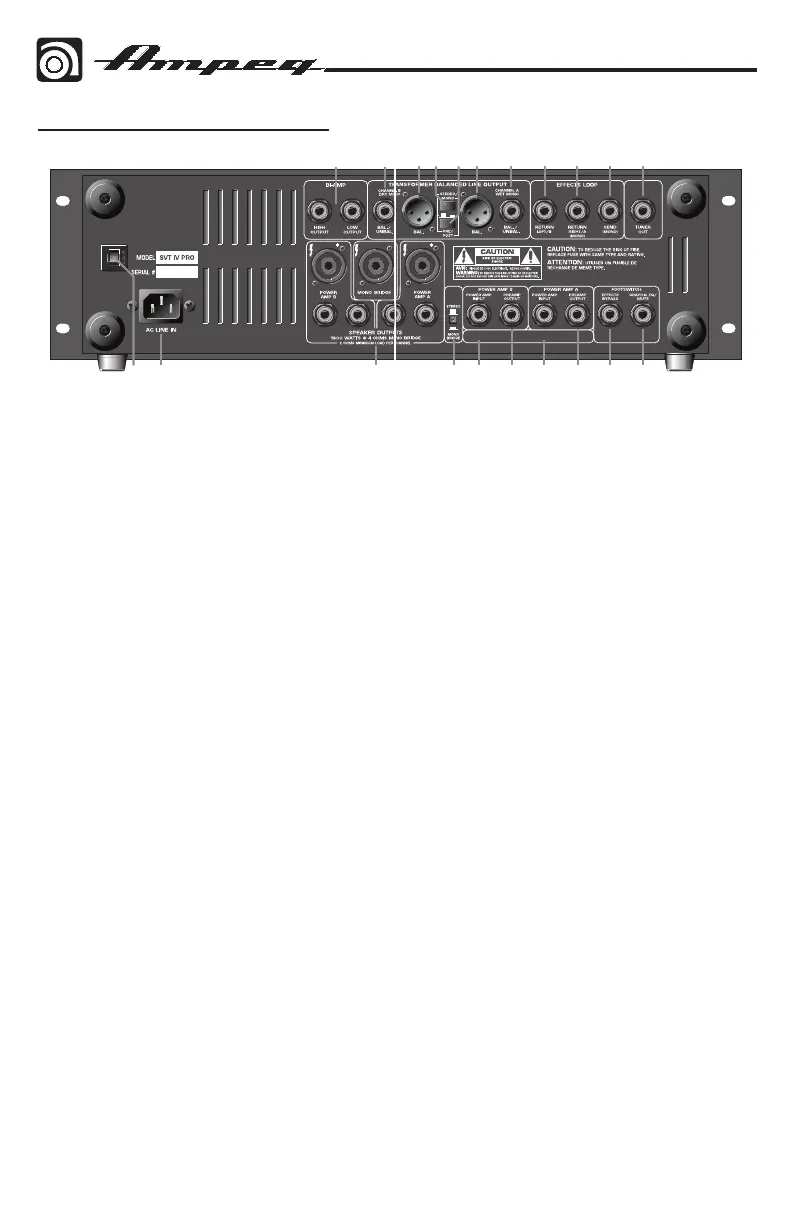
41. LINE OUT STEREO / MONO SWITCH:
This switch is active only when the
Pre/Post switch [43] is in the “post”
position [engaged]. When active, this
switch governs the signals at the Line
Out jacks as follows:
Stereo Mode [switch out]:
•TheChannelAlineoutjacks[44,45]
supply a signal from the Effects
Loop Return Right/A jack [47].
•TheChannelBlineoutjacks[40,41]
supply a signal from the Effects
Loop Return Left/B jack [46].
Mono Mode [switch in]:
•TheChannelAlineoutjacks[44,45]
supply a “wet” mono preamp signal
– any external effects are applied
to this signal. The Effects Loop
Left and Right returns [46, 47] are
summed together, creating a mono
effects signal.
•TheChannelBlineoutjacks[40,41]
supply a “dry” mono preamp signal
– no external effects are applied
to this signal.
42. POST-EQ / PRE-EQ: The signal at
the line out jacks can be set to either
Pre-EQ or Post-EQ with this switch.
With the switch in the OUT position,
the signal at the jacks is Pre-EQ. This
is a direct output not affected by any
EQ or boost settings. With the switch
in the IN position, the signal is
Post-EQ and is controlled and
modified by the tone controls,
Graphic EQ, the Master level control, the
effects loop and the Line Out Stereo /
Mono switch.
45. EFFECTS LOOP RETURN LEFT / B:
When using stereo effects, connect the
effect’s left channel output into this jack.
Do not use this jack with mono effects.
46. EFFECTS LOOP RETURN RIGHT / A
(MONO): When using stereo effects,
connect the effect’s right channel output
into this jack. When using mono effects,
connect the effect’s output into this jack.
47. EFFECTS LOOP SEND: When using
an external signal processor, connect
the INPUT of the effect to this jack
using a shielded instrument cable to
send the post-EQ signal to the effect
for processing. The effects loop may be
bypassed by the front panel switch or by
the use of a footswitch.
48. TUNER OUT: This jack is provided for
connection to an electronic tuner and is
always live, even when the Mute switch
[3] is engaged. This allows for silent
tuning, as well as a monitor feed which
stays hot, even when the house mix is
muted.
OTHER: Make sure that the ventilation
openings are not obscured in any way. This
will allow the flow of cooling air to the power
amplifier’s heatsinks.
1+ HOT, 1–
BIAMP HIGH
INPUT MONO BRIDGE INPUT
BIAMP LOW/
40 41 42 43 44 45 46 47 48
1+ HOT, 1–
1+ HOT,1– RETURN
The Rear Panel continued


 To Next Page
 Loading...