Need help?
Do you have a question about the Amplicomms BigTel 1200 and is the answer not in the manual?
Lists items included in the product box.
Step-by-step instructions for connecting the base unit.
Instructions for connecting the charger to the base unit.
Steps to insert batteries and connect the handset.
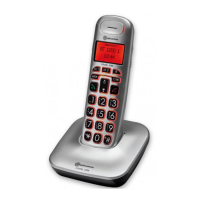
Explains the functions of handset buttons like Earpiece, Boost Key, Menu/Select, etc.
Explains the function of the paging button on the base unit.
Guides users on how to use the phone's menu system.
Outlines the structure and options within the phone's menu.
How to make, answer, and end calls using the phone.
Key safety measures for using the phone.
 General
| Type | Cordless Telephone |
|---|---|
| Display | LCD |
| Volume Control | Yes |
| Ringer Volume | Adjustable |
| Hearing Aid Compatible | Yes |
| Battery Type | NiMH |
| Talk Time | Up to 10 hours |
| Standby Time | Up to 100 hours |
| Answering machine | No |
| Speakerphone | Yes |
| Visual ringer indicator | Yes |
| Caller ID | Yes |
| Handset Speakerphone | Yes |
| Base Speakerphone | No |
| Intercom | No |
| Charging Time | 8 hours |
| Power Supply | AC Adapter |
| Range | Up to 50m indoor, 300m outdoor |

 To Next Page