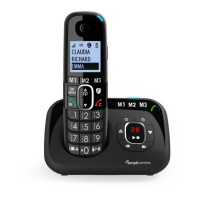
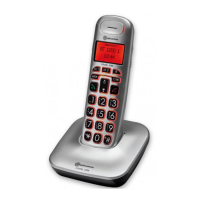
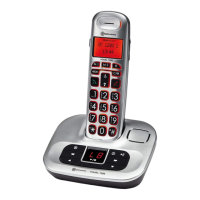
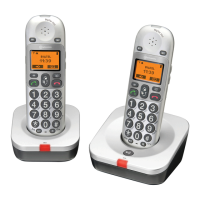
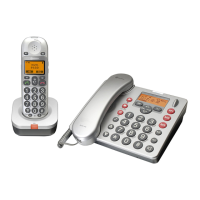
The Amplicomms BigTel 1580 / BigTel 1582 / BigTel 1583 is a cordless telephone system designed for ease of use and enhanced accessibility. This system is available in single (1580), duo (1582), and trio (1583) handset configurations, with additional handsets and chargers included in the duo and trio packages. It features a clear display with large characters and intuitive icons, making it suitable for users who may benefit from improved visibility and simplified operation.
Function Description
The core function of the BigTel series is to provide reliable cordless telephony. Each handset can make and receive calls, with options for preparatory dialing (entering a number before taking the line), direct dialing, and dialing from a redial list of the last 10 numbers called. The phone also includes a private phonebook capable of storing up to 100 entries, each with a name (up to 12 characters) and a number (up to 24 digits). Phonebook entries can be assigned different ringtones and marked as VIP contacts.
A key feature is the integrated answering machine, which records unanswered calls when activated. The answering machine can store up to 59 messages, with a maximum recording time of approximately 30 minutes. Users can record their own outgoing messages (OGMs) or use pre-set ones. The base station includes a 7-segment LED display to show the number of messages. The answering machine can be turned on or off, and the answer delay (number of rings before answering) can be customized from 2 to 10 rings.
The BigTel series also incorporates a "Smart Call Block" feature, which helps to reduce nuisance calls. This feature requires a subscription to Caller Line Identification service from your telephone service provider. It offers several modes:
- Manual Call Block: Allows users to block specific numbers by adding them to a blacklist. Incoming calls from blacklisted numbers will not ring. Numbers can be added to the blacklist during a call or from the call list/redial list.
- Automatic Call Block (VIPs only): Only calls from numbers registered as VIPs in the phonebook will ring. All other calls are blocked.
- Automatic Call Block (Contacts only): Only calls from numbers registered in the phonebook (normal and VIP) will ring. All other calls are blocked.
- Anonymous Call Block: Blocks calls that do not display a number (private calls, international calls, etc.). This can be set to block only private calls or all anonymous calls and can be enabled in conjunction with other call block modes.
Usage Features
The handset is designed for user convenience with clearly labeled buttons and a backlit display.
- Navigation: A central OK/MENU button provides access to the main menu and confirms selections. Up and down arrow keys allow scrolling through menu items and lists (phonebook, redial, call list).
- Call Management: A dedicated call button initiates calls and switches to speaker mode during a call. A "C" (clear) button ends calls and goes back to the idle screen, or clears characters/digits in editing mode.
- Direct Memory Keys (M1, M2, M3, 1, 2, 3): These keys allow for quick dialing of stored numbers. M1, M2, M3 are dedicated direct memory keys, while keys 1, 2, and 3 can also be long-pressed in idle/off-hook mode to dial stored direct memory numbers.
- Volume Control: During a call or message playback, the up and down arrow keys adjust the earpiece/handsfree volume or ringer volume. The handset retains the last selected volume level for subsequent calls.
- Audio Boost: A dedicated button on the handset activates an audio boost (+15dB) for louder earpiece sound, which can be toggled on/off.
- Handsfree Function: The phone supports handsfree operation, indicated by a specific icon on the display.
- Display Icons: Various icons on the display provide visual cues for battery status, signal strength, call in progress, new calls, answering machine status, alarm, ringer off, audio boost, and list access (phonebook, redial).
- Handset Settings: Users can customize various handset settings, including ring melodies for internal and external calls, ringer volume, key tone, battery tone, out-of-range tone, LCD contrast, equalizer settings (natural, bass, treble), language, date and time format, and automatic answer.
- Base Station Settings: The base station offers settings such as renaming handsets, auto answer, registration, default settings, ringer melody/volume, deleting handsets, dial mode (tone/pulse), flash duration, and changing the system PIN.
- Paging: The base station has a "Page" button to locate misplaced handsets.
- Remote Access: The answering machine can be accessed remotely, allowing users to listen to messages from another phone.
Maintenance Features
The BigTel series is designed for straightforward maintenance to ensure longevity and optimal performance.
- Battery Management: The phone uses 2 AAA 300mAh NiMH rechargeable batteries. It is crucial to use only the supplied NiMH rechargeable batteries. The handset should be charged for 8 hours before first use. If the handset will not be used for an extended period, it is recommended to remove the batteries to prevent possible leakage. The display shows battery status, indicating full charge, initial charging, final charging, or low power.
- Cleaning: The device should be cleaned with an antistatic cloth lightly moistened with water. Avoid using water or other liquids directly on the telephone.
- Troubleshooting Guide: The user guide includes a comprehensive troubleshooting section to help resolve common issues such as no dialing tone, out-of-range display, call not working, no display, and answering machine problems. This guide provides potential causes and solutions, often suggesting basic steps like checking connections, recharging batteries, or resetting settings.
- Registration: Handsets are pre-registered to the base station. If re-registration is needed (e.g., for additional handsets or after a reset), the manual provides clear steps to enter registration mode on the base and handset, including entering the 4-digit system PIN.
- Environmental Considerations: The device is designed with environmental responsibility in mind. It is indicated that the electronic appliance should be collected separately for recycling and not mixed with household waste, aligning with European Union directives.
- Safety Precautions: The manual outlines safety guidelines, emphasizing that the phone is not designed for emergency calls during power failure, should not be used to notify gas leaks, and should not be opened to avoid electrical shock. It also advises against opening batteries due to hazardous chemical substances and recommends positioning the phone in a dry place away from heat, humidity, and direct sunlight, and at least 1 meter away from other electrical appliances to prevent interference.



 To Next Page
 General