EasyManua.ls Logo

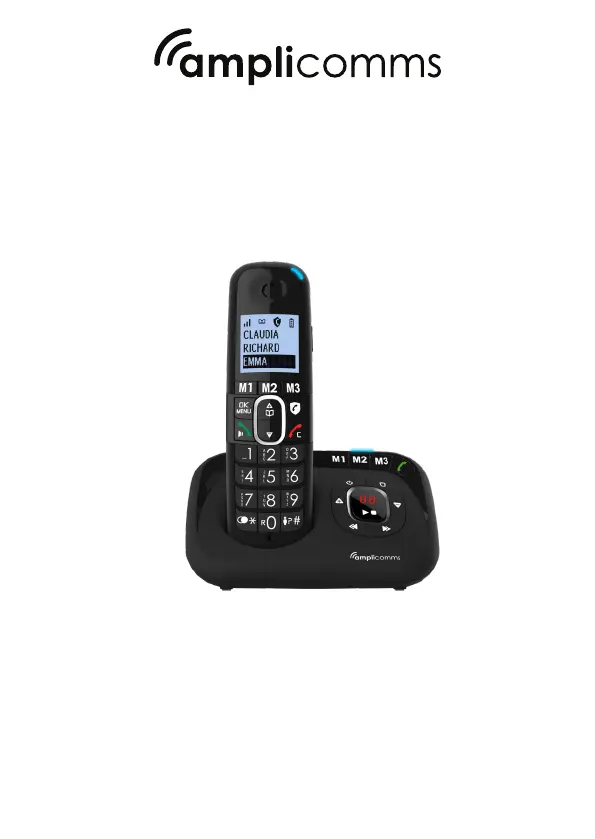
Amplicomms BigTel 1580 - User Manual

Amplicomms BigTel 1580
28 pages
Print Icon
To Next Page IconTo Next Page
Loading...
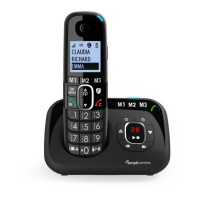
BigTel 1580 / BigTel 1582 / BigTel 1583
User Guide

Table of Contents

Questions and Answers

Summary

GETTING TO KNOW YOUR PHONE

Handset Overview

Detailed explanation of handset components and their functions.

BASE STATION OVERVIEW

VOLUME UP +

How to increase speaker volume during message playback.

7-SEG LED DISPLAY

Explains the meaning of various codes displayed on the base station's LED.

DISPLAY ICONS AND SYMBOLS

PRECAUTIONS

INSTALLING YOUR PHONE

CONNECTING THE BASE STATION

Step-by-step guide to connecting the base station to power and the phone line.

INSTALLING AND CHARGING THE BATTERIES

Instructions for inserting batteries and initial charging.

CONNECTING THE CHARGER(S) (DUO;TRIO)

CHANGE HANDSET LANGUAGE

Guide to changing the language setting on the handset.

MENU TREE

USING YOUR PHONE

Make a Call

Step-by-step guide on how to make phone calls, including preparatory dialing, direct dialing, memory keys, and redial list.

Adjust Earpiece and Handsfree Volume

How to adjust the volume levels for earpiece and handsfree during calls.

PRIVATE PHONEBOOK

Add a New Phonebook Entry

Step-by-step guide to adding new contacts to the phonebook, including names and numbers.

Call from the Phonebook

How to make calls to contacts stored in the phonebook.

CALLER DISPLAY (NETWORK DEPENDENT)

View the Call List

How to access and view the list of incoming calls, including date and time.

Call from the Call List

How to make a call directly from the call list.

REDIAL THE LAST NUMBER

PHONE SETTING

Set the Ringer Melody for Internal;External Calls

How to select different ringtones for internal and external calls.

Set the Ringer Volume

How to adjust the volume of the phone's ringer.

Set the Speed Dial

How to assign numbers to speed dial keys.

ANSWERING MACHINE

Turn On;Off the Answering Machine

Instructions to activate or deactivate the answering machine.

Listen to the Messages in the Answering Machine

How to play back recorded messages, new and old.

Delete All Messages in the Answering Machine

How to erase all recorded messages from the answering machine.

Record Memo

How to record a memo message for other users.

Answering Machine Settings

Various settings to configure the answering machine.

Set the Answer Mode

How to choose between 'Answer & Record' and 'Answer Only' modes.

Set the Outgoing Message Language

How to select the language for the outgoing message.

Record Your Own Outgoing Message (OGM)

How to record a custom outgoing message.

Playback and Delete the Outgoing Message (OGM)

How to play back and delete personalized outgoing messages.

Playback the OGM

How to listen to the recorded outgoing message.

Delete the Personalized OGM

How to remove a custom outgoing message.

Set the Answer Delay

How to set the number of rings before the answering machine answers.

REGISTRATION

CALL BLOCK

Call Block Overview

Summary of different call blocking modes (Off, On, Contacts, VIPs, Anonymous).

Manual Call Block Mode

How to manually block calls by adding numbers to a blacklist.

Enable Manual Mode

Steps to activate the manual call blocking mode.

Add Numbers to Blacklist

How to add numbers to the call block blacklist.

Edit Numbers in Blacklist

How to modify or edit existing entries in the blacklist.

Delete Numbers in Blacklist

How to remove numbers from the call block blacklist.

Delete a Number from Blacklist

Specific steps to remove a single number from the blacklist.

Delete All Numbers from Blacklist

Specific steps to remove all numbers from the blacklist.

Automatic Call Block Mode

Overview of automatic call blocking modes.

VIPs Only

How to block all calls except those from VIP contacts.

Contacts Only

How to block all calls except those from phonebook contacts.

ANONYMOUS CALL BLOCK MODE

Block Private Calls

How to block incoming calls with private numbers.

Block All Anonymous Calls

How to block all calls that do not display a number.

Set Block Anonymous Calls OFF

How to disable the anonymous call blocking feature.

TECHNICAL DETAILS

TROUBLESHOOTING

SAFETY

ENVIRONMENT

CONFORMITY

Amplicomms BigTel 1580 Specifications

General IconGeneral
TypeDECT telephone
Ringer typePolyphonic
Handset typeWired & Wireless handset
Answering machineYes
Number of melodies4
Maximum indoor range50 m
Maximum outdoor range300 m
Number of ringer volume levels5
Call log entries50
Phonebook capacity- entries
Elderly phone-
Mounting typeDesk
Product colorBlack
Battery typeAAA
Standby time100 h
Battery capacity300 mAh
Battery technologyNickel-Metal Hydride (NiMH)
Number of batteries supported2
Display number of lines4 lines
Weight and Dimensions IconWeight and Dimensions
Base dimensions85 x 80 x 80 mm
Handset dimensions (WxDxH)177 x 30 x 52 mm

Related product manuals