Need help?
Do you have a question about the Amplicomms BigTel 480 and is the answer not in the manual?
Specifies the intended purpose and limitations of the telephone for telephoning within a public network system.
Provides guidelines for placing the telephone to avoid damage and ensure proper function, avoiding smoke, dust, and direct sunlight.
Advises on the use of the correct power adapter plug supplied and ensuring its access is not obstructed.
Warns about battery handling, type, and polarity to prevent hazards like explosion during charging.
Explains functionality during a power outage, noting that features dependent on external power will not work.
Advises caution when using the telephone near medical equipment, especially pacemakers.
Provides instructions for the proper disposal of the device and batteries according to local regulations.
Details the amplification feature and warnings about high volume levels, advising caution when sharing.
Lists all items included in the telephone package for user verification before setup.
Guides on how to connect the main desktop telephone unit safely and correctly, considering interference.
Provides instructions for connecting the charging station to a power outlet, ensuring access.
Explains how to insert rechargeable batteries correctly into the handset, observing polarity.
Instructs on the initial charging procedure for the handset's batteries, noting normal warming.
Details how to set the correct time and date for call logging and other features.
Explains how to change the language displayed on the handset and desktop units via the menu.
Describes the function that automatically answers incoming calls when the handset is removed from the charging station.
Explains how to use the hands-free feature on the desktop phone, including taking and ending calls.
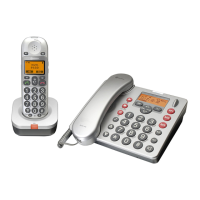
Identifies and describes the function of buttons and keys on the handset, including amplification and softkeys.
Identifies and describes the function of buttons and keys on the desktop telephone, including navigation and direct call keys.
Describes the default operating state of the telephone system where the system switches to standby.
Explains how to access and move through the telephone's menu system using keys and softkeys.
Lists and explains the meaning of various icons displayed on the screen for status and functions.
Guides on how to answer incoming calls on both handset and desktop units.
Explains the methods to terminate an ongoing call by replacing the handset or pressing the correct button.
Details how to redial previously called numbers from the saved list on the telephone.
Provides instructions for initiating outgoing calls from both handset and desktop units.
Explains how to dial numbers directly from the incoming call list stored on the telephone.
Guides on how to make calls using stored entries in the phone book.
Explains how to use pre-programmed direct call keys for faster dialing of frequently used numbers.
Describes how to temporarily disable the microphone during a call on both handset and desktop units.
Covers making calls between different handsets or to the desktop unit within the same system.
Details the process of transferring an incoming external call to another extension using the INT key.
Explains how to set up and manage a three-way conference call involving external and internal participants.
Describes how incoming external calls are handled and signaled when the user is already on an internal call.
Explains how to lock the handset keypad to prevent accidental key presses while allowing incoming calls.
Guides on enabling or disabling the telephone's ringer for incoming calls on both units.
Describes how to silence the ringer for an incoming call on the handset without hanging up.
Explains how to adjust the audio volume for earpiece and loudspeaker in five levels.
Details how to adjust the sound quality through three frequency spectrum settings (Equalizer 1, 2, 3).
Describes how to manage entries in the handset's call list, save numbers, or delete entries.
Guides on managing the desktop telephone's call list, saving numbers to PB, or deleting entries.
Explains how to manage the handset's redial list, save numbers, or delete entries.
Guides on managing the desktop telephone's redial list, saving numbers to PB or direct call keys.
Details the process of adding new contacts to the handset's phone book, including name and number.
Guides on adding new contacts to the desktop telephone's phone book, including name and number.
Explains how to modify existing entries in the handset's phone book, including editing, copying, and deleting.
Guides on modifying existing entries in the desktop telephone's phone book, including editing, copying, and deleting.
Describes how to edit or create entries for the handset's direct call keys (M1/M2).
Guides on editing or creating entries for the desktop telephone's direct call keys (M1/M2/M3).
Instructions for setting the date and time on both the handset and desktop units.
Explains how to select between 12-hour and 24-hour time formats for display.
Details how to set up alarms or reminders with date, time, and melody on the handset.
Guides on selecting ringtones and melodies for the handset for external and internal calls.
Guides on selecting ringtones and melodies for the desktop telephone for external and internal calls.
Explains how to adjust the ringer volume on the handset through menu options.
Guides on adjusting the ringer volume on the desktop telephone through menu options.
Instructions for assigning a custom name to the handset for identification.
Details how to turn the keypad beep sound on or off for both handset and desktop units.
Explains how to adjust the screen contrast for better readability on both units.
Describes how to activate or deactivate the auto-answer feature for incoming calls on the handset.
Guides on setting the duration for which the handset's backlight remains active after an operation.
Explains how to enable or disable the confirmation beep that alerts the user when a setting is saved.
Guides on selecting a base station for the handset to connect to, either automatically or manually.
Instructions for changing the display language on both handset and desktop units via the menu.
Details how to permanently enable the earpiece amplification feature ('Boost On') for enhanced volume.
Explains how to select the dialling mode, Tone or Pulse, for making calls.
Guides on setting the recall time ('Short' or 'Long') for accessing telephone networks.
Instructions for changing the system PIN for security and access to certain settings.
Details how to set appointments or reminders with date, time, and alarm on the handset.
Explains how to use the stopwatch function on the handset, including start, stop, and reset.
Guides on changing the character font used for entries in the phone book on the desktop telephone.
Provides steps to reset the handset to its default factory settings by holding the R key.
Guides on resetting the desktop telephone to its default factory settings via the menu.
Explains the functions of the keys related to the answering machine operation in standby and during playback.
Guides on activating/deactivating the answering machine and selecting outgoing messages (OGM).
Details how to listen to recorded messages using the handset, including new message notifications.
Explains how to play back only the newly received messages from the answering machine.
Guides on listening to all recorded messages, both new and old, from the answering machine.
Describes how to listen to incoming calls and take over the call if desired while it's being recorded.
Details how to listen to recorded messages using the desktop telephone, including skipping and deleting.
Guides on deleting individual messages from the desktop telephone's answering machine during playback.
Explains how to remove all previously heard messages from the answering machine.
Covers playback, deletion, and recording of outgoing messages for the answering machine.
Details the process of recording a custom outgoing message to replace the standard ones.
Explains how to record memos for other users, which are treated as incoming messages.
Guides on configuring the number of rings before the answering machine activates or uses 'Toll saver' mode.
Details how to set or change the 3-digit PIN for remote access to the answering machine.
Guides on selecting the language for outgoing messages from a list of available options.
Explains how to operate the answering machine remotely using a tone-dialing (DTMF) telephone.
Guides on adding a new handset to the base station, involving PIN and paging.
Details how to remove a handset from the base station registration using its internal number and PIN.
Guides on removing a handset registered via the desktop telephone by entering its internal number.
Explains functions like call transfer and callback via the R button when connected to a private branch exchange.
Details support for network provider services like brokering, call waiting, and conference facilities via the R-button.
Provides a hierarchical overview of the handset's menu options for easy navigation.
Provides a hierarchical overview of the desktop telephone's menu options for easy navigation.
Provides initial steps to resolve common issues by checking power, connections, and proximity to the base station.
Offers solutions for problems preventing outgoing calls, checking cables, power, and line connections.
Addresses issues with intermittent signal loss, suggesting checking range to the base station and its location.
Provides steps for resolving the handset turning off unexpectedly, typically related to battery charging or replacement.
Explains troubleshooting for issues with Caller ID not displaying correctly, checking service and withheld numbers.
Offers solutions for when the telephone fails to ring for incoming calls, checking ringer settings.
Advises on reducing interference from other electronic devices by maintaining adequate distance from the phone.
Suggests using an ADSL filter if experiencing slow internet speeds when the phone is connected to a broadband line.
Lists technical standards, channels, frequencies, modulation, and power transmitter details of the telephone.
Outlines the pre-configured default settings for various features on both desktop and handset units.
Provides instructions for cleaning the telephone housing using a soft, fluff-free cloth.
Details the terms and conditions of the product's guarantee period, exclusions, and claims process.
An alphabetical listing of topics covered in the manual for quick reference and location of information.
 General
| Type | Cordless Telephone |
|---|---|
| Display | LCD |
| Volume Control | Yes |
| Ringer Volume | Adjustable |
| Speakerphone | Yes |
| Emergency Button | Yes |
| Talk Time | Up to 10 hours |
| Standby Time | Up to 100 hours |
| Hearing Aid Compatible | Yes |
| Answering Machine | No |
| Caller ID | Yes |
| Phonebook entries | Up to 50 |
| Visual Ringer Indicator | Yes |
| Keypad | Large buttons |
| Call Waiting | Yes |
| Phonebook | Yes |
| Redial | Yes |
| Battery Type | NiMH |
| Power Source | AC Adapter |
| Range | Up to 300 meters outdoors |

 To Next Page