R Record Mode
Step 1
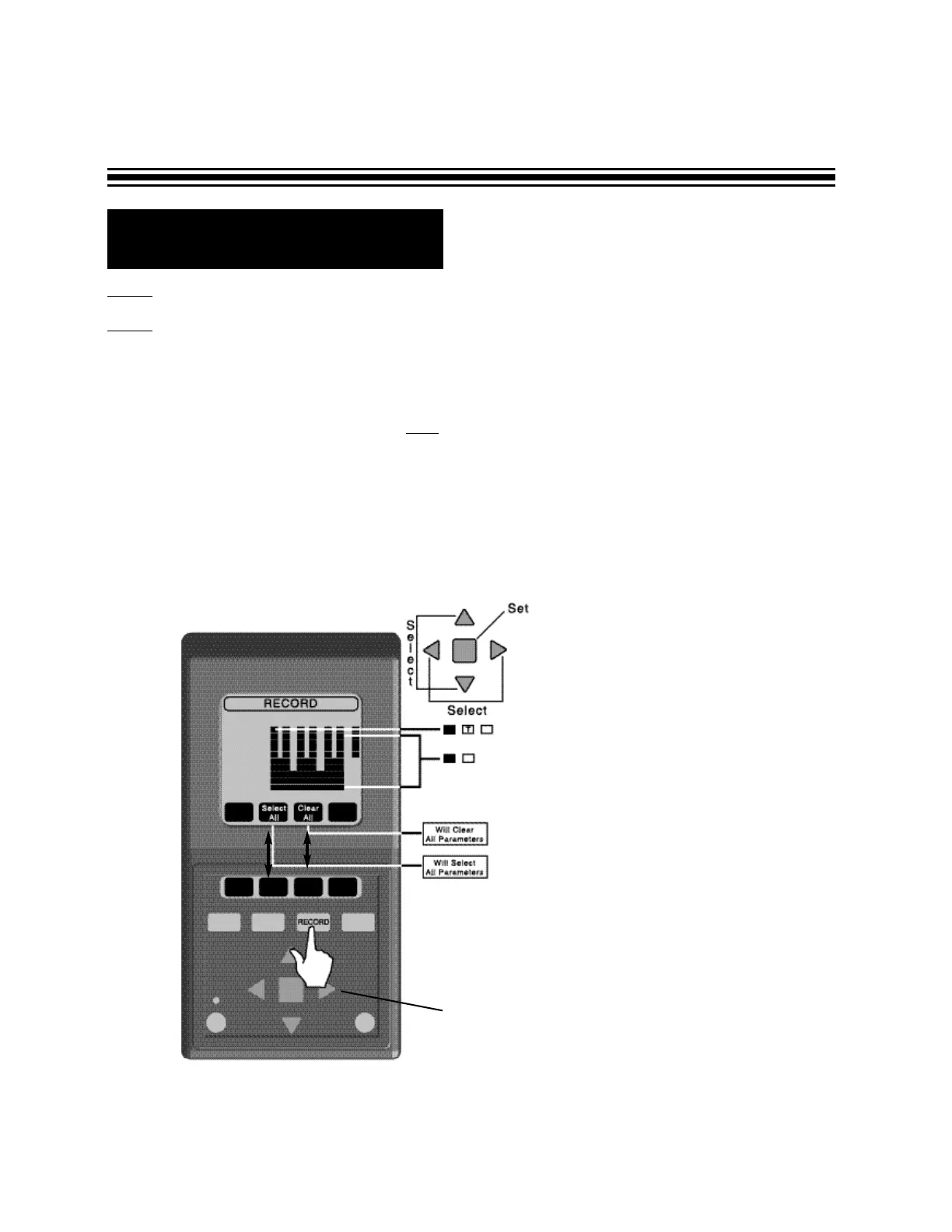
- Press the RECORD button .
Step 2 - Select parameters for recording.
• SELECT ALL button will select all of the parameters for recording. All grid boxes will
become black. The DMII™ is going to record everything.
• CLEAR ALL button deselects all parameters. All grid boxes will become blank. When
this is selected, the DMII™ will NOT record anything.
• Selecting or deselecting one parameter at a time. Using the arrow keys, you can move
the blinking cursor to one of the selection boxes.
Press the ENTER button, to change between blank (not record) and black (record).
For RMS voltage and current, you can change between blank, black or black with “T”
(Threshold).
Page 16
ARROW KEYS
Black box indicates parameter selected
for recording.
Box with T indicates parameter selected
for recording with threshold parameters
indicated.
Blank box indicates parameter not
selected for recording


 To Next Page