3 Software
Custom firmware source code can be generated using the Arduino IDE. An example code and
Arduino library is available for reference. In addition, the AS5600 LabVIEW Evaluation GUI software
can be used to readout and configure the AS5600.
3.1 LabVIEW
The AS5600 LabVIEW Evaluation GUI supports the Arduino UNO. The latest version of the
software can be downloaded from the ams webpage.
Before the Arduino UNO can be used together with the POTUINO shield the LabVIEW interface
firmware has to be flashed onto the Arduino. Easiest way to do this is to download the free software
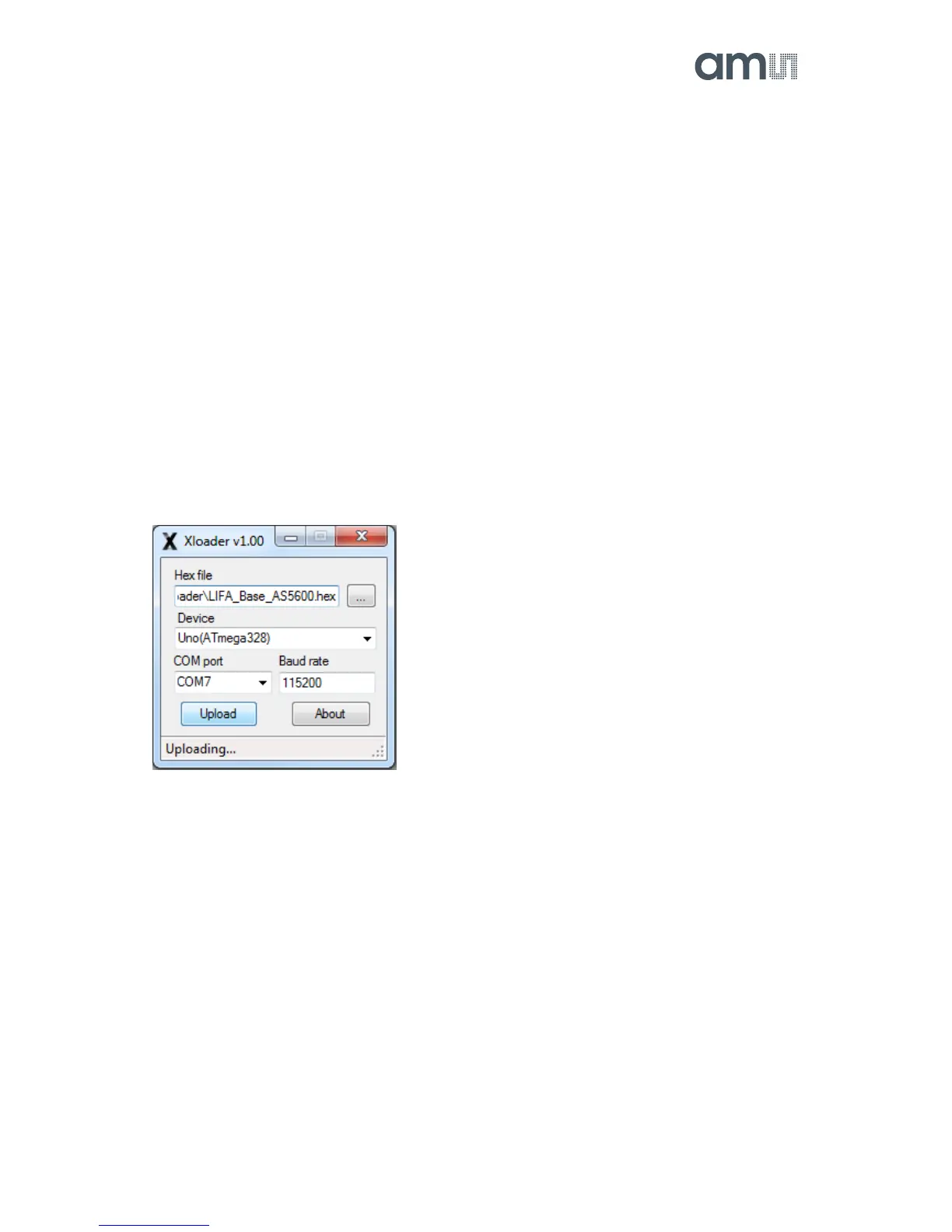
tool XLoader.
Figure 3: XLoader for flashing the Arduino UNO
Choose the LIFA_Base_AS5600.hex file which is also available for download from the ams
webpage. Then choose the Uno(ATmega328) in the Device dropdown menu. After this choose the
correct COM port which can easily be checked in the Windows Device Manager and finally click
Upload.


 To Next Page