EasyManua.ls Logo

AMSTRAD PC1512 - 0 Track Sensor Adjustment; Azimuth Check

AMSTRAD PC1512
52 pages
Print Icon
To Next Page IconTo Next Page
To Previous Page IconTo Previous Page
Loading...
2
Tracks at the
minimum
access
time
between
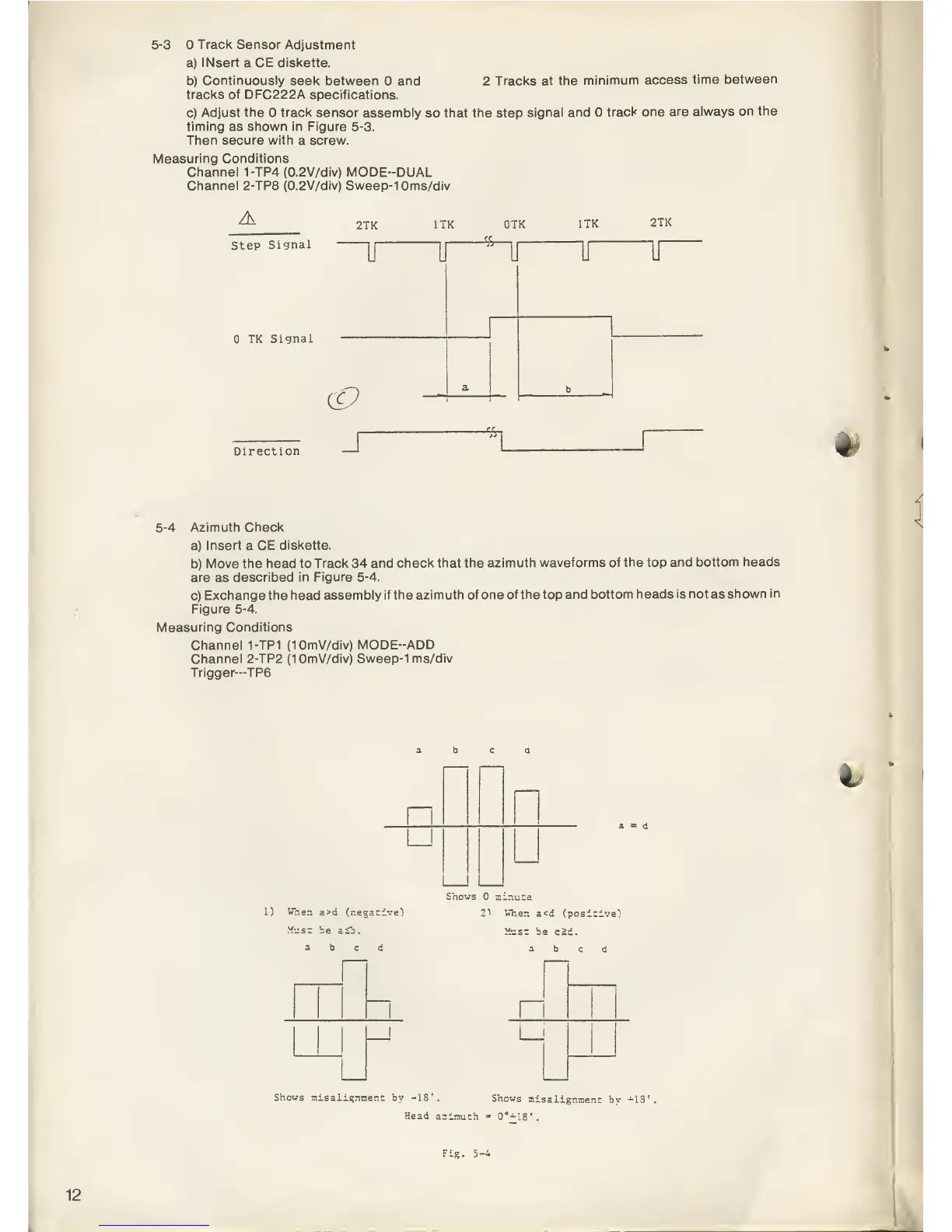
5-3
Track
Sensor Adjustment
a)
INsert
a CE diskette.
b)
Continuously
seek between and
tracks of
DFC222A specifications.
c)
Adjust the track
sensor assembly
so
that the
step
signal and
track one
are
always on the
timing as shown in Figure
5-3.
Then secure with a screw.
Measuring
Conditions
Channel 1-TP4
(0.2V/div)
MODE-DUAL
Channel 2-TP8 (0.2V/div) Sweep-10ms/div
A
Step
Signal
TK
Signal
2TK
1TK QTK
1TK
2TK
Direction
J
5-4
Azimuth Check
a)
Insert a CE
diskette.
b)
Move the head to
Track 34 and
check that the
azimuth waveforms
of the top
and bottom heads
are as
described in Figure
5-4.
c)
Exchange the head
assembly if the azimuth of
one of the top
and bottom heads
is not as
shown in
Figure
5-4.
Measuring Conditions
Channel 1-TP1
(10mV/div)
MODE-ADD
Channel 2-TP2
(10mV/div) Sweep-1 ms/div
Trigger—TP6
<\
L) Wher.
a>d
(negative")
v.. =-
V,
Shows
tiinuta
2">
Vher.
a<d (positive)
Ymsz be
c2c.
abed
Shows
misalignment
by -IS'.
Shows
misalignment
bv
+13'
Head
azimuth
«
0°-18'.
Fig. 5-4
12

Related product manuals