6
GENERAL CONTROLS
Power ON/OFF Recording
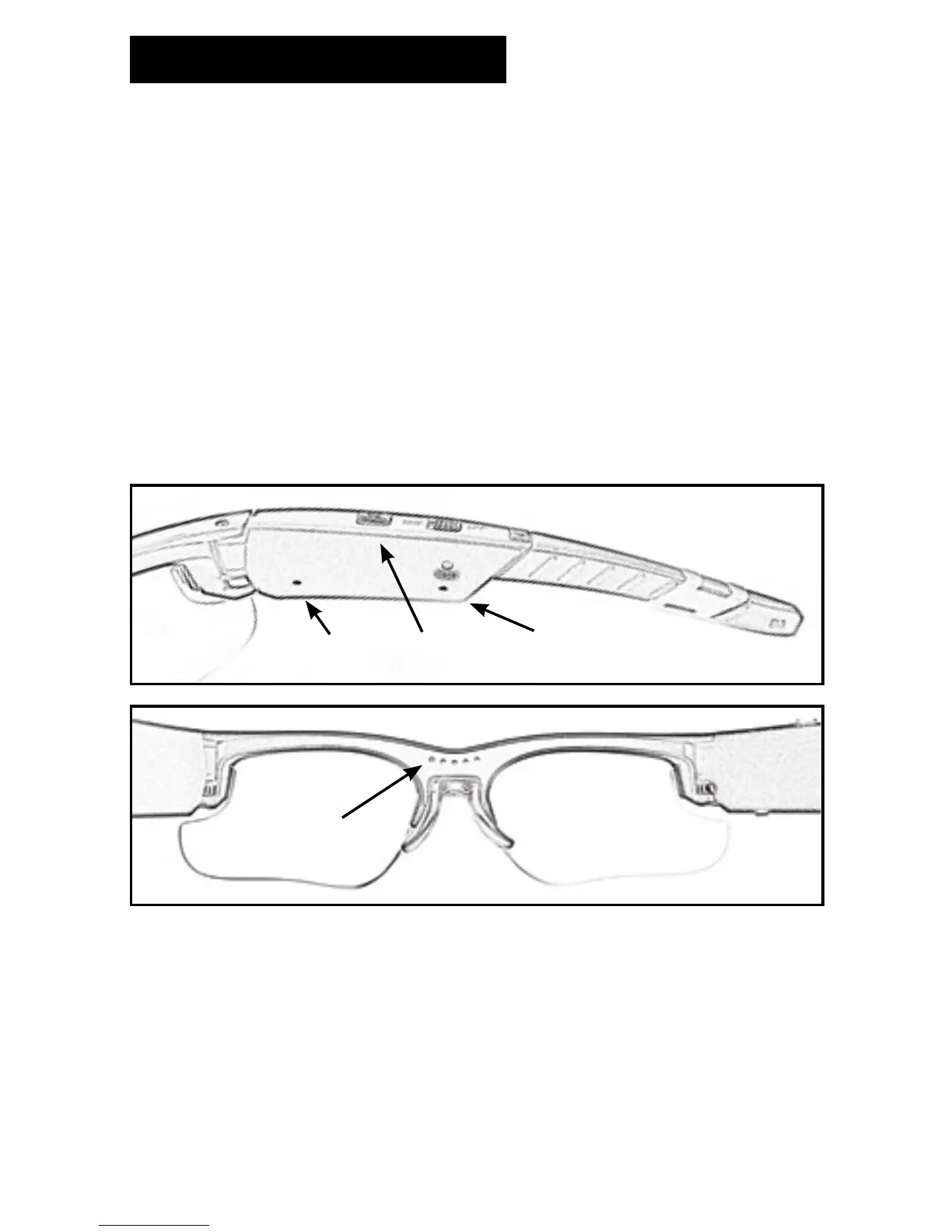
Press and hold the Power/Video Record ON/OFF button (A) for 2
seconds to turn ON the Opticam. The Battery indicator light (B) will
turn GREEN, the Power Indicator light (C) will blink a BLUE light and
you will hear 3 alert chimes.
After a few seconds the Frame status light (D) will blink a BLUE light
indicating that the Opticam is recording a video.
Power OFF /Stop Recording
To stop recording and to turn OFF the Opticam press and hold the
Power/Video Record ON/OFF button (A) for 2 seconds. You will hear a
steady 3 seconds chime as the camera saves the recording le and turns
the Opticam OFF.
B
C
A
D
File Saving
The Opticam records videos up to 25 minutes of duration automatically
saving a new le once it reaches the time limit. The camera will
automatically stop recording when it is low in power or when the SD
Card is full.
Make sure you copy the les from the Micro-SD card to your computer
and delete them afterwards, this will ensure you are keeping enough
space in the Micro-SD card to record new videos.


 To Next Page