8
Connect the Opticam to your computer and create a TEXT le (.txt)
named setdate.txt in the SD-Card volume that is mounted.
Open the new setdate.txt le, type 20151108090828 and save it in the
SD-Card volume. Change the numbers to set the date of your choice.
The inputted text 20151108090828 means:
Year / Month / Day / Hour / Minute / Second
2015 11 08 09 08 28
SET DATE & TIME
PC & MAC CONNECTION
BASIC AND ADVANCED CAMERA SETTINGS
• Operating system: PC -
Windows XP or higher / Mac –
Mac OS 10.6 or higher required.
• USB Port required.
• SD Card Port is optional.
• Minimum 2.0GHz Dual-core
processor required.
• Minimum 4GB free hard disk
memory required.
• Minimum 2GB RAM required.
• Graphic minimum 512M memory
and support 720p resolution or
higher required.
A
1080P 720P
A) Basic Camera Settings
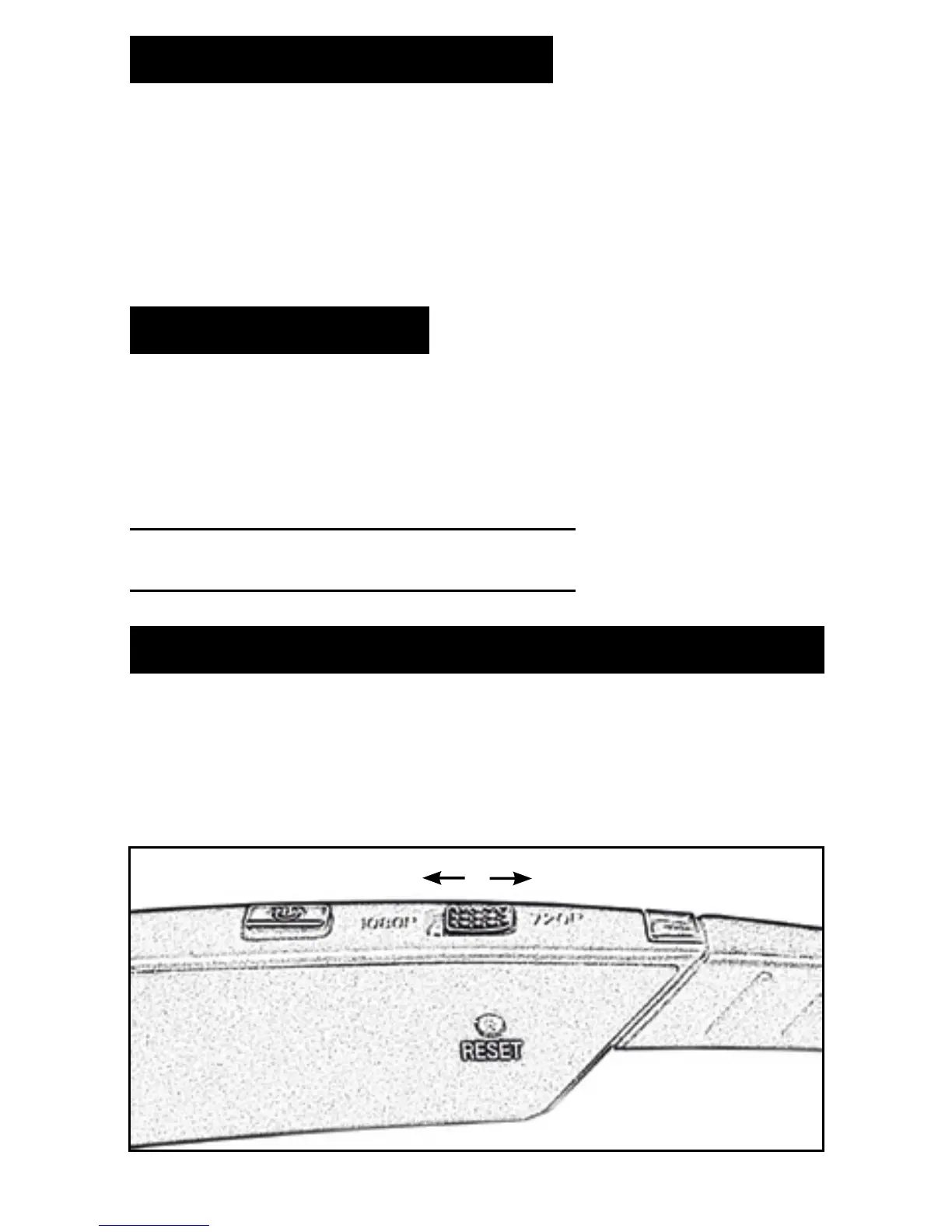
You can select the quality of the video using the selector located on the
right arm of the Opticam (A). Slide the button to select between 720p
and 1080p Full HD video.


 To Next Page