5
General Features
Range: up to 300m (Open Field), 50m (Indoor)
*Call Waiting / Type I & Type II Caller ID Support
Low radiation
Crystal clear voice quality
120 Duplex Channels
3-Line LCD
Amber LCD backlit
20 Number Phone Book Memory (Name & Numbers)
10 Ringing Melodies on Handset
Ring On / Off Shortcut Key
Range Out & Low Battery Warning (Visual & Audio)
Up to 120 hrs Standby time
Up to 12 hrs Talk Time
Rechargeable Battery cells (2x AAA)
Multi-Handset Registration at a Single Base Station (Up to 4)
Multi-way conference (1 EXT, 2 INT)
Call Transfer, Intercom between Handset
*Requires Subscription To Service Provider
Welcome
This user guide provides you with information and instruction you need to get the most from your phone.
HOW TO USE THIS USER GUIDE?
The following symbols are used to alert you on important information.
•
Warning:
::
:
Critical information for preventing
personal injury.
•
Caution:
Caution:Caution:
Caution:
Critical information for preventing
damage on the product.
•
Tip:
Tip:Tip:
Tip:
Information for easier operation.
•
Note:
Note:Note:
Note:
Explanatory or critical information for
carrying out an operation correctly.
NEED MORE HELP?
•
See the Troubleshooting section in this user guide on page 24.
•
Call the Helpline at AMYTEL’s local distributors
•
Visit our online help www.amytel.net
6
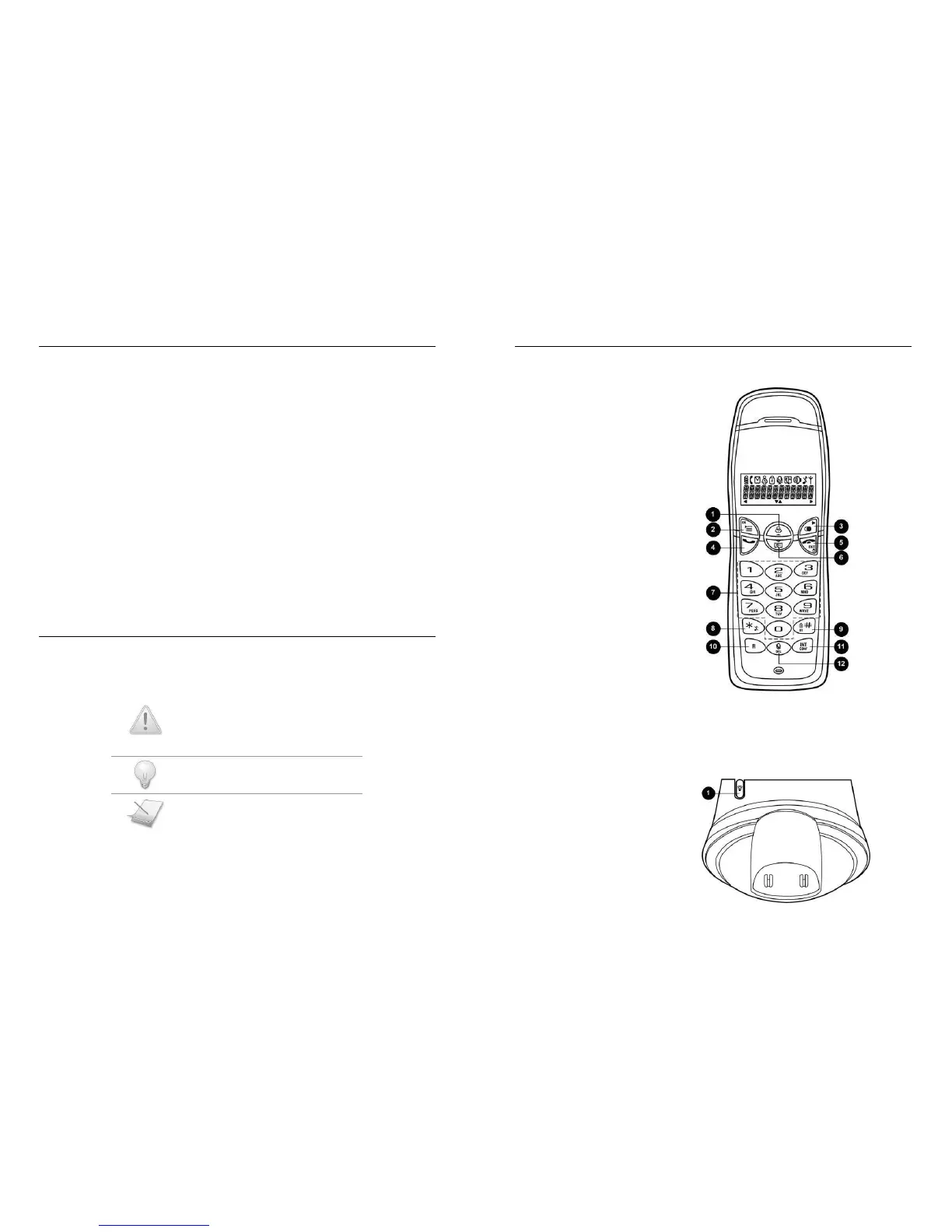
About your phone
THE HANDSET
1 Up Navigation & Call Log key
Scroll up menu items
Increase ringer and receiver volume
Enter incoming call log
2 Menu & OK key
Access main menu
Confirm selection / operation
3 Redial & More key
Enter redial log
View more record information
4 Talk key
Make and receive calls
5 End & On/Off key
End current call
Exit menu / operation
Turn handset on/ off
6 Down Navigation & Phonebook key
Scroll down menu items
Reduce ringer and receiver volume.
Enter phonebook record review
7 Digit keys
Dial digits
Enter characters
8 Star & Ringer Off key
Dial *
Turn ringer on / off
9 Pound, Keylock, & Pause key
Dial #
Enter a pause
Lock / unlock keypad
10 Recall key
Send a flash signal
11 Intercom key
Make intercom call
Start conference call
12 Mute & Delete key
Mute / un-mute microphone
Delete character or digit
THE BASE
1 Page key
Find handset(s)
Enter registration mode



 To Next Page