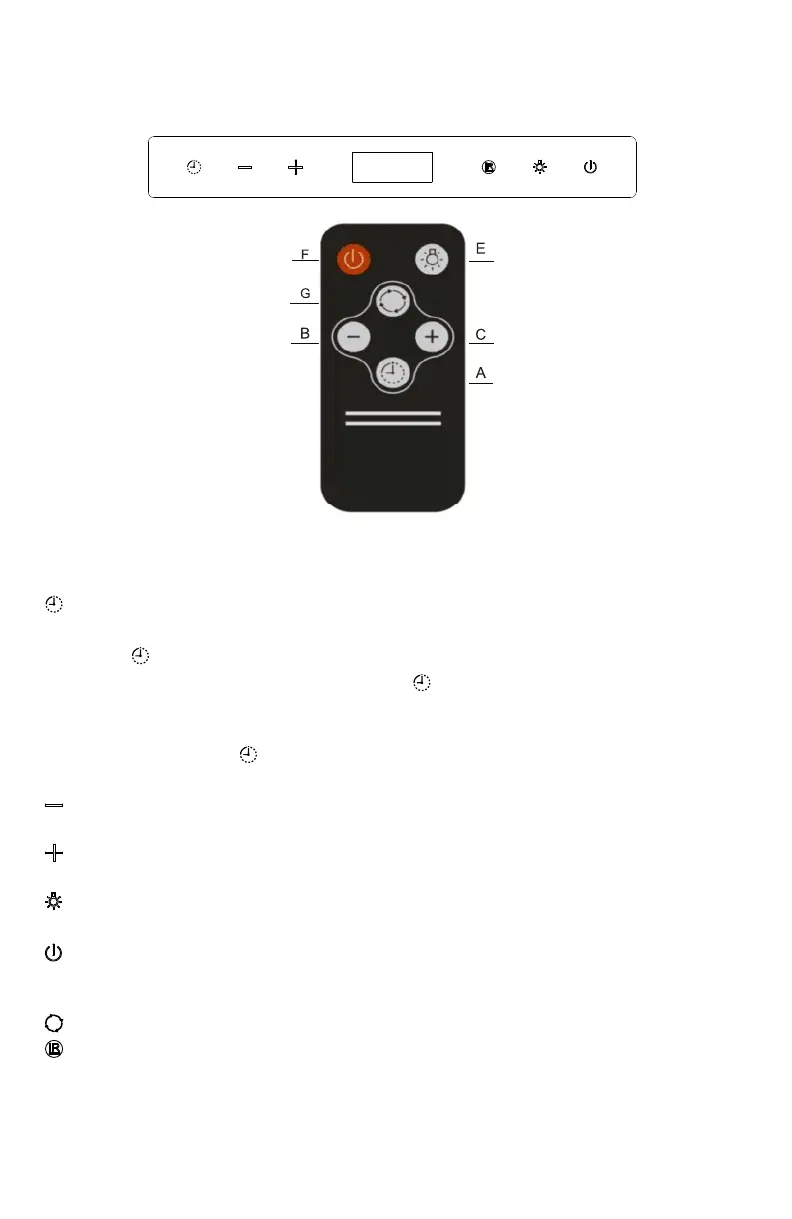
Function Key and Remote control operation
1. When power on, press 3 seconds to enter into time setting
mode. Then press “-” and “+” to set hour, after hour confirmed,
press again to set minute, press “-” and “+” to set minute.
2. In motor working mode, press once to enter into 3 minutes
delay turn off mode, press again to set from 3-59 minutes, no
operation for 5 seconds to start count down delay turn off.
During this time button flashes, can change speeds.
In motor working mode, press “-” to set from speed
3 to 1, press again to stop the motor.
In motor working mode, press “+” to set from speed
1 to 3, max speed 3.
1. In standby mode, press to turn on or turn off the light.
2. In standby mode, press 3 seconds to set 12 or 24 hour.
In standby mode, press once to start all function
buttons. In motor working mode, press once to
start delay turn off for 60 seconds, press again to turn off the hood.
In standby mode, press once to start speed 3.
Remote receiver.
OPERATION INSTRUCTION
14


 To Next Page