O2NE+ & Safe-Ox+
User Manual Int. Approved
Document ref: P0120-820-14 August 2017 Page 13 of 23
Commercial in Confidence
6 Maintenance
6.1 Oxygen cell replacement
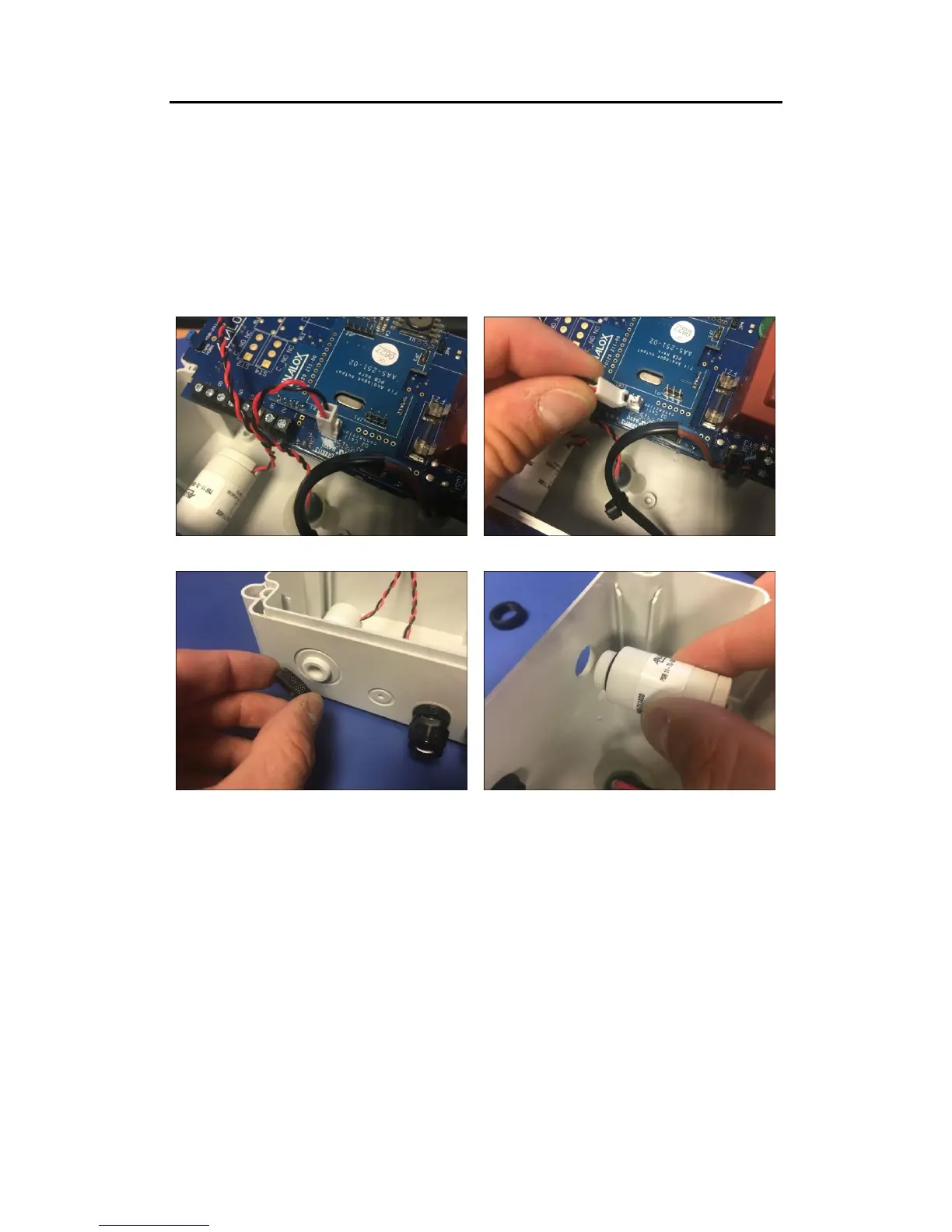
The following instructions describes the replacement of the O2NE+™ & Safe-Ox+™ oxygen
sensor.
• Upon receiving the new sensor, remove from its packaging and leave for 24 hours to
stabilise in air.
• Power down the instrument and remove from its installed location to allow access to
the lid screws.
• Remove the lid of the instrument to gain access to the internals of the instrument.
• Disconnect the sensor from its location on the PCB.
• Remove the locking ring from the sensor and remove the sensor from the enclosure.
• Refit the new sensor by reversing the above process.
• Refit the enclosure lid and re-install the instrument and power up.
Upon renewing the oxygen sensor a full calibration will be required to be performed, this
should be done 2 hours after power up.


 To Next Page