EasyManua.ls Logo

Ananda D13/U - User Manual

Default Icon
22 pages
Print Icon
To Next Page IconTo Next Page
Loading...
D13 and D13/U
Manual
Question and Answer IconNeed help?

Do you have a question about the Ananda D13/U and is the answer not in the manual?

Summary

Product Functions

Bottom Definition

Installation

Operation

Switch on;off

Procedure for turning the display unit on and off.

PAS Level and Walking Assistant Mode

Explanation of pedal assist levels and how to activate walking assistant mode.

Error Code Interpretation

Information on error codes displayed by the unit and their meanings.

Reset Procedure

Steps to reset the display unit's settings and data to default.

Default Set

Speed Limit Adjustment

Instructions for setting and adjusting the speed limit.

Wire Harness

Q&A

Overview

ANANDA D13 and D13/U Manual

Function Description

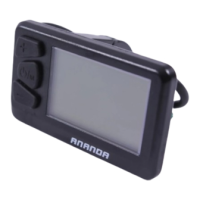
The ANANDA D13 and D13/U are compact LCD displays designed for electric bicycles (ebikes). They integrate a 2.4-inch multi-function screen and support 24V, 36V, and 48V batteries. The primary function of these displays is to provide real-time information about the ebike's operation and allow users to control various settings.

Key functions include:

  • Total Mileage (ODO): Tracks the total distance the ebike has traveled.
  • Trip Mileage (Trip): Records the distance for a single journey, which can be reset.
  • Current Speed: Displays the ebike's instantaneous speed, with options to switch between KM/H and MPH.
  • Light Status: Indicates whether the ebike's headlights are on or off.
  • Pas Level: Shows the current level of power assistance, which can be adjusted by the user.
  • Battery Capacity: Provides a visual representation of the remaining battery charge.
  • Error Code: Displays specific codes if the ebike's control system encounters a fault, aiding in troubleshooting.
  • Wheel Size: Allows for setting the wheel diameter to ensure accurate speed and mileage readings.
  • Riding Time (Time): Tracks the duration of a single ride.
  • Maximum Speed (MAX SPEED): Records the highest speed achieved during a ride.
  • Average Speed (AVG SPEED): Calculates the average speed for a ride.
  • Walking Assistant Mode: Provides low-speed assistance for walking the ebike.
  • Speed Limit: Enables setting a maximum speed for the ebike.
  • USB Current Limit (D13U only): The D13U model includes a USB port with a 1A current limit for charging external devices.

The display receives speed values from the vehicle speed monitoring device and the speed sensor, which then communicates with the controller to adjust motor speed. The display also feeds back motor speed information.

Usage Features

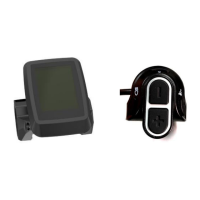
The D13/U display features a simple user interface with three buttons: Plus, Minus, and On/Off.

Switching On/Off: To turn on the display and start the ebike system, press and hold the On/Off key for 1 second. To turn off the system, press and hold the On/Off key for 2 seconds. When off, the display consumes minimal power (less than 2µA leakage current).

Controlling Lights and Backlights: In the power-on state, a long press of the On/Off button for 2 seconds will turn on the headlights and turn off the instrument backlight. Another long press for 2 seconds will turn off the headlights and turn on the instrument backlight.

Adjusting Pas Level and Walking Assistant Mode:

  • Pas Level: In the power-on state, click the Plus or Minus button to switch between power-assisted gear positions, thereby changing the motor output power. The default output power range is 0-5 pas or 0-9 pas, which is adjustable in the settings.
  • Walking Assistant Mode: Press and hold the Minus button to activate Walking Assistant mode. In this mode, the pas level becomes 0, providing low-speed assistance. Releasing the Minus button exits this mode and returns to the previous pas level.

Display Information Switching: The total mileage, single mileage, riding time, maximum speed, and average speed can be switched and displayed. In the power-on state, short press the On/Off key for 0.5 seconds to cycle through ODO -> TRIP -> TIME -> MAX -> AVG -> ODO. The display defaults to the interface shown before the last shutdown.

Resetting Trip Information: In the power-on state, pressing the Plus and Minus keys simultaneously for more than 3 seconds on any interface will reset the information in the TRIP, TIME, MAX, and AVG interfaces to zero.

Default Settings: To access default settings, ensure the ebike is stationary (speed is 0) and press and hold the On/Off key for 10 seconds to enter the password input interface.

  • Password Input: Use the Plus key to cycle through digits (0-9) and the Minus key to switch between digit positions (Left -> Right -> Left). The fixed password is 6262. After entering the correct password, press the On/Off key for 0.5 seconds to enter the menu selection interface. If the password is incorrect, it returns to the main interface. The display remembers the last correctly entered password, so subsequent entries might not require re-entering it unless the power is turned off or an incorrect password is entered.
  • Setting Max Pas: Within the menu, use the Minus button to select the maximum pas (5th or 9th gear). Press the On/Off key for 0.5 seconds to save and exit.
  • Setting Wheel Size: Select from wheel diameters 16, 18, 20, 22, 24, 26, 27.5, 28 using the Plus and Minus keys. This ensures accurate speed and mileage. Press the On/Off key for 0.5 seconds to save and exit.
  • KM/Mile Switching: Enter the unit switching interface and use the Minus key to switch between kilometers and miles. Press the On/Off key for 0.5 seconds to save and exit.
  • Speed Limit: Adjust the limit speed using the Plus and Minus keys. The default speed limit is 25 KM/H. Press the On/Off key for 0.5 seconds to save and exit.

If no operations are performed in the setting interfaces for 10 seconds, the dashboard will automatically return to the main interface.

Maintenance Features

Error Code Display: If the ebike control system fails, the display will automatically show a flashing error code and stop normal operation. The fault must be eliminated to exit the error display interface and resume normal function. The manual provides a detailed error code definition table for troubleshooting.

Wiring Harness: The D13/U LCD display uses a 5-pin cable for connection, which includes positive power supply, ground, weak electrical lock, communication R, and communication T.

Troubleshooting (Q&A):

  • Cannot switch on: Check the connection of the plugs.
  • Understanding Error Codes: Refer to the error code list in the manual and contact service if needed.

Quality Commitment and Warranty Coverage: The company provides a limited warranty for failures caused by product quality under normal use. The warranty period is 30 months from the production date.

Warranty Exceptions: The warranty does not cover:

  • Unauthorized disassembly and modification.
  • Failure or damage due to misuse, incorrect installation, or commissioning by the user or a third party.
  • Scratched or damaged outer casing.
  • Scratched or broken display lead wire.
  • Failure or damage caused by irresistible forces (e.g., fire, earthquake, natural disasters, lightning strikes).
  • Products outside the warranty period.

Error Code Meanings:

  • 21: Current abnormal
  • 23: Motor phase error
  • 24: Motor hall defect
  • 25: Brake failed
  • 30: Communication Error
  • 31: Power bottom Error
  • 32: Walking assistant Error
  • 33: Microprocessor failure, voltage reference fault

Troubleshooting 5-core Cable Issues:

  • Meter cannot be turned on, LCD screen not displayed:
    • Possible cause: Main power cord not connected / controller is out of phase.
  • Meter turns on but stops working after 3 seconds:
    • Possible reason: One of the green or yellow signal lines connected to the controller or the controller itself is open.

Ananda D13/U Specifications

General IconGeneral
Screen Size13.3 inches
Aspect Ratio16:9
Panel TypeIPS
Refresh Rate60 Hz
Response Time5ms
Brightness300 cd/m²
Contrast Ratio1000:1
Viewing Angle178°(H)/178°(V)
Color Gamut72% NTSC
Resolution1920 x 1080 pixels
PortsUSB-C

Related product manuals