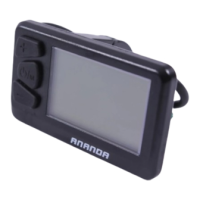
The ANANDA D16 is a comprehensive display unit designed to enhance the e-bike riding experience by providing a wide array of functions and real-time data. It serves as a central interface for monitoring and controlling various aspects of your e-bike, ensuring a more informed and enjoyable ride.
Function Description
The D16 display offers a rich set of functionalities, including:
- Real-time Data Display: It shows essential riding data such as current battery capacity (both progress bar and grid models), real-time speed, trip mileage (ODO, single trip distance, single trip time), maximum speed, average speed, average power, instantaneous power consumption, motor power, riding power, remaining distance, and riding frequency.
- PAS Level Control: Users can easily switch between 0-5 PAS (Pedal Assist System) levels using dedicated buttons. Level 0 provides no output power, while level 5 offers the highest motor output. The display shows corresponding labels like "OFF," "ECO," "TOUR," "SPORT," "TURBO," and "BOOST" for each level, and "WALK" for walk assist mode.
- 6km/h Walk Assist Mode: This feature allows users to activate a 6km/h assistance function, ideal for pushing the e-bike. It is activated by pressing and holding the "WALK" button and deactivated upon release.
- Headlight Control: The display supports both automatic and manual control of the e-bike's headlight. In automatic mode, the headlight turns on or off based on ambient light intensity. In manual mode, users can toggle the headlight on or off using the "HEADLIGHT" button.
- USB Charging Function: The D16 includes a USB charging port with an output of 5V/1A, allowing riders to charge their devices while on the go. The USB charging logo illuminates when the function is active.
- Wireless Function (Optional): For models equipped with wireless capabilities, the display shows a wireless indicator when connected, providing connectivity status.
- Error Code Display: In case of an electrical fault in the e-bike's electronic control system, the display automatically shows the latest error code in real-time, along with a red "!" mark in the upper column.
- Automatic Shutdown: The system is designed to automatically shut down after a period of inactivity (customizable time setting), conserving battery life. If unused for 30 minutes, the battery and the entire system will power off.
- Read-Only Information: The display provides access to various read-only information about the motor, battery, and the display itself, including firmware versions, hardware versions, serial numbers, wheel size, odometer, battery voltage, cycle count, and SOH (State of Health).
- Customized Data Display: Users can select which data points they want to see on the main interface, allowing for a personalized display experience.
Usage Features
The D16 is designed for intuitive and user-friendly operation:
- Button Interface: The display features a separate button unit with clearly defined functions: "Switch" (On/Off/Mode/Confirm), "Plus," "Minus," "Headlight," and "Walk." These buttons facilitate easy navigation and control.
- Power On/Off: The display turns on automatically when the battery has output current. It can also be manually turned on or off by pressing and holding the switch button for 1-2 seconds.
- Mileage Data Cycling: A short press of the "MODE" button cycles through various mileage data, including Odometer, single trip distance, single trip time, max speed, average speed, average power, instantaneous power, motor power, riding power, remaining distance, and riding frequency.
- User Settings Menu: By pressing and holding the "PLUS" and "MINUS" buttons simultaneously, users can access a comprehensive settings menu. This menu allows for adjustments to backlight level, speed unit (Metric/Imperial), power unit, automatic shutdown time, and customized data display.
- Factory Reset: The settings menu includes an option to perform a factory reset, clearing all user data and reverting to default settings.
- Wireless Setting: For wireless-enabled models, the settings menu allows users to enable or disable the wireless function and view the wireless name (read-only).
- Visual Indicators: The display utilizes clear visual indicators for battery status, USB charging, wireless connection, and headlight status, making it easy for riders to grasp the e-bike's condition at a glance.
- Start-up and Shutdown Interfaces: Upon powering on, an "ANANDA" start-up interface is displayed, followed by the main interface. Similarly, an "ANANDA" shutdown interface appears before the system powers off.
Maintenance Features
The D16 is built with durability and ease of maintenance in mind, while also providing tools for troubleshooting:
- Robust Construction: The product features a black PC + ABS plastic housing with a black leather texture treatment, designed to withstand working temperatures from -20°C to 60°C. It boasts an IP66 protection grade, ensuring resistance against dust and water ingress.
- Compliance and Certification: The display complies with RoHS, Reach, and CE certification requirements, indicating adherence to environmental and safety standards.
- Waterproof Design: Users are advised not to split the waterproof sticker to maintain the waterproof performance of the device.
- Error Code Diagnostics: The automatic display of error codes (e.g., Current abnormal, Throttle fault, Motor Hall signal fault, Brake abnormal, Communication failure) allows for quick identification of system issues. When an error code appears, users are advised to contact an e-bike maintenance station.
- Read-Only Information for Troubleshooting: The ability to view firmware and hardware versions, serial numbers, and other system parameters can be invaluable for technicians when diagnosing problems or performing updates.
- Installation Guidance: The manual provides clear instructions for installation, emphasizing proper placement on the handlebar and connecting the display to the controller when the e-bike is powered off.
- Warranty Information: The product comes with a 24-month warranty covering faults arising from quality defects during normal operation. Specific conditions for warranty exclusion (e.g., shell opened, connector damaged, physical damage, force majeure, expired warranty) are clearly outlined, guiding users on proper care and when to seek professional repair.
- Avoid Parameter Modification: Users are cautioned against modifying system parameters to prevent disorder and potential malfunction.
- Secure Fastening: The locking screws have a specified tightening torque of 1N.m, ensuring secure attachment without overtightening.

 Need help?
 General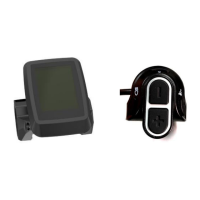

 To Next Page