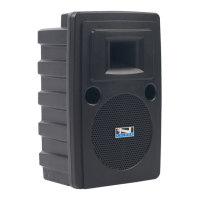
System Inspection & Inventory
Check unit carefully for damage which may have occurred during
transit. Each Anchor product is carefully inspected at the factory
and packed in a special carton for safe transport.
Inventory
• Explorer sound system
• Speaker stand adapter
• Warranty registration card
All damage claims must be made with the freight carrier. Notify the
freight carrier immediately if you observe any damage to the
shipping carton or product. Repack the unit in the carton and await
inspection by the carrier’s claim agent. Notify your dealer of the
pending freight claim.
Returning Systems For Service or Repair
Should your unit require service, contact your dealer or the Anchor
Audio Customer Service Department at (800) 262-4671 to obtain a
Return Authorization (RA) number. All shipments to Anchor Audio
must include an RA number and must be shipped prepaid. C.O.D.
shipments will be refused and returned at your cost.
Warranty Registration
Please fill out the warranty card and return it with a copy of your
invoice to Anchor’s Customer Service Department. This will
activate your limited six year warranty.
GETTING STARTED
2
NOTE:
All damage
claims must
be made with
the freight
carrier.
IMPORTANT:
Save the
shipping
carton and
packing
materials.
They were
specially
designed to
ship your unit
safely.



 To Next Page