7
WIRELESS OPERATION
Diversity Wireless by Anchor Audio
Anchor Audio UHF wireless is a 16 channel, diversity wireless
system that utilizes two independent antennae to receive signal. The
diversity feature means that the receiver will process the stronger of
the two antenna signals, effectively minimizing dropouts and
interference from other transmitting sources. The antennae are
mounted internally so there are no obstructions or risk of damage.
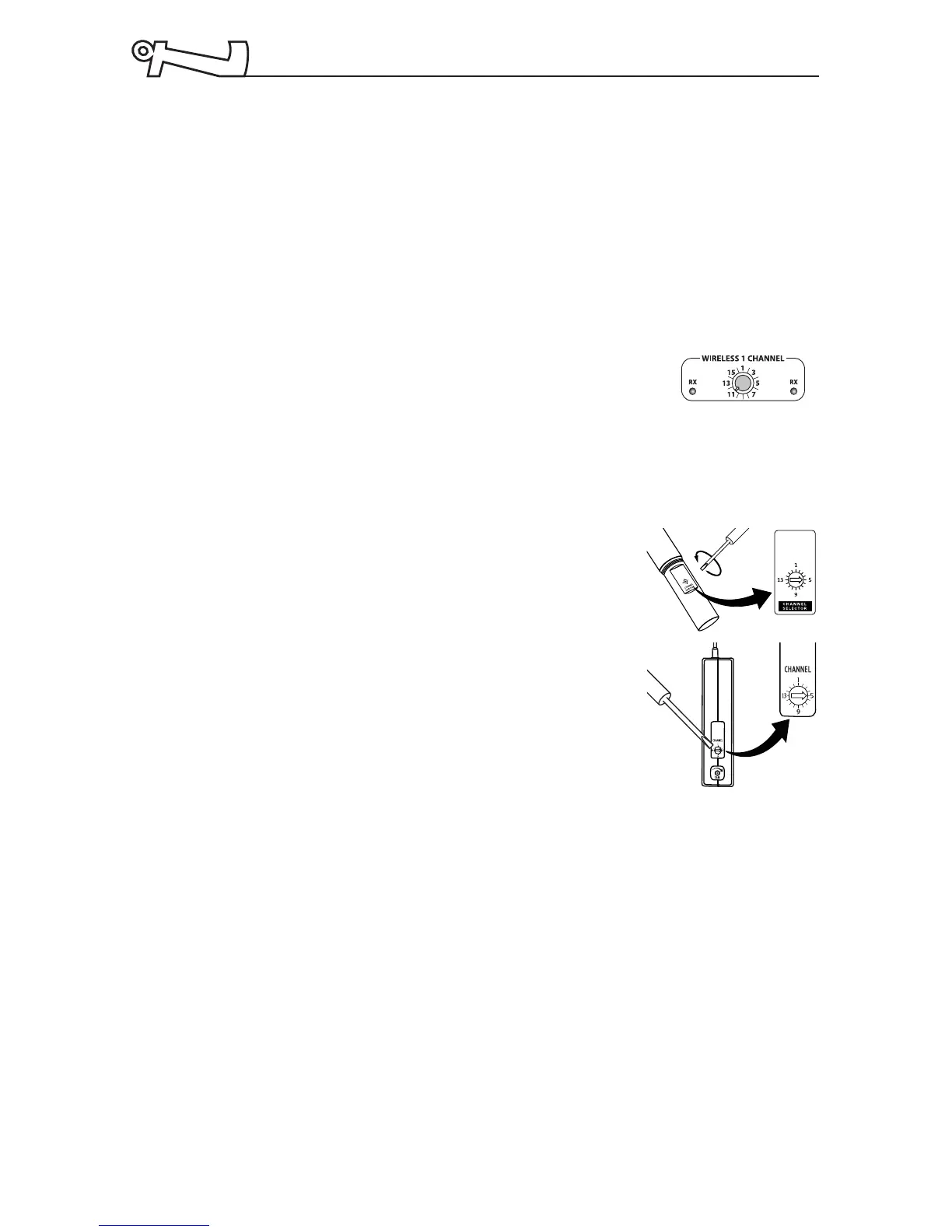
Receiver Channel Selection
Before you use your UHF wireless system, you
will need to select a wireless frequency channel.
1. Locate the Wireless Channel selector on the back panel.
2. Set the Channel (frequency) of the receiver to 1 thru 16.
Transmitter Channel Selection
Handheld Transmitter:
1. Unscrew battery cover on lower end of
microphone.
2. Set the Channel Selection to match the
channel setting on the receiver.
3. Replace the battery cover.
Body-pack Transmitter:
1. The channel selection dial is located on
the side of the transmitter.
2. Set Channel to match the channel setting on the receiver.
Wireless Microphone Operation
Both the receiver and microphone must be set to the same channel.
1. For body-pack transmitter, insert mic plug into the MIC jack.
2. Turn the transmitter power ON, the red LED will flash once.
(If the red LED stays on, the battery is low.)
3. Turn the Explorer PRO power switch to ON. Pull out the
volume knob for the correct microphone channel.
4. The RX indicators will light (one indicator at a time lights)
when the wireless signal is being transmitted and received.
NOTE:
Be sure that
the MIC/LINE
switch is in
the “MIC”
position when
a mic is
plugged into
the body-pack
transmitter.
NOTE:
If you
experience
ongoing
interference
with your
wireless
system, the
selected
frequency
may be
incompatible
with other RF
systems in
your area.
Try a different
channel.
NOTE:
When using a
dual wireless
unit, make
sure each
microphone is
set to a
different
channel
frequency.



 To Next Page