4
Note:
Connections
must be made
with shielded
cable to avoid
hum, radio
interference
or buzzing.
Note:
Use of
companion
speaker will
reduce
battery run
time.
GENERAL OPERATION
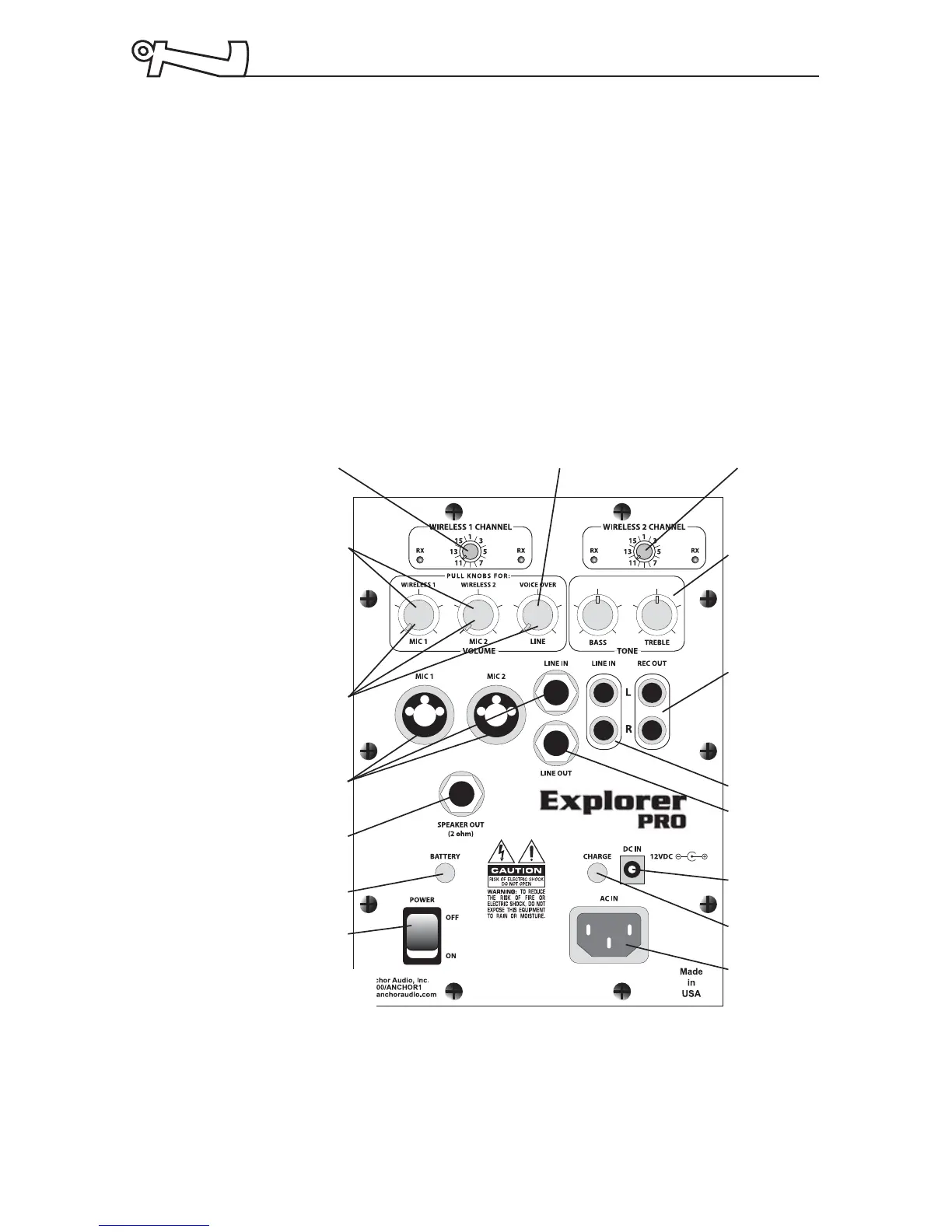
Explorer PRO Control Panel
1. Set all input level controls to minimum and tones controls to
flat or middle position before turning on the power.
2. Plug a microphone into Mic 1 or Mic 2, or plug an audio
source into the Line-in input jack.
3. Turn power ON (LED above switch will light). If the LED
turns red the battery requires charging (see page 6).
4. Adjust the level control adjacent to the input used to desired
volume level.
5. Adjust Bass and Treble controls for desired sound quality.
EXP-6000U2
Back Panel
AC Inlet
Charge
Indicator Light
Power Switch
Rec Out
Tone Controls
Wireless 1 Channel Selector Voice Over/Level Control (Pull) Wireless 2 Channel Selector
12V DC Input
Line Out
Line In
Input Level
Controls
Wireless Level
Controls (Pull)
Speaker
Output
Input Jacks
Battery Level
Indicator Light



 To Next Page