
 Need help?
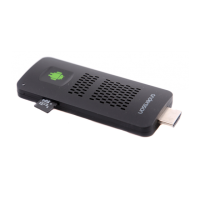
Do you have a question about the Andersson Android Smart-TV stick and is the answer not in the manual?
Critical warnings for safe operation, avoiding moisture, drops, and unauthorized repairs, plus upgrade precautions.
Details the HDMI, MicroSD, Micro USB OTG, and USB ports for connecting peripherals and power sources.
Guide on connecting the stick to TV via HDMI and power, and initial boot-up process.
Explains using the air mouse, USB mouse, and keyboard for navigation and interaction within the Android UI.
Identifies key buttons (OK, direction, locking, reset) and the power indicator light on the remote.
Locates the lithium battery charge port on the remote control for power replenishment.
Covers charging the remote via USB and connecting the USB receiver to the Android stick.
Details activating the remote, power-saving mode, pairing lost connections, and resetting the device.
Explains status bar icons (return, home, volume, power) and basic navigation buttons.
Guides on deleting, adding, and moving icons, plus sliding between different pages on the home screen.
Covers Wi-Fi, Ethernet connection, language selection, and keyboard/mouse configuration.
Instructions for downloading from Google Play, installing, and deleting applications on the device.
How to browse multimedia files via USB/SD card and stream content using E-home Media Center.
Lists RF frequency, power, current, signal mode, power-saving time, and supported operating systems.
Enumerates all items included in the product box, such as the stick, remote, cables, and adapter.
 General
| RAM | 1 GB |
|---|---|
| Internal Storage | 8 GB |
| Supported Resolutions | Up to 1080p |
| Google Play Store | Yes |
| Bluetooth | Yes |
| USB Port | Yes |
| Remote Control | Yes |
| Operating System | Android |
| Processor | Quad Core |
| Connectivity | Wi-Fi |

 To Next Page
