- 14 -
e. Erasing Procedure
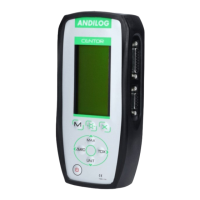
Press the left button (ZERO) to erase the selected sample or the complete
set of measurements. If your sample includes several measures, they will
be all deleted.
A sub menu is displayed, asking what need to be deleted:
• Clear the selected sample: left (ZERO)
• Clear the entire series: M button
• Do not erase: X button
Note: It is strictly impossible to recover deleted data
f. Switch to the measure mode
To start recording your measurements and using the statistical mode of the maximum values, press
the X button and you will go directly to the measurement mode.
Press the M key to return to the main menu of the Centor without saving.
g.
Measuring Mode
The measurement is performed by applying a force to the pressure sensor
Centor. At any time the maximum is displayed in large characters on line
1. You can if you wish, display the current value instead of the maximum
by pressing the top button (MAX).
When a measurement was made press right (TDX) to validate and save or
left button (ZERO) to cancel and delete.
Once the measurement is recorded or deleted, the device is ready to
perform a new measurement.
When you reach the maximum of 100 values, pressing the right key (TDX)
no longer has any effect and a warning s is displayed. The memory is full.
Note that unlike the conventional use of the Centor unit is locked and will
remain as you have set throughout your measurements. By pressing the
UNIT key will have no effect.
h.
Return to the STATS menu
To return to the STATS sub menu and displayed the results, press the M button.
Note: If you turn OFF the device will using the STATS mode, he will remains in the same mode when
turn it back ON, and pressing the M key will display the STAT sub menu.


 To Next Page
 Loading...