Continuum CPU Reference
21
Infinet Connections
COMM Port 1 provides both Infinet and RS-232 connections. However, only one type
may be connected at any one time. For example, COMM 1 can be used as an Infinet
connection or an RS-232 connection
BUT NOT BOTH!
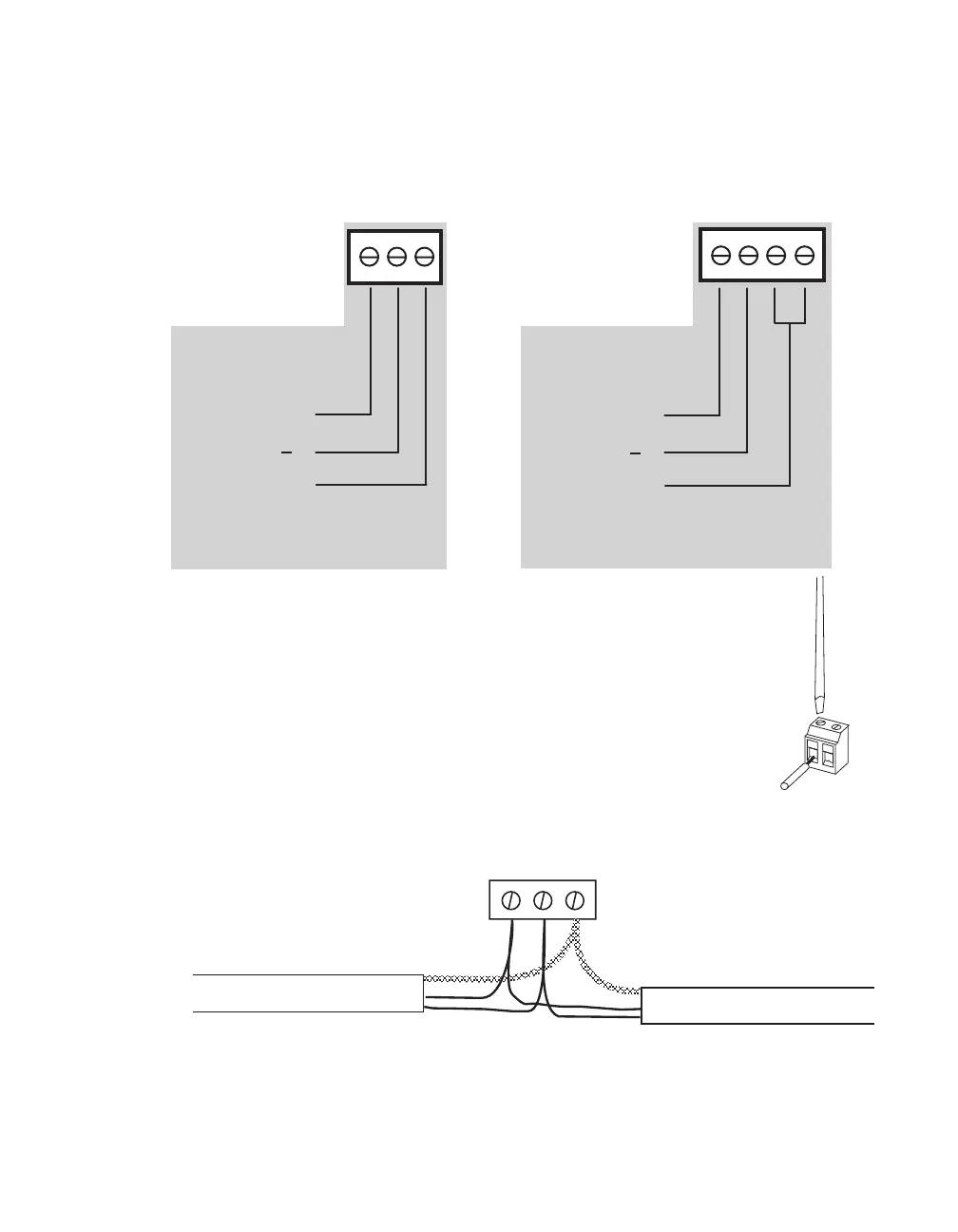
The Infinet pin connections are shown below:
The connector for COMM 2 includes an extra connection for the shield.
Connection to the cable is done by inserting a stripped conductor
into the opening on a screw terminal position and tightening the
associated screw to secure it in place.
When the network is connected to more than one device, it is done so in a daisy
chain manner as shown below:
* Wire colors are included for clarity. The colors of your cable may vary. However, make sure that all
Infinet connections are consistent on their connections.
COMM 2
Infinet Connector
+
Shield
+ - SHLD
White
Black
Black
White
Shield
Shield
Infinet Cable
Infinet Cable
COMM 1 & COMM 4
Infinet Connectors
+
Shield



 To Next Page