APPENDICES
75
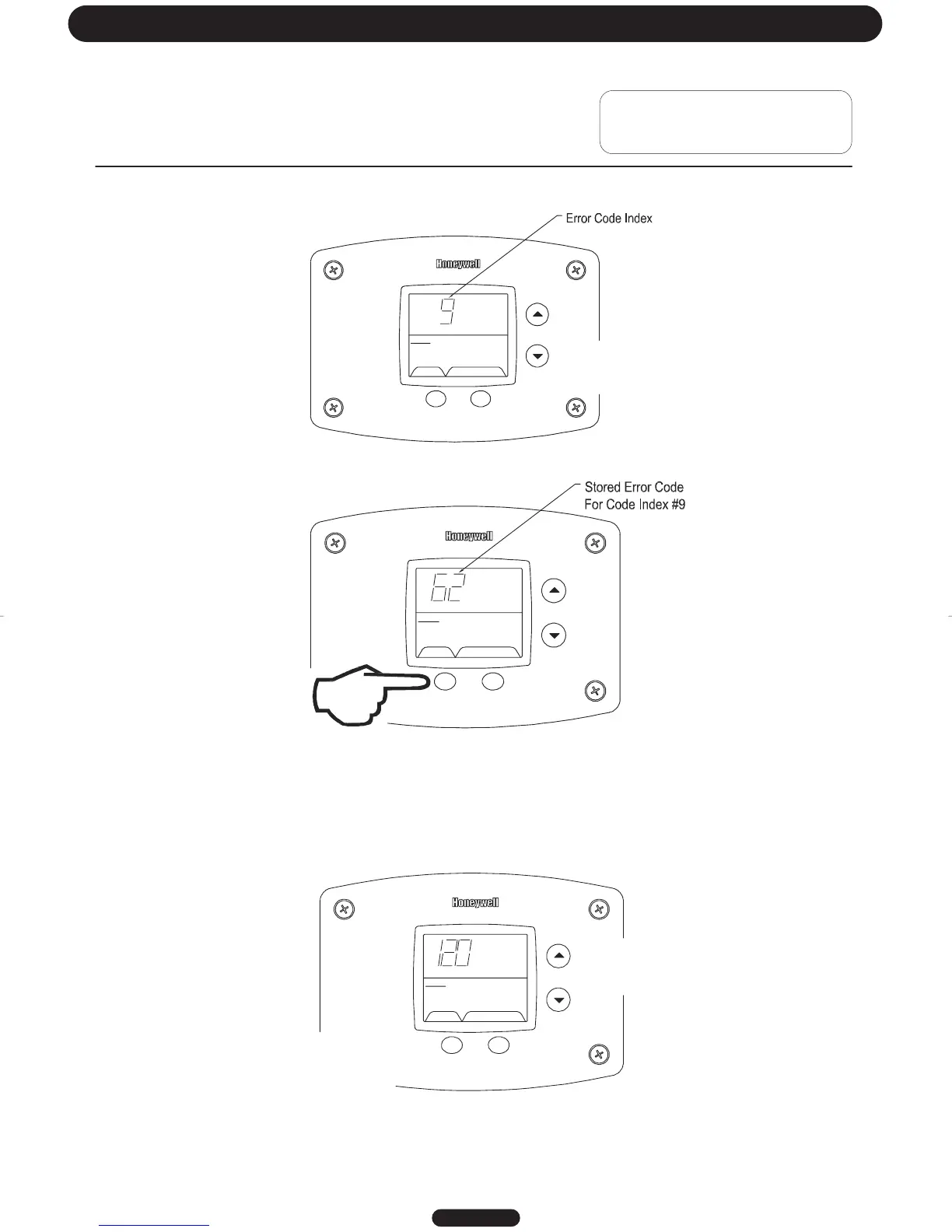
Step 4:
Press the “Temperature Down” button to change to the previous code index, code #9.
SELECT SET
Status
idle
Operational
%
Step 5:
Press the “Select” button for code index #9 to view if there are any code numbers.
SELECT SET
Status
idle
Operational
Step 6:
Continue pressing the “Temperature Down” button to change to the next error code index and press “Select” to view the
error code number, if any, for that index number. Continue on to index #1, the oldest error code index. The water
heater display will store up to 10 error codes with the oldest code starting in code index #1 with the most recent code in
code index #10.
Step 7: 10 seconds after the last button press, the Water Heater Display will revert back to the current error code
display. To exit Service Mode, either wait 30 seconds or press Temperature Up button and Select Button for 3 seconds.
Page 21
Troubleshooting
SELECT SET
Statu
s
°F
idle
setpoint
Operational
&
%
Exiting Service Mode




 To Next Page