10
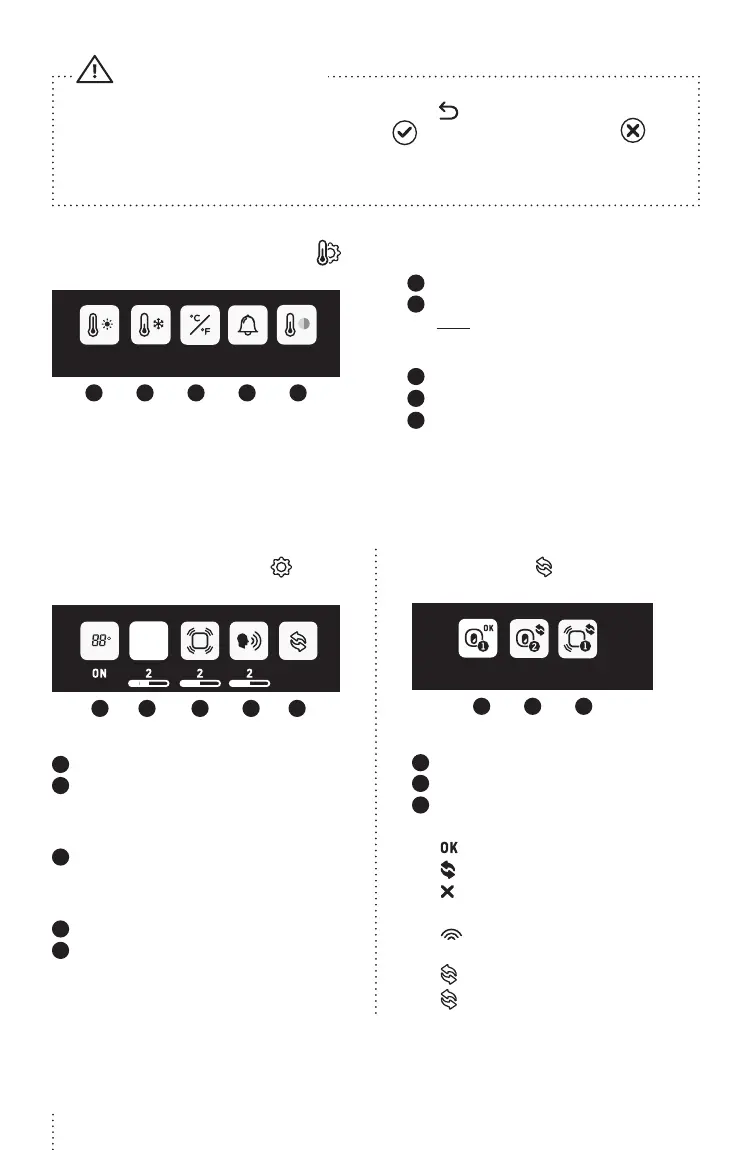
• To confirm your settings, you’ll always need to press the icon. A confirmation icon will then
appear on the screen: Settings have been saved Settings have not been saved
• If you have 2 Nursery Units & 2 Sensor Pads paired with your monitor, you can only change the
settings of the viewing Nursery Unit
IMPORTANT
TEMPERATURE SETTINGS MENU
22 16 OFF ON
o
C
1 2 3 4 5
1
Set warmer temperature alarm
2
Set colder temperature alarm
Note: e range between the minimum and
maximum temperature can not be less than
4°C / 7°F
3
Set Celsius or Fahrenheit display
4
Activate the temperature alarm
5
Activate the Nursery temperature
colour code display
White: Temperature is normal
Red: Temperature is too hot
Blue: Temperature is too cold
GENERAL SETTINGS MENU
VOX
1 2 3 4 5
1
Activate Nursery Unit display
2
Set VOX sensitivity: e sensitivity of the
microphone is adjustable and has 4 levels (the
most sensitive is level 4). is means that sound
will only transmit based on the level that you set
3
Set Sensor Pad sensitivity:
To ensure adequate monitoring of your child’s
movements, you can adjust the sensitivity of
the Sensor Pad
4
Set Nursery Unit speaker volume
5
Pairing Menu
PAIRING MENU
1 2 3
1
Nursery Unit 1 Status
2
Nursery Unit 2 Status
3
Sensor Pad 1 Status
Nursery Unit and Sensor Pad Status Icons:
Green: Connected/Paired
Blue: Add a Nursery Unit or Sensor Pad
Red: Remove Nursery Unit or Sensor Pad
Confirmation process ON THE SCREEN:
Blue: ‘’Link’’ icon animation when pairing
(Linking timeout: 60s)
Green: Successful pairing
Red: Failed pairing, please try again
CFO4C_ANGE_Manuel_AC527_ROW.indd 10 19-02-05 09:32


 To Next Page