Need help?
Do you have a question about the anko 43056002 and is the answer not in the manual?
Lists conditions to avoid for safe and proper product usage, including moisture, heat, and chemical cleaners.
Details the components included in the product package, such as the clock radio, adapter, and cable.
Instructions for powering the clock using AAA batteries and the provided DC adapter and cable.
Guide to setting the clock's time, including format (12/24H), hours, minutes, and temperature units (°C/°F).
Instructions for setting alarm times, snooze intervals, and alarm sound types (buzzer or radio).
Explains how to activate the snooze function when the alarm rings and how to permanently stop the alarm.
Details how to enable/disable the light sensor, adjust manual brightness levels, and how battery power affects display.
Instructions for activating and configuring night mode to automatically dim the display during specific hours.
Instructions for turning the FM radio on/off, adjusting volume, and tuning radio channels.
Information on using the USB port to charge external devices and limitations when using battery power.
Outlines the product's 12-month warranty, coverage, conditions, and how to make a claim.
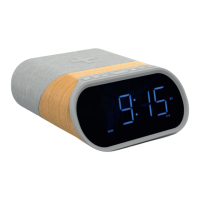
This document describes the Anko Clock Radio Wood, Keycode: 43056002, an instruction manual for a clock radio with a wood-look finish.
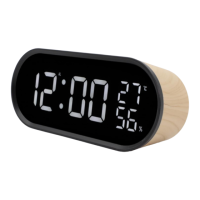
The Anko Clock Radio Wood serves as a multi-functional device, primarily a digital clock with alarm capabilities and an integrated FM radio. It displays time, temperature, and humidity. The alarm function offers both buzzer and radio alarm options, with a snooze feature for temporary silencing. The device also includes a light sensor to automatically adjust screen brightness and a night mode for dimming the display during specific hours. Additionally, it features a USB port for charging mobile phones.
Time Setting:
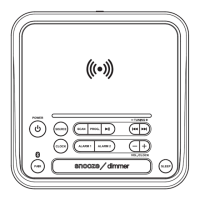
To set the time, long-press the MODE button for 2 seconds. The setting article will flash, allowing adjustment using the UP or DOWN buttons. The sequence for setting is 12/24H format, Hour, Minute, and °C/°F temperature unit. Confirmation is done by pressing MODE again, or the settings will be confirmed and exited automatically after 10 seconds of inactivity.
Alarm Setting:
A short press of the MODE button enters alarm mode. To set the alarm, long-press MODE for 2 seconds. The AL icon and setting article will flash. Use the UP or DOWN buttons to set the Alarm hour, Alarm minute, Snooze interval time (5-60min), and Alarm ring choice (buzzer alarm 'bU' or radio alarm 'rd'). Press MODE to confirm each setting. The settings will be confirmed and exited automatically after 10 seconds. To deactivate the alarm, short-press the DOWN button, and the AL icon will disappear from the display.
Snooze Function:
When the alarm rings, pressing the SNOOZE button will temporarily stop the alarm for 5 minutes (default) before it rings again. Pressing any other button (except SNOOZE) will stop the alarm completely.
Light Sensor Function:
Long-press the UP button for 2 seconds to toggle the light sensor function ON/OFF. When ON, the LED display brightness adjusts automatically based on ambient light. If the light sensor is OFF, short-pressing the UP button allows manual adjustment of LED display luminance (High - Medium - Low). Note: If using AAA batteries only, the LED display will turn off after 10 seconds unless connected to the DC cable.
Night Mode Function:
Ensure the light sensor is OFF. Press MODE twice to enter night mode interface, then use UP or DOWN to toggle ON/OFF. Long-press MODE to set the night mode period (Start hour -> Start minute -> Stop hour -> Stop minute). Confirm with MODE. The default period is 18:00 to 6:00. Night mode automatically dims the display during the set period. This function is unavailable if the light sensor is ON.
FM Radio:
Long-press the DOWN button for 2 seconds to turn the FM radio ON/OFF. Rotate the DOWN knob to adjust volume. Rotate the TUNING knob to change radio channels by 0.1MHz.
USB Port Phone Charging: To charge a mobile phone, connect the clock to a DC 5V 2A USB adapter (not included) and plug your charging cable into the clock's USB output port. This feature is not supported when the clock is powered solely by internal batteries.
General Care: The manual advises against using the product in moist or underwater conditions, near heaters or high-temperature services, or in direct and strong sunshine. It also states not to use chemical solvents for cleaning the product.
Battery Replacement: To maintain settings during a power outage, 3 x AAA batteries should be inserted into the battery compartment at the back of the clock, ensuring correct polarity. If power is lost and batteries are not present, all settings will revert to default data.
Warranty: The product comes with a 12-month warranty from Kmart Australia Ltd, covering defects in materials and workmanship, provided the product is used according to recommendations. This warranty is in addition to rights under the Australian Consumer Law. For warranty claims, customers should retain their receipt and contact Kmart's Customer Service Centre.
 General
| Brand | anko |
|---|---|
| Model | 43056002 |
| Category | Clock Radio |
| Language | English |

 To Next Page