EasyManua.ls Logo

anko 42706687 - User Manual

anko 42706687
12 pages
Print Icon
To Next Page IconTo Next Page
Loading...
PLEASE READ CAREFULLY BEFORE OPERATING THIS EQUIPMENT
KEEP IT IN A SAFE PLACE FOR FUTURE REFERENCE
MODEL:42706687
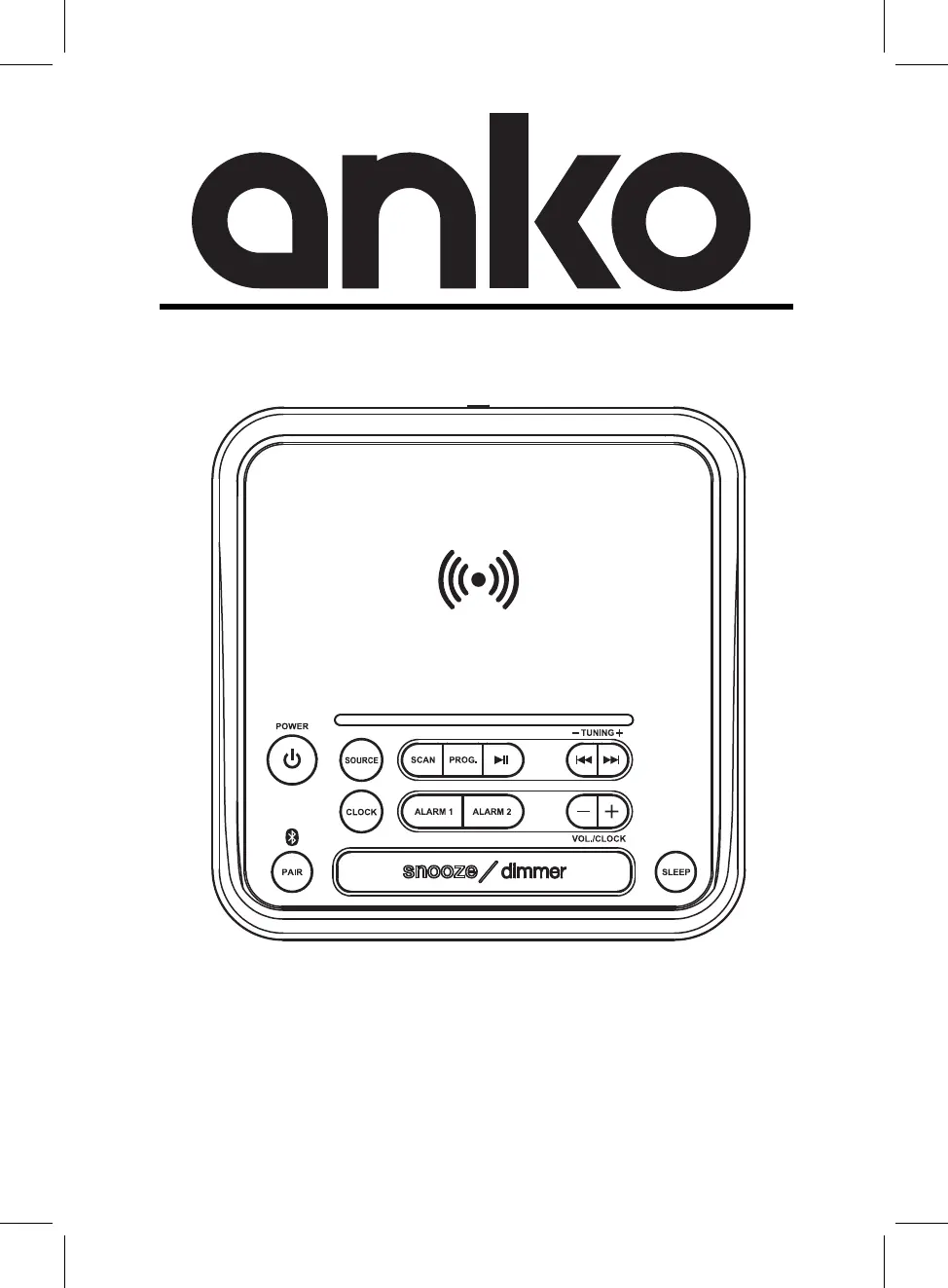
Bluetooth Wireless Charger Clock Radio

Questions and Answers

  • J
    janetwagnerAug 4, 2025
    What to do if my anko 42706687 has no sound or the sound is weak?
    • P
      pamelafloresAug 4, 2025
      If your anko Clock Radio has no sound or the sound is weak, it could be due to several reasons: * The volume level might be at the minimum. If this is the case, raise the volume level by pressing the + Button on the unit. * The volume level of your paired/connected device might be too low. Try raising the volume level of the paired/connected device. * The input source might be incorrect. Press the SOURCE button on the unit to switch to the desired mode.
  • R
    Roger MartinAug 9, 2025
    What to do if my anko 42706687 Clock Radio sound is distorted?
    • B
      Bradley OconnorAug 10, 2025
      If the sound from your anko Clock Radio is distorted, it could be because the volume level is too high. Reduce the volume level by pressing the - Button on the unit. Alternatively, the volume level of the connected/paired device might be too high. Reduce the volume level of the connected/paired device.
  • D
    Dr. Mark HartAug 15, 2025
    How to fix Bluetooth not functioning on my anko 42706687 Clock Radio?
    • M
      Mr. William SolomonAug 15, 2025
      If the Bluetooth is not functioning on your anko Clock Radio, it might be because the Bluetooth device has not been paired with the unit. In this case, pair the Bluetooth device with the unit. Alternatively, the external Bluetooth device might be too far from the unit. Try placing the external Bluetooth device closer to the unit.
  • M
    Mark SullivanAug 23, 2025
    Why my anko 42706687 can’t power on?
    • J
      Jenna HicksAug 23, 2025
      If your anko Clock Radio can’t power on, the adapter might not be plugged in, or the AC outlet might not be switched on. Connect the adapter to the AC outlet and switch on the outlet.
  • W
    Wendy TranAug 28, 2025
    How to improve weak radio reception on anko 42706687?
    • E
      Eric WilliamsAug 28, 2025
      To improve weak radio reception on your anko Clock Radio, extend the FM antenna wire on the rear of the unit and reposition it to get better reception.

Summary

Important Safeguards

Product Overview

Wireless Charging

Wireless;Fast Charging

Guide on using wireless and fast charging features with compatible devices and adapters.

USB Charging Port

Power

Battery Precautions

Essential safety guidelines for installing and handling batteries in the device.

Bluetooth Operation

Pairing to a Bluetooth Device and Playing Audio

Steps to pair a Bluetooth device and play audio wirelessly through the unit.

Clock

Setting the Clock

Step-by-step guide to set the clock time and AM/PM indicators.

Alarm and Sleep Timer

Setting the Alarm

Instructions for setting Alarm 1 or Alarm 2, including sound type and volume.

Snooze and Alarm Reset

How to delay an alarm or turn it off temporarily.

Setting the Sleep Timer

Procedure to set the automatic power-off timer for the clock radio.

FM Radio

Tuning the FM Radio

Guide on how to tune into FM radio frequencies and scan for stations.

Saving Radio Presets

Instructions for automatically scanning or manually saving FM radio presets.

Aux In

Troubleshooting

Specifications

Warranty Card

anko 42706687 Specifications

General IconGeneral
Brandanko
Model42706687
CategoryClock Radio
LanguageEnglish

Related product manuals