BLUETOOTH OPERATION
7
Pairing to a Bluetooth Device and Playing Audio
After initial pairing, the unit will stay paired unless unpaired manually by the user
or erased due to a reset of the device. If your device should become unpaired or if
any pairing issues should occur, remove the unit from your Bluetooth settings and
follow these steps again.
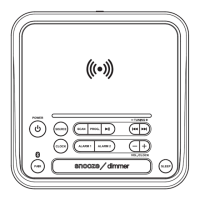
1. Press the Source button to switch to Bluetooth mode. Press and hold the
Pair button, the BT
symbol on the display will begin ashing and a voice
prompt will sound from the speaker. When pairing, remain within 3 feet of the
unit.
2. Using the controls on your Bluetooth device, select from your
Bluetooth settings to pair. When successfully paired, the BT
symbol on
the display will turn solid and a voice prompt will sound. You can refer to the
user’s manual for your specic device for instructions on pairing and connecting
Bluetooth devices.
3. Audio played through the connected Bluetooth device should now be heard
through the speakers. Use the controls on the connected Bluetooth device to
select and begin playing audio. Play, pause or skip audio using the controls
on the device or the unit.
42706687


 To Next Page