Need help?
Do you have a question about the anko CW0503500AU and is the answer not in the manual?
Safety guidelines for the power adapter and battery usage, including temperature and disposal.
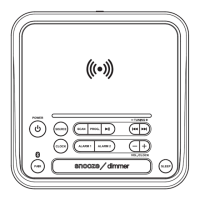
Identifies and explains the buttons and features on the top control panel of the device.
Details ports, speaker on the back, and battery compartment on the base.
Instructions on how to connect the power adapter and turn on the alarm clock.
Explains the use of backup batteries for retaining settings when mains power is lost.
Step-by-step guide to setting the 12-hour or 24-hour time format and current time.
Instructions for pairing Bluetooth devices and playing audio wirelessly.
How to tune into FM radio stations and scan for frequencies.
Guide to storing and recalling favorite FM radio stations using presets.
Using white noise/nature sounds and setting the sleep timer for automatic shut-off.
Instructions for configuring dual alarms with various sound options.
How to enable/disable alarms and use the snooze or stop functions.
Instructions for placing devices on the charging pad and troubleshooting.
Using the USB port to charge phones and other devices.
Operating the multi-colour nightlight and adjusting LCD brightness.
Details power input, output, speaker, and adapter specifications.
Information on warranty period, claims, and customer service contact details.
The Anko Bluetooth Clock Radio Wireless Charger is an all-in-one bedside accessory designed to combine multiple functionalities into a single, convenient unit. This device serves as a phone stand, a 5W wireless charger, a Bluetooth speaker, an FM radio, a dual alarm clock, and a nightlight with multiple color settings. Its comprehensive design aims to enhance the user's bedside experience by providing entertainment, charging, and timekeeping features in one compact unit.
The core function of this device is to provide a versatile bedside hub. As a Bluetooth speaker, it allows users to wirelessly stream audio from their smartphones or other Bluetooth-enabled devices. The FM radio function provides access to local radio stations, complete with the ability to store and recall up to 10 preset stations. For those who prefer ambient sounds, the device includes a white noise and nature soundtrack mode, offering options like white noise, frog, flowing water, and birdsong soundtracks to aid relaxation or sleep.
The dual alarm clock feature is particularly useful, allowing users to set two independent alarms, which is ideal for couples or individuals with different wake-up times. Alarms can be set to FM radio, a bleep sound, or any of the available nature soundtracks. A snooze function is also included, providing an additional 9 minutes of sleep before the alarm sounds again.
One of the standout features is the wireless charging capability. Equipped with a 5W wireless charger, it allows Qi-enabled smartphones to be charged simply by placing them on the integrated phone stand. This stand is designed to hold the phone in an upright position, making it convenient for watching videos, looking at recipes, or making video calls hands-free while charging. For devices without wireless charging, a USB charging port (1A output) is available on the back panel, allowing for wired charging.
The device also incorporates a nightlight with LED panels that offer multiple color options, including Cool White, Warm White, Blue, Green, Red, and Purple. There's also a seventh option that cycles slowly through a spectrum of colors, providing a soothing ambiance. The dimmer function allows users to adjust the brightness of the LCD display, with six levels including off, to suit their preferences and avoid disturbing sleep.
Getting started with the device involves plugging in the supplied AC/DC power adaptor. The unit automatically switches on in clock/standby mode, and the LCD lights up. A battery backup system, using 2 x AA batteries (not supplied), ensures that time and alarm settings are retained in case of a power outage, although speaker, radio, and charging functions will not operate on backup power alone.
Setting the time is straightforward: a long press of the clock key allows users to switch between 24hr and 12hr formats, and then adjust the hour and minutes using the navigation keys.
For Bluetooth pairing, users press the mode key twice to enter pairing mode, indicated by "bt" on the display and a flashing Bluetooth symbol. Once paired with a device (named "43032969"), a chime confirms the connection, and the symbol stops flashing. The device will automatically reconnect to a paired device when in Bluetooth mode and within range. During Bluetooth playback, volume can be adjusted, and tracks can be skipped or paused using dedicated keys.
Operating the FM radio involves repeatedly pressing the mode key until "FM" and a frequency appear. Users can scan for stations by long-pressing the navigation keys. Storing presets is done by long-pressing the Play/Pause key, selecting a preset number, and then confirming. Recalling presets involves a short press of the Play/Pause key and using navigation keys to scroll through stored stations.
To activate the white noise and nature soundtrack mode, the mode key is pressed three times. Users can then scroll through the available soundtracks and adjust the volume. The sleep function allows users to set a timer (120, 90, 60, 30, 15, 10, 05 minutes, or OFF) for audio playback to automatically stop, which is activated by a long press of the Snooze key while audio is playing.
Setting alarms involves entering standby mode, then long-pressing the alarm key (either 1 or 2) to adjust the hour, minutes, and alarm sound option (FM, bleep, or nature soundtracks). Alarms can be enabled or disabled by pressing the respective alarm key in standby mode.
Wireless charging is initiated by placing a Qi-enabled smartphone centrally on the phone stand. A wireless charging icon will appear on the LCD, and the phone's display will show its charge status. For wired charging, a USB cable (not supplied) connects the phone to the USB charging port.
The nightlight is controlled by the dedicated nightlight key: short presses cycle through colors, and a long press turns it off. The display dimmer is adjusted by repeatedly short-pressing the Snooze/Sleep/Dimmer key.
The manual emphasizes several important safety and maintenance guidelines. Users are advised to read the instructions fully before operation. The device should be kept away from flame sources, and not exposed to dripping or splashed fluids. It should also be protected from direct sunlight, extreme temperatures, moisture, vibrations, strong magnetic fields, high frequencies, and dusty environments. Proper ventilation is crucial, so the unit should not be placed in enclosed spaces where airflow is restricted.
Users are explicitly warned against inserting wires or other objects into vents, disassembling, or modifying the speaker, as there are no user-serviceable parts. In case of damage or malfunction, a qualified service engineer should be consulted. Cleaning should be done with a clean, soft cloth and a mild detergent solution, avoiding abrasives, benzene, thinner, or other solvents.
Regarding battery disposal, both the product and its batteries should be disposed of appropriately at a collection center for recycling, not with household waste. The power adaptor supplied must be used, and the socket-outlet for the adaptor should be easily accessible.
Specific warnings are provided for wireless charging:
These guidelines ensure safe and effective operation, as well as prolong the lifespan of the device.
 General
| Model | CW0503500AU |
|---|---|
| Type | Clock Radio |
| Power Source | AC Power |
| Display Type | LED |
| Alarm Function | Yes |
| Radio Tuner | Yes |
| Snooze Function | Yes |
| Radio Bands Supported | AM/FM |

 To Next Page