8
Setting the Clock
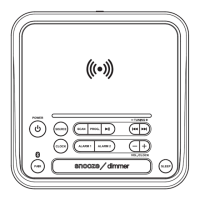
1. With the unit OFF, press and hold the Clock button until the hour begins ashing.
2. Press the Volume +/− buttons to adjust the hour. Note the AM/PM indicators on the
display.
3. Press the Clock button to proceed.
4. Press the Volume +/− buttons to adjust the minute.
5. Press the Clock button to nish setting the time.
ALARM AND SLEEP TIMER
Setting the Alarm
1. With the unit OFF, press and hold the Alarm 1 button until the Hour begins ashing.
2. Press the Volume +/− buttons to adjust the hour. Note the AM/PM indicators on the display.
3. Press the Alarm 1 button.
4. Press the Volume +/− buttons to adjust the minute.
5. Press the Alarm 1 button.
6. Press the Volume +/− buttons to set the alarm for Radio or Buzzer.
7. Press the Alarm 1 button.
8. Press the Volume +/− buttons to set the volume level for the alarm.
9. Press the Alarm 1 button to nish setting the alarm time. Once the set alarm time is
reached, the alarm will sound.
10. To set Alarm 2, follow the above steps using the Alarm 2 button.
Snooze and Alarm Reset
After the alarm sounds:
Press the Snooze button to delay the alarm for several minutes.
Press the Power button to turn the alarm o until the set alarm
time is reached again.
Disabling the Alarm
Press the Alarm 1 or Alarm 2 buttons to turn the alarm ON or OFF. Note the indicator in the
display.
Setting the Sleep Timer
1. Press the Sleep button to set the sleep timer (90, 80, 70, 60... min or OFF).
2. Once the set sleep time has expired the clock radio will automatically power o.
CLOCK


 To Next Page