Page 9 of 12
Important: Always operate the product on a flat, level, steady, and stable surface to
avoid it overturning.
5.2 Fan Only
• Insert the plug into a standard electrical power point and switch on at the power
point.
The “Nor.” indicator light on the front panel will illuminate Red
indicating Power is supplied to the unit and is in Standby Mode.
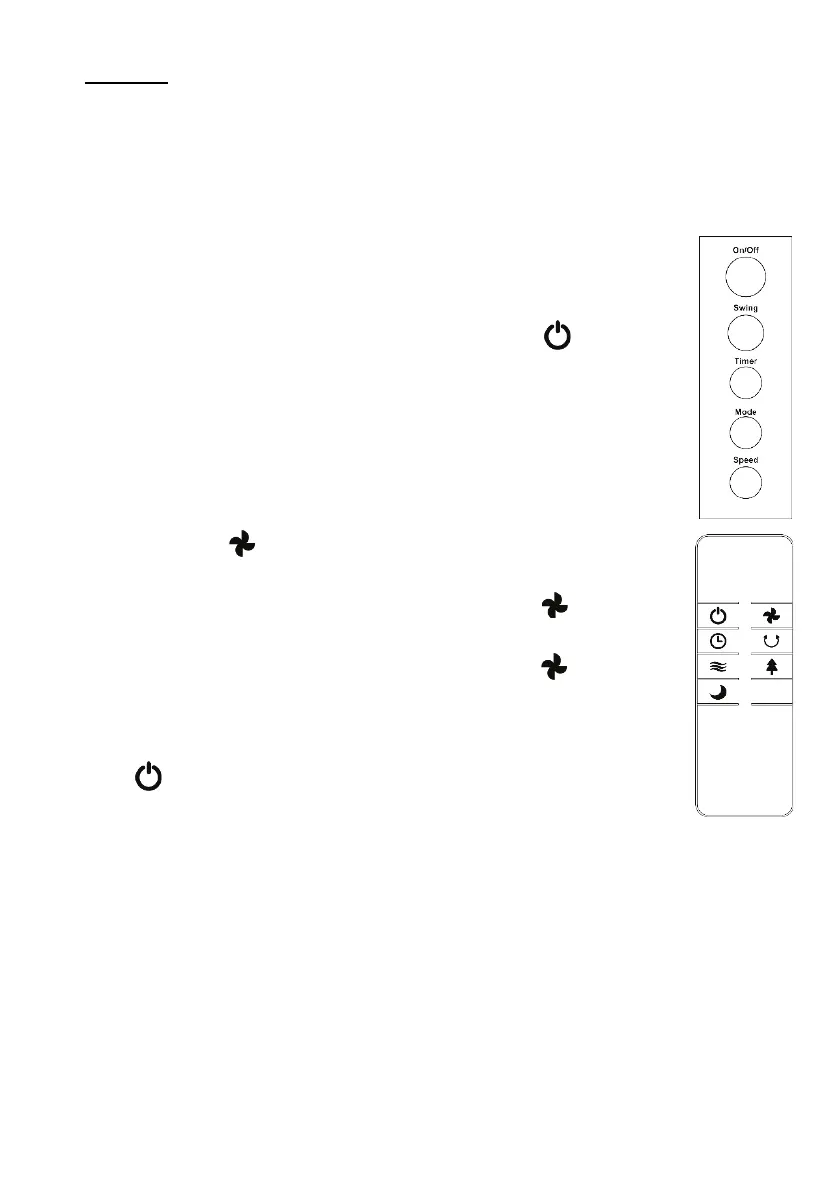
• Press the On/Off button on the control panel, or the button on the
remote control to turn the fan on.
Note: The Red Standby indicator light will turn off and a Blue indicator
light will illuminate.
• The Fan will briefly start with “Mid” fan level but will then switch to Low
Fan speed and “Nor” fan mode. This is the default setting.
• To increase the fan speed, press the “Speed” button on the control
panel, or the button on the remote control and the fan will increase
speed to the “Mid” setting.
• Press the speed button on the control panel, or the button on the
remote control again, and the fan will increase to “Hi” fan setting.
• Press the speed button on the control panel, or the button on the
remote control again, and the speed will cycle back around to “Low”
fan speed.
• To Turn Off, press the On / Off button on the control panel, or the
button on the remote control.


 To Next Page