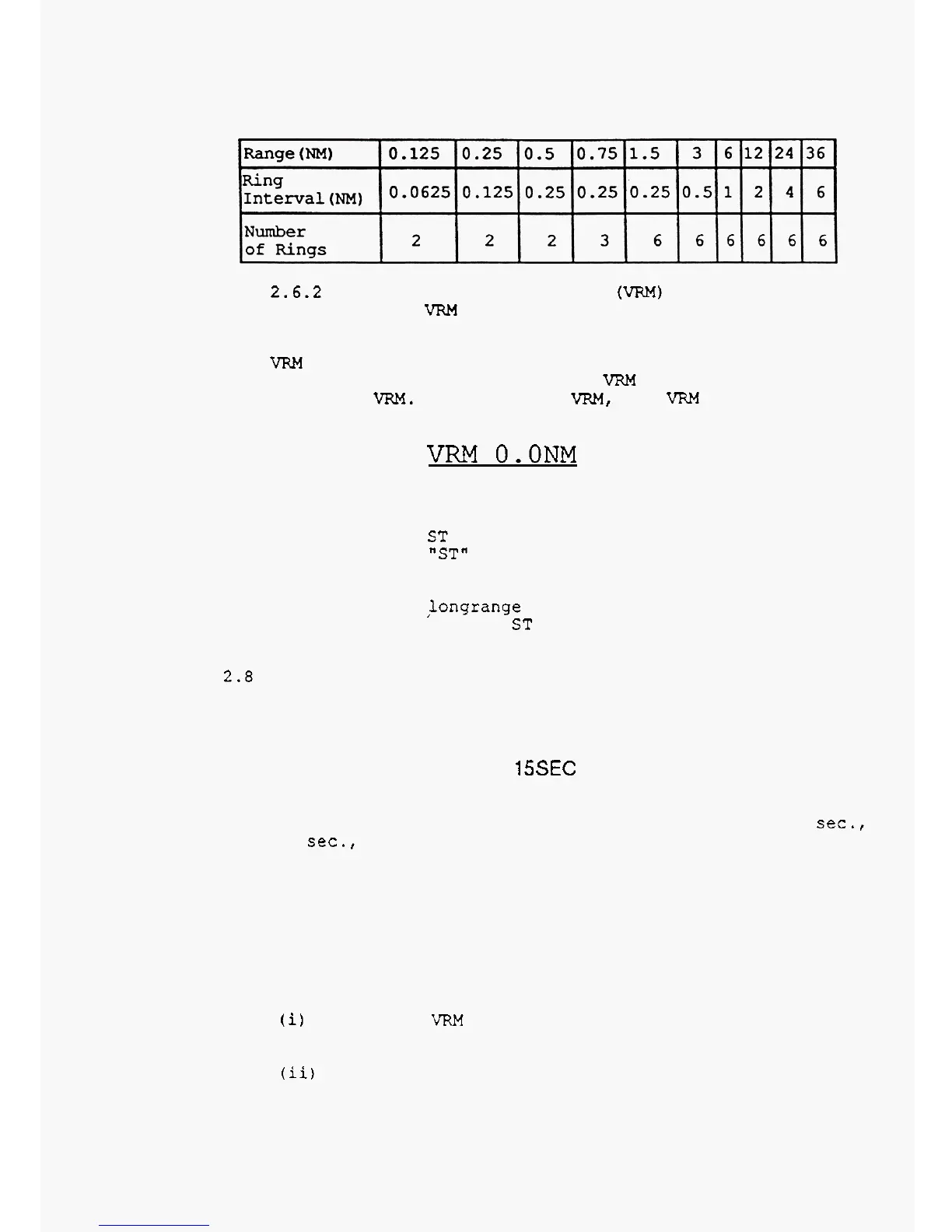
Press
the range ring key once more
to
erase
the
range
marker
rings.
2.6.2
To
Measure Accurate
Ranges
(VRM)
ring
and
the
indication
below
will
be
displayed on the
bottom of the
screen.
Turn the control knob
to
move the
VRM
to coincide with the
target
to
measure
the accurate
range
from your ship.
Press
the
VRM
key once again
to
erase
the
VRM.
(To
erase
the
VRM,
the
VRM
function must be
selected
at the moment.)
Press the
VRM
key
to
select
the variable
range
marker
VRM
O.ONM
2.7
Stretching Echoes from Target for Easy Target
Observation
the
indication "ST"
is
displayed on the upper
-
right
position of the
screen.
from medium
or
longrange targets
are
too
small
for
observation. Press
the
ST key
once
more to release the
function.
Press
the ST key.
The
stretching function
is
set and
This stretching function
is
mainly used when echoes
2.0
Plotting
Echo
Track
from Moving Targets
Press
the
TRACK
key
to plot echoes (picture) and the
indication below
will
be displayed on the top
-
right of the
screen.
TRACK
15SEC
The track of target picture
is
displayed on the
screen. The tracking
time
can be selected from
:
15
sec.,
30
sec.,
1
min.,
3
min.,
6
min., and continuous.
To erase
the
track of target picture, press the
TRACK
key more
than
3
seconds.
2.9
Setting
Guard Zone around Your
Ship
The guard zone function
is
used to warn against
possible collision with other ships, for surveillance, and
warn against running ashore.
(i)
Press the
VRM
key and turn the control knob to
set
the range
of
guard zone.
(ii)
Press
the
EBL
key and turn
the
control knob to
set
the
EBL
direction of
the
guard zone.



 To Next Page