31
5 To connect the product to the
Smart Life app
1 Connect the product to the power outlet and start the
product.
2 Push the Speed button for 5 seconds to enter WiFi
connection mode.
3 Open the Smart Life app and follow the instructions
in the app.
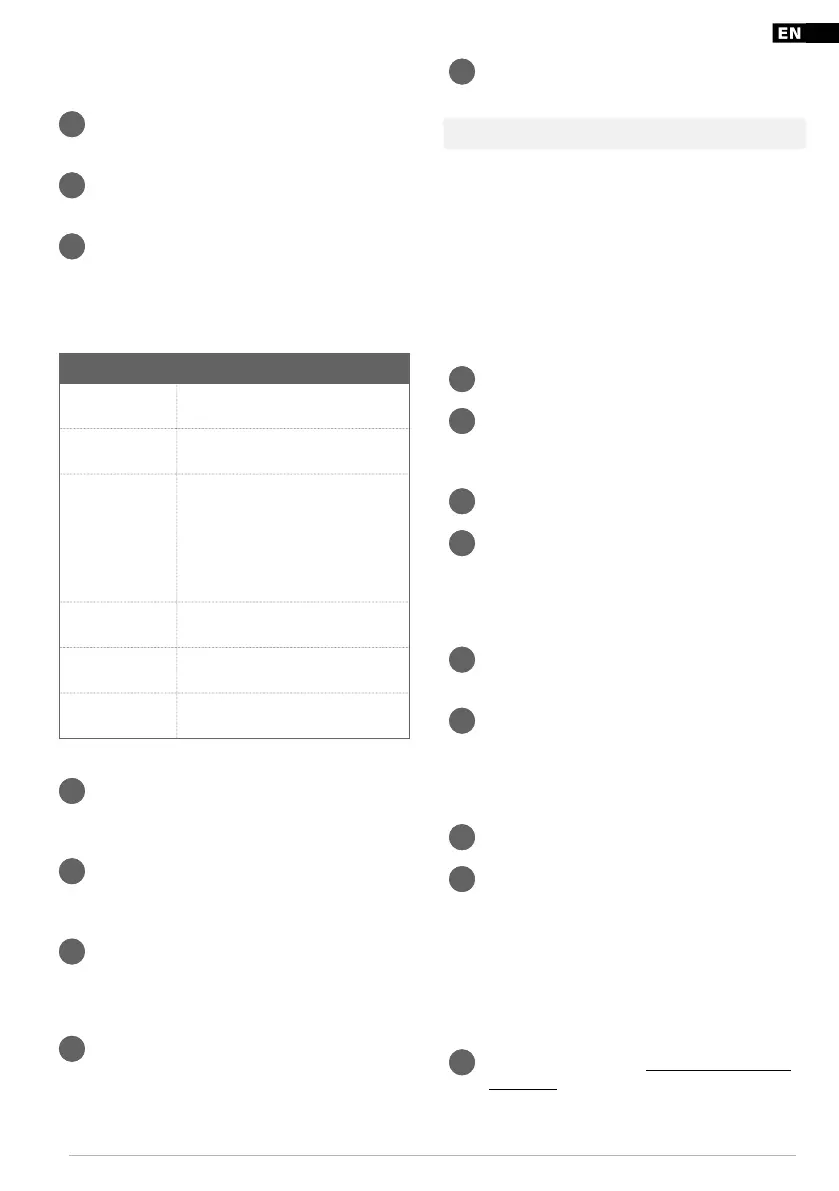
5.1 Control panel and remote control
guide
Function Action
Power button Push the button to start or stop the
product
Mode button Push the button to select “Cool”, “Fan”,
or “Dry” mode.
Temperature and
time adjustment
buttons
Push the buttons to increase or
decrease the temperature when the
product operates in “Cool” mode.
Push the buttons to adjust the start
or stop time when the product
operates in “Timer” mode.
Speed button Push the button to choose high or
low speed.
Temperature
switch button
Push the button to switch between
C and F.
Sleep button Push the button to activate the sleep
mode.
5.2 To set the product in “Cool” mode
1 Push the “Cool” mode button on the remote control.
Or push the mode button on the control panel and
select “Cool” mode. The cooling indicator lights up.
2 Push the temperature and time adjustments buttons
to adjust the setting temperature. The temperature
range is 16 –30C.
3 Push the high or low speed button on the remote
control to select fan speed.
5.3 To set the product in “Fan” mode
1 Push the “Fan” mode button on the remote control. Or
push the mode button on the control panel and
select “Fan” mode. The fan indicator lights up.
2 Push the speed buttons to select high or low fan
speed.
Note! The temperature cannot be set in “Fan” mode.
5.4 To set the product in “Dry” mode
● The compressor starts when the temperature in the room
is higher than 17C. When the temperature is 15C or
lower, the compressor stops.
● In “Dry” mode the fan speed is defaulted to low speed
and the speed can not be adjusted.
● Temperature can not be set when the product operates in
“Dry” mode.
1 Remove the outlet duct from the product.
2 Push the “Dry” mode button on the remote control. Or
press the mode button on the control panel and
select “Dry” mode. The dry indicator lights up.
3 Remove the water plug at the rear of the product.
4 Attach the water pipe to the water outlet and put the
other end of the water pipe into a water tank or a
drainage. (Figure 10)
5.5 To set the timer to a start time
1 When the product is in standby mode, push the timer
button.
2 Push the temperature and time adjustment buttons to
set the start time. The start time can be set between
0 and 24 hours. The timer indicator lights up.
5.6 To set the timer to a stop time
1 When the product operates, push the timer button.
2 Push the temperature and time adjustment buttons to
set the stop time. The stop time can be set between 0
and 24 hours. The timer indicator lights up.
6 Storage
● Store the product in a dry place.
6.1 To prepare the product for storage
1 Drain the product. Refer to “7.1 To drain the product”
on page 32.


 To Next Page
 Loading...